Adobe Firefly vs Midjourney V6: The Ultimate AI Art Generator Showdown
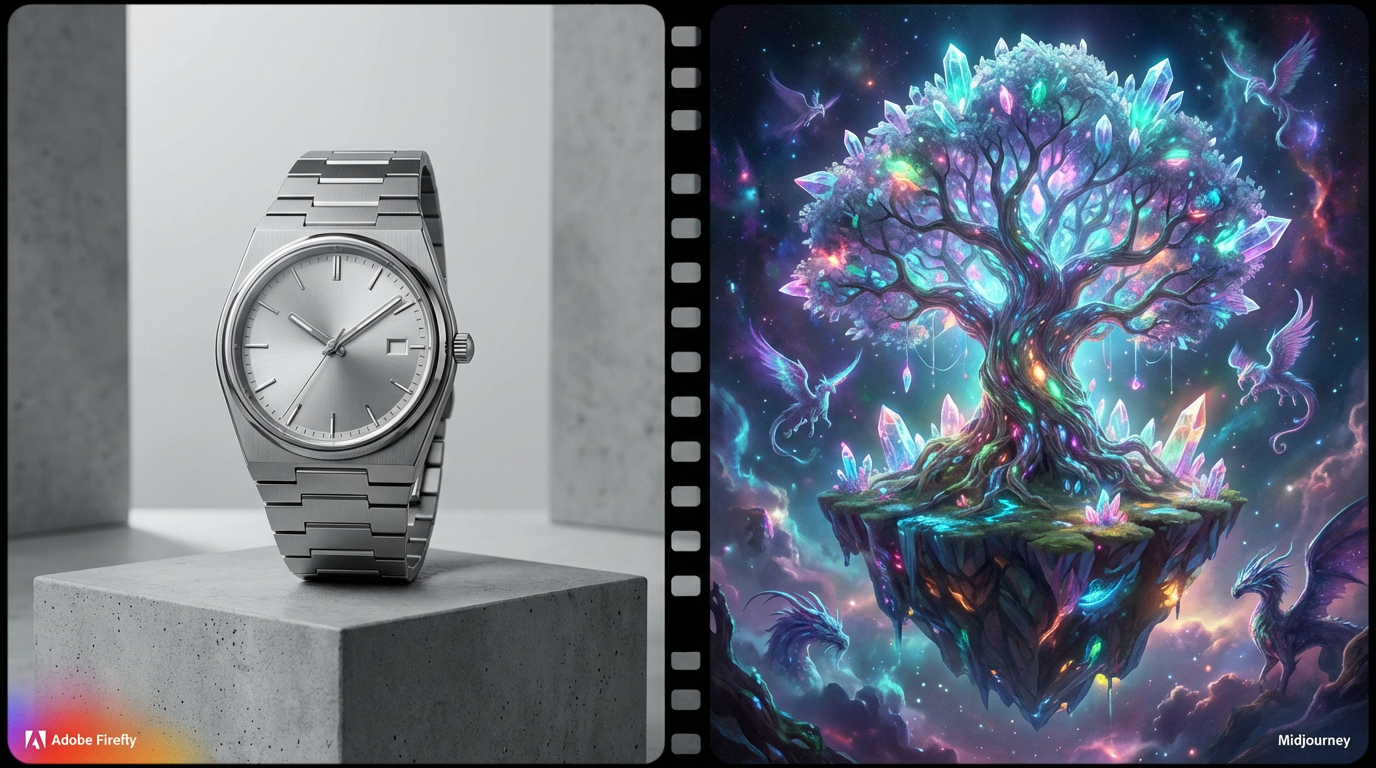
The world of generative AI art is a battleground where two titans, each representing a distinct philosophy of creation, vie for supremacy. On one side is Adobe Firefly, the professional, commercially safe, and deeply integrated tool designed for the world’s largest creative ecosystem. On the other is Midjourney V6, the cutting-edge, community-driven engine that has redefined the standard for cinematic realism and artistic vision.
For artists, designers, and businesses, the choice between these two is not merely a matter of preference; it is a strategic decision that impacts workflow, legal safety, and the final aesthetic of their work. This comprehensive 2500-word analysis will provide a definitive comparison, dissecting the core differences in philosophy, output quality, workflow, and commercial viability to determine which platform is the superior tool for your specific creative needs.
1. Core Philosophy: Commercial Safety vs. Artistic Freedom
The most fundamental difference between the two platforms lies in their approach to training data and commercial use, a distinction that makes the Adobe Firefly vs Midjourney V6 debate so crucial for professionals.
Adobe Firefly: The Commercial Safety Net
Adobe Firefly was built from the ground up with commercial use in mind. Its core philosophy is centered on legal safety and seamless integration into professional workflows.
- Curated Training Data: Firefly is trained exclusively on a massive dataset of licensed content from Adobe Stock, public domain content, and content for which Adobe has obtained explicit permission 1. This curated approach is Adobe’s guarantee that the generated images are safe for commercial use, minimizing the risk of copyright infringement.
- Commercial Indemnity: For Creative Cloud subscribers, Adobe offers commercial indemnity for Firefly-generated content. This means Adobe will legally back and defend its users if they are sued for copyright infringement related to an image generated by Firefly. This legal safety net is a massive advantage for businesses and large agencies.
- Content Credentials (C2PA): Firefly automatically embeds Content Credentials (C2PA) metadata into every image, providing verifiable proof of the image's AI origin and history. This is essential for maintaining transparency and combating misinformation in professional media.
Midjourney V6: The Unfiltered Artistic Engine
Midjourney, while rapidly professionalizing, has historically prioritized raw artistic output and pushing the boundaries of the model.
- Unfiltered Training Data: Midjourney’s training data is vast and, historically, has been sourced from the open web without the same rigorous licensing and opt-out mechanisms as Adobe. While the quality is often stunning, the legal status of the training data remains a point of concern for large corporations.
- No Indemnity: Midjourney does not offer commercial indemnity. While users retain ownership of their creations, they are solely responsible for any legal challenges related to copyright or intellectual property.
- Artistic Focus: The platform’s focus is on maximizing aesthetic quality and cinematic realism, often at the expense of the clean, predictable output favored by commercial design.
The visual metaphor below illustrates the difference in their training data philosophies.
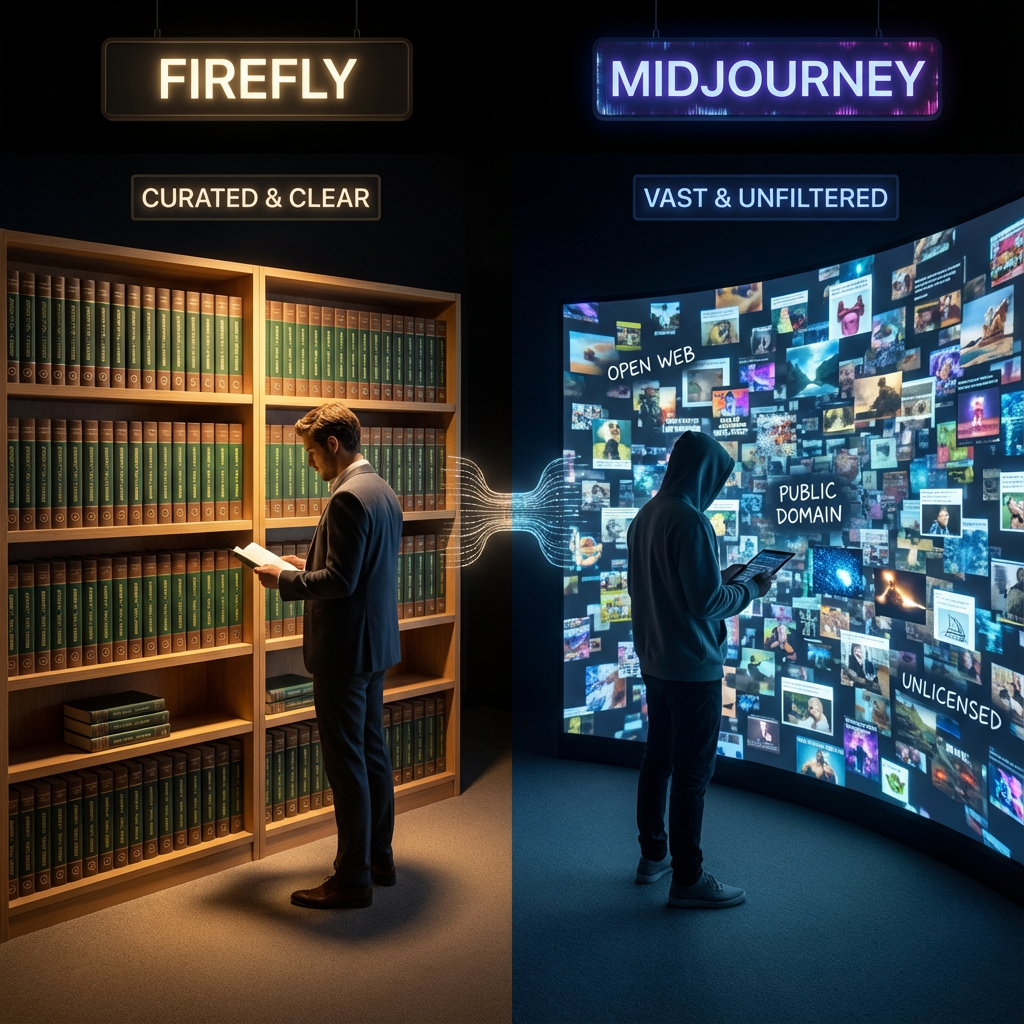
A visual metaphor for training data. Left side (Firefly): A neat, organized library of physical books labeled "Adobe Stock" with clear copyright symbols. Right side (Midjourney): A vast, chaotic, but beautiful collage of images floating in a digital void, representing the open web.
2. Workflow and Integration: Ecosystem vs. Isolation
The second major point of divergence is the user experience and integration into the creative process.
Adobe Firefly: Seamless Creative Cloud Integration
Firefly is not a standalone tool; it is a feature woven into the fabric of the Adobe Creative Cloud. This integration is its greatest strength for professional designers.
- Generative Fill and Expand: The ability to select an area in Photoshop and instantly fill or expand it with AI-generated content (Generative Fill) is a revolutionary editing tool that Midjourney cannot match. This is a workflow feature, not just a generation feature.
- Text Effects and Vector Graphics: Firefly extends beyond raster images, offering unique features like Text Effects (applying textures to text) and integration with Adobe Illustrator for generating vector graphics, making it a versatile tool for graphic designers.
- Web and App Access: Firefly is accessible via a clean web interface and directly within core Adobe applications, providing a familiar and private workspace.
Midjourney V6: The Discord Command Line
Midjourney’s primary interface is the Discord chat application. While this has fostered a unique, vibrant community, it presents a high-friction workflow for professional production.
- Command-Line Workflow: All generation is done via the /imagine command, requiring users to manage prompts, parameters, and upscaling within a chat environment. This is less intuitive and more prone to errors than a dedicated graphical interface.
- Social and Public: By default, all generations are public, which can be a significant drawback for designers working on confidential client projects. While a "Stealth Mode" is available for higher-tier subscribers, the core experience is social and public.
- External Editing: Midjourney images must be downloaded and then imported into a separate editor (like Photoshop or Affinity Photo) for any post-processing, adding a cumbersome step to the workflow.
The image below highlights the stark contrast in their respective workflows.
.png)
A side-by-side comparison of two computer screens. Left screen shows the Adobe Photoshop interface with the Generative Fill tool active on a selection. Right screen shows the Midjourney Discord interface with a complex /imagine command and the resulting four-grid image. Use a clean, modern UI style.
3. Aesthetic and Quality: Cinematic Realism vs. Commercial Cleanliness
When comparing the raw output quality, the Adobe Firefly vs Midjourney V6 debate shifts from technical to aesthetic preference.
Midjourney V6: The Cinematic Master
Midjourney V6 has cemented its reputation as the master of cinematic, high-detail, and often surreal imagery.
- Unmatched Realism: V6 introduced a massive leap in photorealism, particularly in rendering hands, faces, and complex lighting scenarios. Its ability to create dramatic, highly detailed scenes is often considered the industry benchmark.
- Artistic Bias: Midjourney has a distinct artistic bias, often injecting a "cinematic" or "painterly" quality into images, even with simple prompts. This is excellent for fine art and concept design but can be a liability for clean, neutral commercial work.
- Text Rendering: V6 significantly improved text rendering, though it still requires careful prompting and is not as reliable as Firefly's dedicated text tools.
Adobe Firefly: The Commercially Viable Aesthetic
Firefly’s aesthetic is clean, predictable, and commercially viable. It excels at product shots, stock photography, and graphics that need to be integrated seamlessly into existing design projects.
- Predictable Output: Firefly’s output is less prone to the "Midjourney look," making it easier to generate images that fit a specific brand guideline or neutral aesthetic.
- Excellent for Compositing: The clean edges and predictable lighting make Firefly images ideal for compositing and use with Generative Fill, where the AI-generated content must blend perfectly with the original image.
- Focus on Utility: While Firefly’s raw artistic output may not always match Midjourney’s dramatic flair, its utility for a working designer is arguably higher due to its reliability and integration.
The image below compares the output of a simple product shot prompt.
.png)
A side-by-side comparison of two images generated from the same prompt: "A sleek, modern chrome coffee maker on a white marble counter, professional studio lighting." Left side (Firefly): A clean, photorealistic product shot with perfect lighting and composition. Right side (Midjourney): A highly cinematic, stylized, slightly surreal product shot with dramatic shadows and depth of field.
4. Control and Customization: Parameters vs. Presets
Both platforms offer a deep level of control, but they achieve it through different mechanisms.
Midjourney V6: Granular Command-Line Control
Midjourney V6 offers granular control through a complex system of parameters and prompt engineering.
- Prompt Weights: Users can use double colons (::) to assign weights to different parts of a prompt, dictating the model's focus.
- Stylize and Raw Modes: The --style raw parameter allows users to bypass Midjourney's default artistic bias, giving them a cleaner canvas. The --stylize parameter controls the intensity of the artistic flair.
- Aspect Ratios: Midjourney offers a wide range of aspect ratios, easily controlled via the --ar parameter.
Adobe Firefly: Visual and Preset Control
Firefly opts for a more visual, preset-driven approach, making advanced control accessible without complex command-line syntax.
- Style Reference and Structure Reference: These powerful features allow users to upload an image to guide the style or the structural composition of the new generation, offering a highly intuitive form of control.
- Generative Match: This feature allows users to apply the style of an existing image to a new generation, ensuring consistency across a project.
- Visual Settings: Firefly uses simple sliders and dropdown menus to control camera angle, lighting, color, and style, making it much easier for beginners to achieve professional results.
5. Pricing and Accessibility: Subscription vs. Credits
The cost of using these tools is a major factor, especially for high-volume commercial users.
Adobe Firefly Pricing
Firefly is included with most Adobe Creative Cloud subscriptions. The pricing model is based on Generative Credits, which are consumed when using features like Generative Fill or Text-to-Image.
- Free Tier: A limited free tier is available, but it is not suitable for professional use.
- Subscription Model: Creative Cloud plans include a monthly allotment of credits. For example, the Photography plan includes a set number of credits, and higher-tier plans include more. Additional credits can be purchased.
- Value Proposition: The true value of Firefly is that it is an add-on to tools (Photoshop, Illustrator) that most professionals already pay for, making its incremental cost very low.
Midjourney Pricing
Midjourney operates on a dedicated subscription model, with pricing based on the amount of "Fast GPU Time" consumed.
- No Free Tier (Currently): Midjourney has historically offered a free trial, but this is often paused due to high demand. It is essentially a paid-only service for consistent use.
- Subscription Model: Plans are tiered based on the amount of GPU time. The cost can escalate quickly for users who do a lot of re-rolling, upscaling, and complex generations.
- Value Proposition: The cost is justified by the consistently high quality and artistic output, but it is an additional cost on top of any other software a designer uses.
The image below visually compares the two platforms' core value propositions.
.png)
A split image. Left side: A clean, professional image with a visible C2PA Content Credentials icon and a small Adobe logo, representing commercial safety. Right side: A highly artistic, surreal image with a bold, stylized signature, representing pure artistic expression.
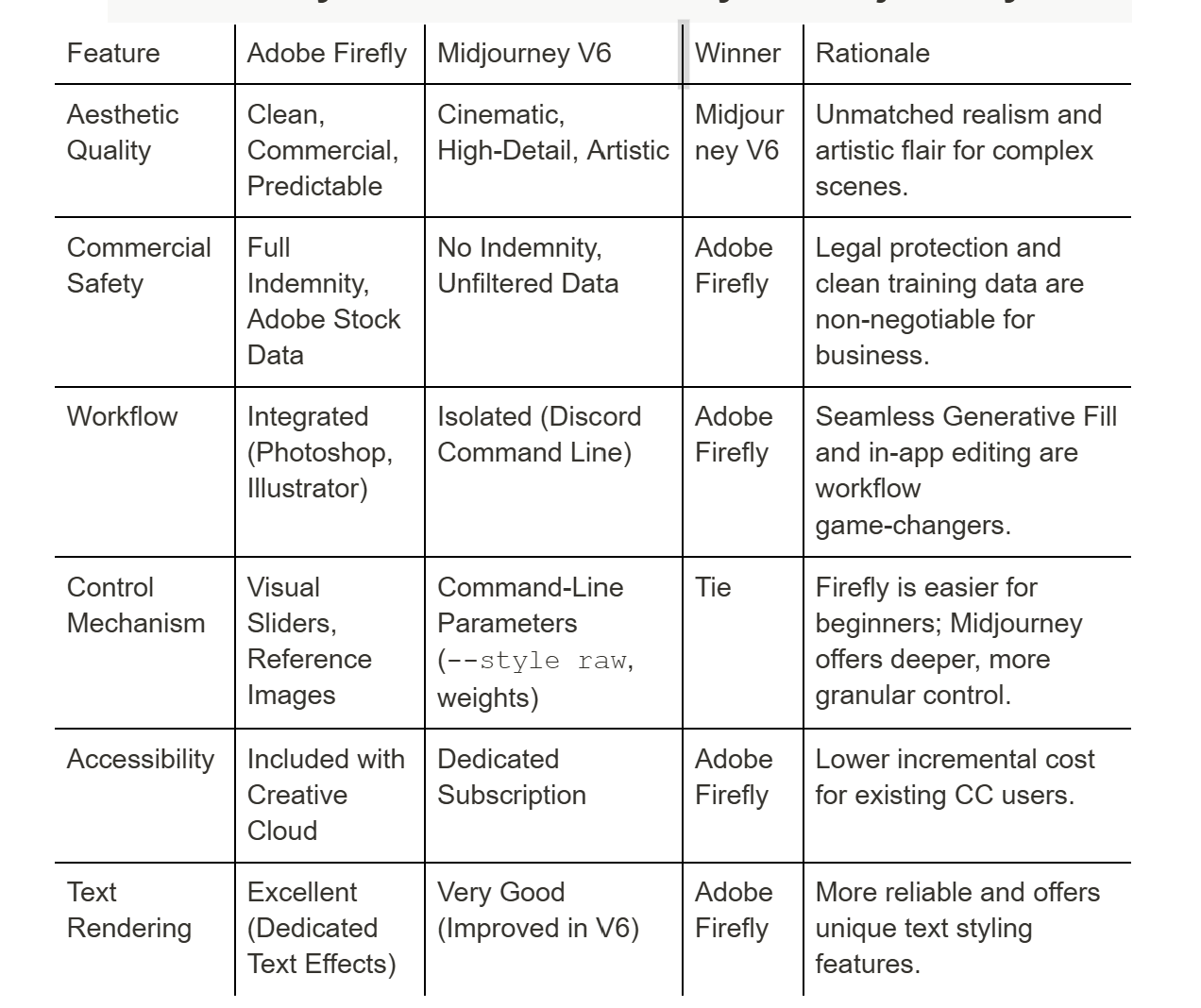
6. Summary Table: Adobe Firefly vs Midjourney V6
7. Final Verdict: Which Tool is Right for You?
The choice between Adobe Firefly vs Midjourney V6 is a choice between two different creative ecosystems.
If you are a professional designer, a marketing agency, or a large business where legal safety, seamless integration into a production pipeline, and predictable, clean output are paramount, Adobe Firefly is the clear and superior choice. The commercial indemnity and the power of Generative Fill within Photoshop make it an indispensable tool for the working professional.
If you are a fine artist, a concept designer, or a hobbyist who prioritizes pushing the boundaries of aesthetic quality, cinematic realism, and raw artistic expression, Midjourney V6 remains the king. Its ability to interpret complex, artistic prompts and deliver stunning, high-detail images is currently unmatched.
The rivalry between Adobe Firefly vs Midjourney V6 is a powerful engine for innovation, ensuring that the future of AI art will be both commercially safe and artistically boundless.
8. The Future Roadmap: Convergence and Divergence
The rivalry between Adobe Firefly vs Midjourney V6 is not static; both platforms are rapidly evolving, and their future roadmaps suggest both convergence on core features and divergence in their ultimate goals.
Midjourney's Push for Control and Integration
Midjourney's future development is clearly focused on addressing its current limitations, particularly the high-friction Discord workflow and the lack of direct editing tools.
- Dedicated Web Interface: The development of a dedicated web interface is a major step toward a more professional and private workflow, moving away from the public nature of Discord. This will make it a more viable option for commercial users who require confidentiality.
- In-App Editing: The community eagerly anticipates the introduction of native editing tools, such as inpainting and outpainting, directly within the Midjourney interface. This would significantly reduce the need to export images to Photoshop for minor adjustments, directly challenging one of Firefly's key advantages.
- Model Refinement: Midjourney will continue to refine its model, focusing on better prompt adherence and consistency, aiming to maintain its lead in raw artistic quality.
Firefly's Push for Quality and Advanced Features
Adobe Firefly's roadmap is focused on closing the quality gap with Midjourney while leveraging its integration advantage.
- Quality Improvement: Adobe is continuously training Firefly on its vast stock library to improve the photorealism and artistic range of its output, aiming to match Midjourney's cinematic flair without compromising commercial safety.
- 3D and Video Integration: Firefly is being integrated into Adobe's 3D and video tools (Substance, Premiere Pro), allowing for the generation of textures, motion graphics, and video elements. This deep, multi-media integration is a strategic move that Midjourney, as a primarily image-focused tool, cannot easily replicate.
- Advanced Control: Features like Style Reference and Generative Match are just the beginning. Adobe is expected to introduce more granular, visual controls that allow users to dictate composition, lighting, and camera angles with the same precision that Midjourney users achieve through complex command-line parameters.
The Inevitable Convergence
Ultimately, the two platforms are converging on a set of core features: both will offer high-quality image generation, both will have dedicated web interfaces, and both will offer some form of in-app editing.
The final choice will remain a philosophical one:
- Midjourney will be the tool for the Artistic Visionary—the one who values the raw, unfiltered output and is willing to manage the legal and workflow complexities for the sake of unparalleled aesthetic quality.
- Adobe Firefly will be the tool for the Professional Pragmatist—the one who values legal safety, seamless integration, and a predictable, reliable output that fits perfectly into an existing, high-volume commercial workflow.
The competition between Adobe Firefly vs Midjourney V6 is not a zero-sum game; it is a powerful force that is driving the entire industry forward, ensuring that creators will have access to the most powerful and specialized tools ever conceived.