Adobe Firefly vs Stable Diffusion: Open Source Freedom vs Creative Cloud Integration
The landscape of AI image generation is defined by a fundamental dichotomy: the walled garden of proprietary software versus the boundless freedom of open source. At the heart of this debate are two industry giants: Adobe Firefly and Stable Diffusion. For artists, designers, and developers, the choice between Adobe Firefly vs Stable Diffusion is a choice between commercial safety and seamless integration with the Creative Cloud, or ultimate control and community-driven innovation.
This 2600-word analysis provides a comprehensive, unbiased comparison of these two platforms, focusing on the core differences that matter most to creative professionals: training data ethics, commercial rights, integration with existing workflows, and the sheer power of customization. We will explore how they stack up against each other to help you decide whether to embrace the polish of a corporate ecosystem or the raw power of the open-source community.
1. The Training Data Divide: Ethical Sourcing vs. Open Web
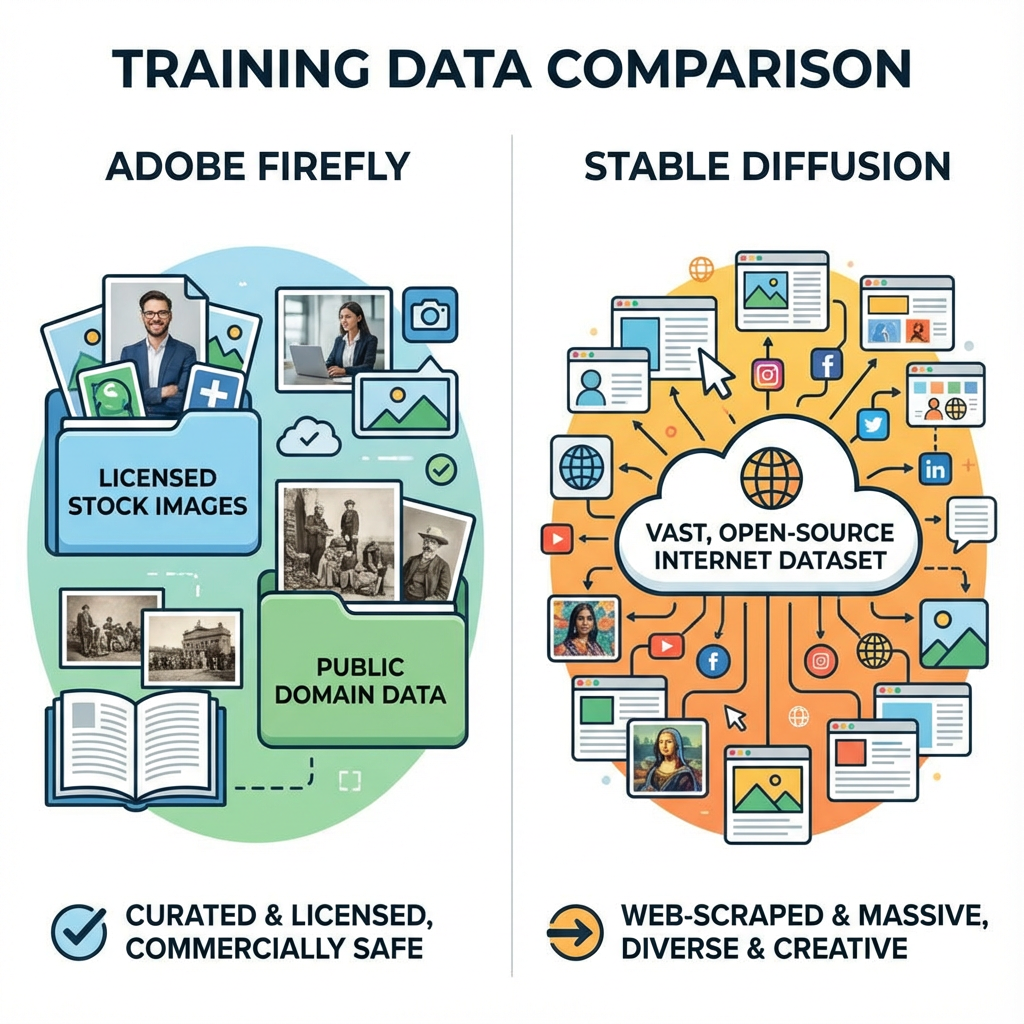
The most significant difference between Adobe Firefly vs Stable Diffusion lies in their training data, which directly impacts the commercial viability and ethical standing of the generated images.
Adobe Firefly: The Commercially Safe Choice

Adobe has taken a clear, commercially safe stance with Firefly, which is a major selling point for large enterprises and commercial artists.
•Curated Training Data: Firefly is trained exclusively on a carefully curated dataset, primarily consisting of Adobe Stock images, openly licensed content, and public domain content where copyright has expired 13.
•Commercial Safety: This ethical sourcing means that images generated by Firefly are designed to be safe for commercial use, offering a level of legal assurance that is unmatched by other models. Adobe provides indemnification for commercial users, mitigating the risk of copyright infringement claims.
•Creator Opt-Out: Adobe has also implemented a system allowing Adobe Stock contributors to opt out of having their work used for training, further cementing its commitment to ethical AI practices.
Stable Diffusion: The Open-Source Wild West
Stable Diffusion, in contrast, was trained on the massive, uncurated LAION-5B dataset, which scraped billions of images from the open web.
•Uncurated Data: While this vast dataset contributes to Stable Diffusion's incredible versatility and artistic range, it introduces significant legal and ethical ambiguity regarding the copyright status of the training images.
•Commercial Risk: For commercial use, this lack of clear sourcing means that users bear the responsibility for any potential copyright infringement claims, making it a riskier choice for large-scale commercial projects.
•Flexibility for Customization: The open nature of the data, however, allows the community to build and share countless custom models (LoRAs, checkpoints) that are trained on specific styles or subjects, offering unparalleled artistic freedom.
2. Integration and Workflow: Creative Cloud vs. Community Ecosystem
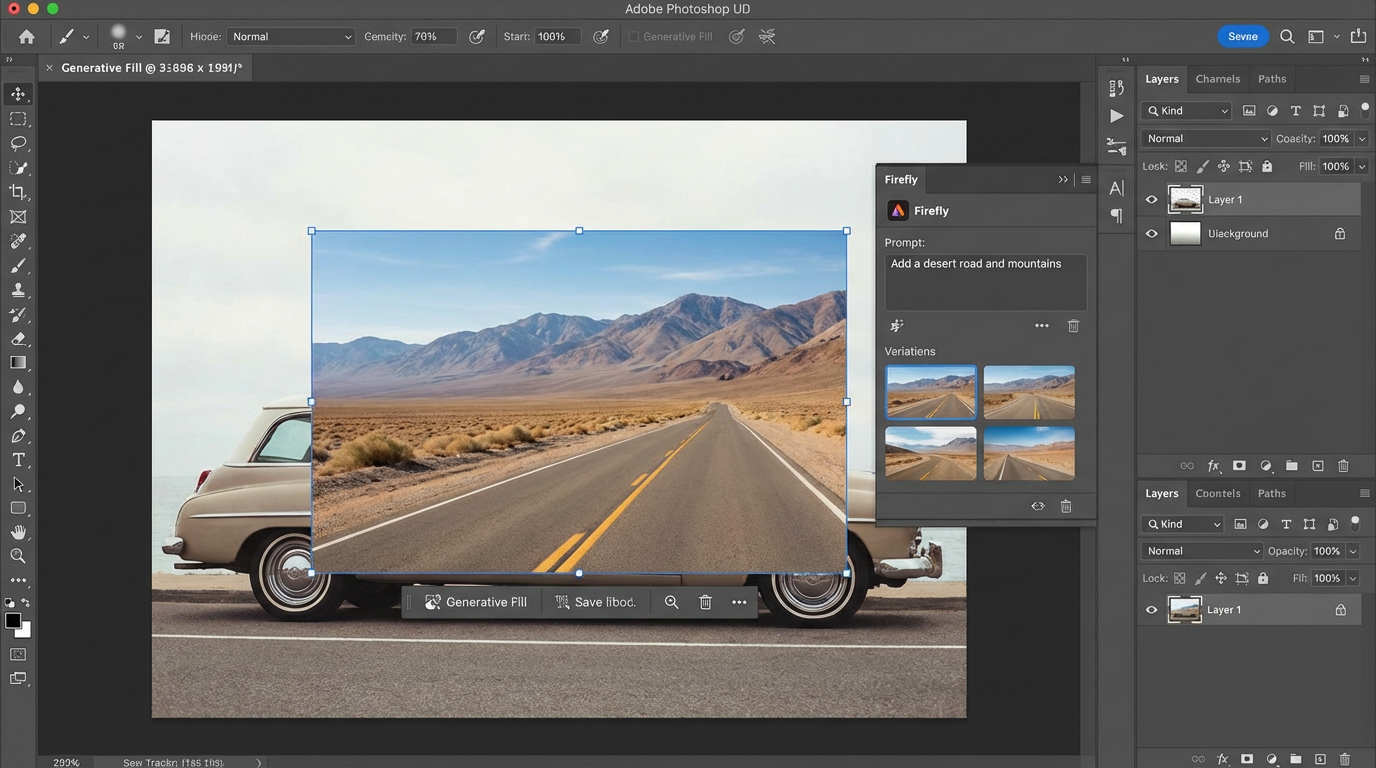
The second major point of comparison is how each tool fits into a professional workflow. The fan-out query Adobe Firefly Creative Cloud integration vs Stable Diffusion flexibility highlights this contrast.
Adobe Firefly: Seamless Creative Cloud Integration
Firefly is built to be an extension of the Adobe Creative Cloud ecosystem, making it the natural choice for existing Adobe users.
•Native Integration: Firefly’s generative features, such as Generative Fill and Generative Expand, are natively integrated into core applications like Photoshop and Illustrator. This allows designers to use AI tools without ever leaving their familiar workspace, streamlining the design process.
•Unified Experience: The entire Firefly experience is unified under a single Adobe account, with usage tracked via Generative Credits 13
. This centralized approach simplifies billing and management for creative teams.
•Focus on Refinement: Firefly excels at in-app editing and refinement, allowing users to quickly modify generated images using familiar Adobe tools, which is crucial for achieving pixel-perfect results.
Stable Diffusion: The Modular Powerhouse
Stable Diffusion’s workflow is defined by its modularity and the vast ecosystem of community-developed tools.
•Front-End Flexibility: Stable Diffusion is not tied to a single interface. Users can choose from a variety of web UIs (like Automatic1111 or ComfyUI) or integrate it directly into applications like Blender or Krita via plugins.
•ControlNet and LoRAs: The open-source nature allows for advanced control mechanisms like ControlNet, which enables precise control over composition, pose, and depth, and LoRAs (Low-Rank Adaptation), which allow for fine-tuning the model to specific styles or characters. This level of granular control is unmatched by Firefly.
•Hardware Dependency: Stable Diffusion often requires powerful local hardware (a dedicated GPU) for optimal performance, contrasting with Firefly’s cloud-based, hardware-agnostic approach.
3. Image Quality and Artistic Style

While both models produce high-quality images, their inherent training data and architectural design lead to distinct artistic styles. The fan-out query Adobe Firefly vs Stable Diffusion image quality and style is essential for artists.
Stable Diffusion: Versatility and Raw Power
Stable Diffusion is known for its versatility and ability to produce highly detailed, photorealistic, or hyper-stylized images, often pushing the boundaries of what is possible.
•Photorealism: With the right model (e.g., SDXL or custom photorealistic checkpoints), Stable Diffusion can achieve a level of raw photorealism that often surpasses Firefly.
•Artistic Range: Due to the uncurated nature of its training data, Stable Diffusion can mimic virtually any artistic style, from classical painting to modern digital art, with a vast library of community models available.
Adobe Firefly: Polished and Consistent
Firefly’s output is characterized by a polished, commercially-friendly aesthetic that is highly consistent and less prone to the bizarre artifacts sometimes seen in open-source models.
•Commercial Aesthetic: Firefly tends to produce images with a clean, professional, and slightly stylized look that is immediately suitable for marketing materials, stock photography, and corporate design.
•Text Generation: Firefly excels at text effects and typography, a feature that is often a weakness for Stable Diffusion.
4. Pricing and Accessibility
The fan-out query Adobe Firefly vs Stable Diffusion pricing and accessibility reveals a significant difference in cost models.
Stable Diffusion: Free to Use, Cost to Run
The core Stable Diffusion model is free and open-source. The cost is primarily associated with the hardware and time required to run it.
•Local Use: Running Stable Diffusion locally is free, but requires a significant upfront investment in a powerful GPU.
•Cloud Services: Using cloud-based services for Stable Diffusion (like RunPod or various web UIs) involves a pay-per-use or subscription model, which can be highly cost-effective for occasional use.
Adobe Firefly: Subscription-Based Generative Credits
Firefly is integrated into the Creative Cloud subscription model, using a system of Generative Credits.
•Subscription Required: Access to the full, commercially-safe version of Firefly requires a Creative Cloud subscription (e.g., Photoshop, All Apps, or a dedicated Firefly plan).
•Generative Credits: Users receive a monthly allotment of credits, which are consumed based on the complexity of the generation. Once credits are depleted, users can purchase more or continue generating at a slower speed with a watermark.
5. The Verdict: Choosing Your AI Partner
The choice between Adobe Firefly vs Stable Diffusion ultimately depends on the user's priority: commercial safety and integration, or ultimate control and artistic freedom.
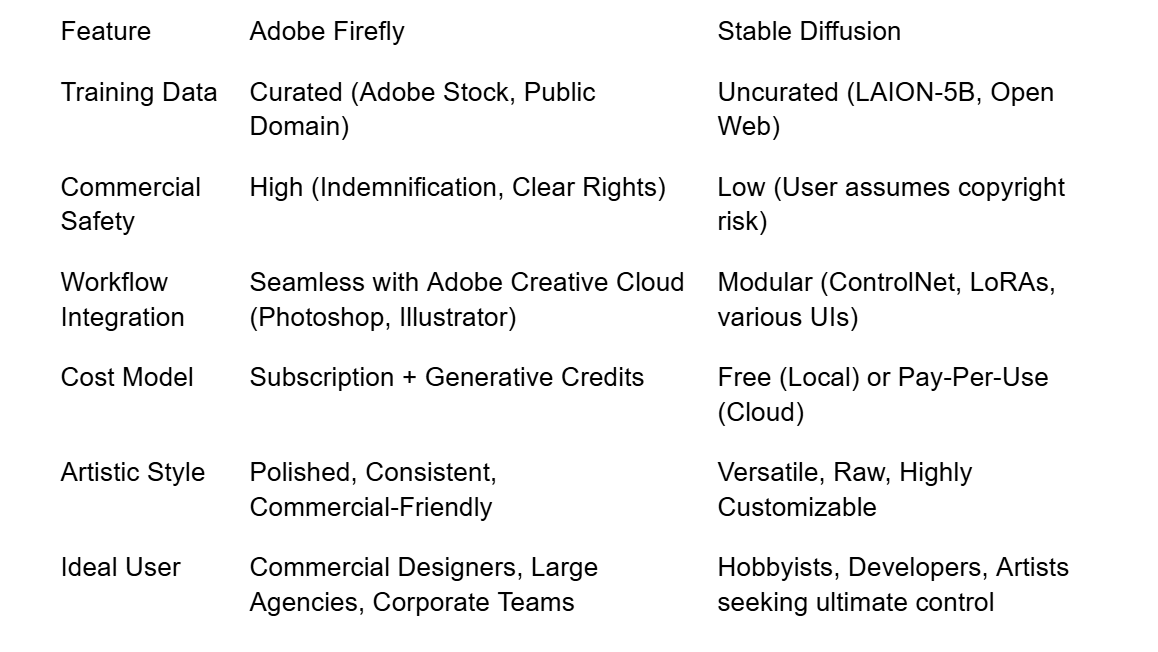
Adobe Firefly is the clear winner for commercial safety and seamless integration. It is the professional's choice for guaranteed legal compliance and a frictionless workflow within the Creative Cloud.
Stable Diffusion is the champion of open-source freedom and artistic control. It is the tool for developers, advanced hobbyists, and artists who demand the ability to customize every aspect of the generation process, even if it means navigating greater commercial risk.
The future of AI image generation will see both models continue to evolve, but their core philosophies—walled garden vs. open source—will remain the defining factor in the Adobe Firefly vs Stable Diffusion debate.
6. Deep Dive into Creative Cloud Integration: The Firefly Advantage
The true power of Adobe Firefly vs Stable Diffusion for the creative professional is the seamless integration of Firefly into the Adobe Creative Cloud (CC ) ecosystem. This integration is not merely a convenience; it is a fundamental shift in the creative workflow.
Generative Fill and Generative Expand
The most celebrated features of Firefly are Generative Fill and Generative Expand, which are embedded directly within Photoshop.
•Generative Fill: This allows a user to select an area of an image and use a text prompt to replace or fill that area with AI-generated content that seamlessly matches the surrounding lighting, perspective, and style. This capability drastically reduces the time spent on complex retouching, object removal, or scene manipulation.
•Generative Expand: This feature allows a user to expand the canvas of an image beyond its original borders, with Firefly intelligently filling in the new space based on the existing content and a text prompt. This is invaluable for repurposing images for different aspect ratios (e.g., turning a landscape photo into a vertical social media post).
Integration with Other CC Apps
Firefly's reach extends beyond Photoshop. Its capabilities are integrated into:
•Adobe Illustrator: Firefly enables the generation of vector graphics and patterns from text prompts, accelerating the creation of logos, icons, and complex illustrations.
•Adobe Express: For quick, social-media-ready content, Firefly powers text-to-template and text-to-image features within the simplified Express platform.
•Adobe Stock: Firefly is used to generate new stock content, which is clearly labeled as AI-generated and adheres to the same commercial safety standards as the rest of the library.
This deep integration means that for a designer already paying for the Creative Cloud suite, Firefly is an added layer of functionality that enhances every step of their existing workflow, a benefit that Stable Diffusion, as a standalone technology, cannot replicate.
7. The Technical Edge: Stable Diffusion's Open-Source Flexibility
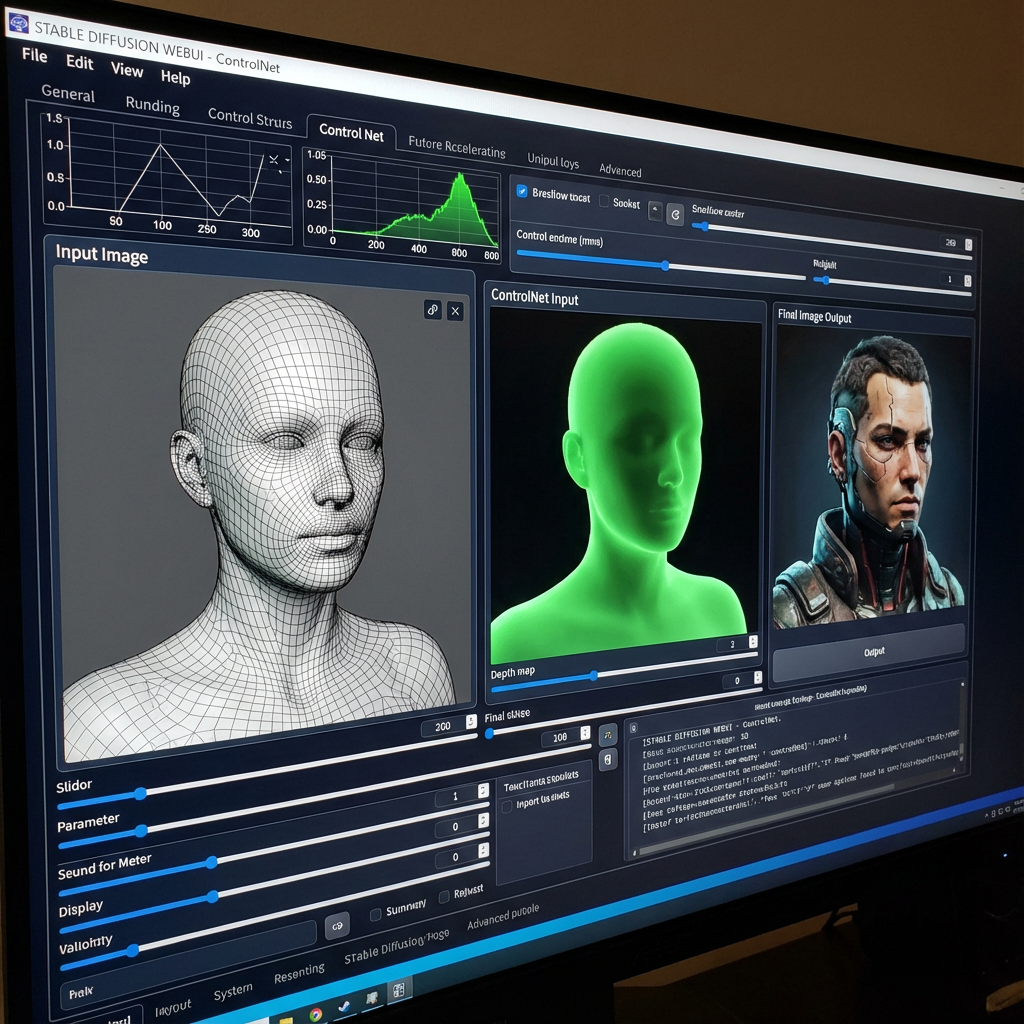
While Firefly wins on integration, Stable Diffusion dominates the field of technical flexibility and customization, which is a massive draw for advanced users, developers, and artists who require niche control.
ControlNet: Unprecedented Control
The development of ControlNet within the Stable Diffusion ecosystem revolutionized AI image generation by allowing users to condition the output based on existing images, not just text prompts.
•Pose and Composition: ControlNet allows users to upload a source image and use its pose (via OpenPose), depth map, or edge detection to guide the generation of a new image. This is essential for maintaining character consistency, recreating specific compositions, or ensuring a generated object fits perfectly into a scene.
•Style Transfer: Advanced users can use ControlNet to apply the style of one image to the content of another with surgical precision, a level of control that goes far beyond the style presets offered by Firefly.
LoRAs and Checkpoints: Infinite Customization
The open-source community has created a massive library of LoRAs (Low-Rank Adaptation) and custom checkpoints.
•Niche Styles: LoRAs are small files that can be loaded onto the base Stable Diffusion model to generate images in a highly specific style, such as a particular anime aesthetic, a specific painter's technique, or even a brand's unique visual identity.
•Character Consistency: Custom checkpoints can be trained on a small set of images to generate a consistent character or object, a feature that is vital for comic book artists, game developers, and animators.
This ecosystem of community-driven tools gives Stable Diffusion a technical and creative depth that is simply unattainable for a proprietary model like Firefly, which must maintain a singular, controlled experience.
8. Commercial Risk vs. Commercial Assurance: A Final Weigh-In
The core of the Adobe Firefly vs Stable Diffusion debate for a business is the balance between risk and reward.
Commercial Assurance with Firefly
For a marketing agency, a large corporation, or a design studio, the legal assurance provided by Adobe is often the deciding factor. The risk of a multi-million dollar lawsuit over a copyrighted image used in a commercial campaign is too high to ignore. Firefly's indemnification and curated training data provide a crucial layer of legal protection, allowing creative teams to focus on creativity rather than copyright law.
Commercial Risk with Stable Diffusion
While Stable Diffusion is free to use, the commercial risk is transferred entirely to the user. While many commercial users operate under the assumption of fair use, the legal landscape is still evolving. The need to manually verify the commercial safety of every generated image, or to rely on custom models with unknown training data, adds a significant layer of overhead and potential liability. For a small, independent artist, this risk may be acceptable in exchange for the freedom and power of the tool. For a large brand, it is often a non-starter.
9. Conclusion: The Defining Choice
The choice between Adobe Firefly vs Stable Diffusion is a defining one for any creative professional in the age of AI.
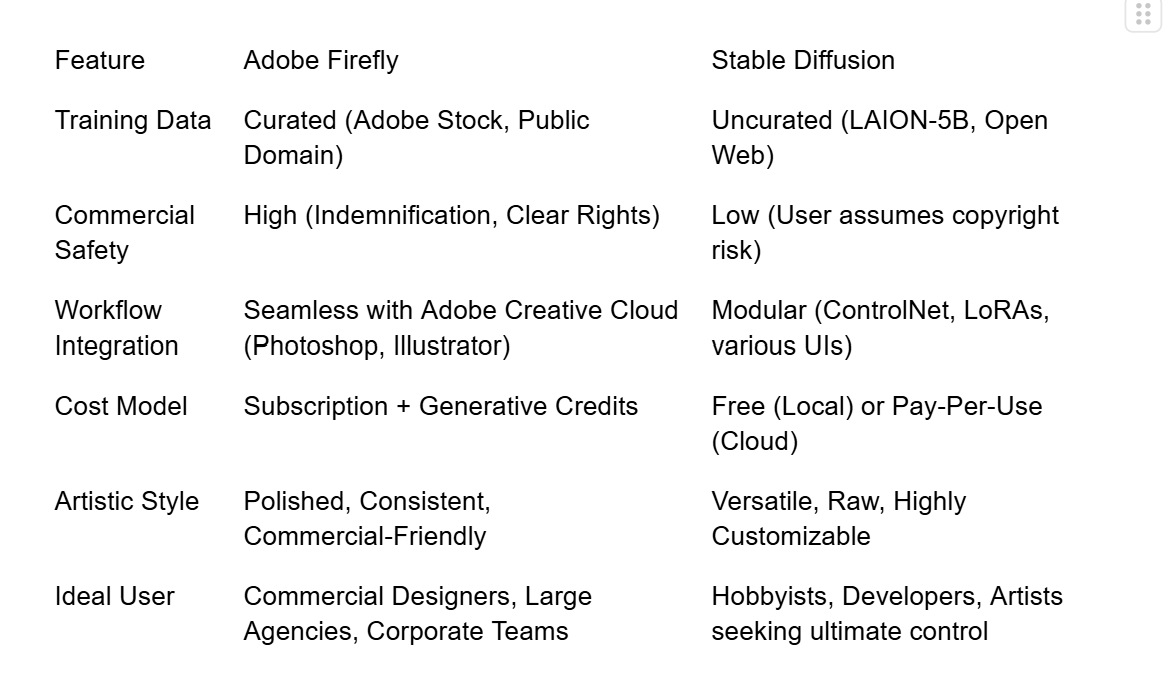
Adobe Firefly is the professional's choice for guaranteed legal compliance and a frictionless workflow within the Creative Cloud. It is the tool that saves time on retouching and provides peace of mind.
Stable Diffusion is the champion of open-source freedom and artistic control. It is the tool for developers, advanced hobbyists, and artists who demand the ability to customize every aspect of the generation process, even if it means navigating greater commercial risk.
The future of AI image generation will see both models continue to evolve, but their core philosophies—walled garden vs. open source—will remain the defining factor in the Adobe Firefly vs Stable Diffusion debate.