ClickUp Review: Easy Project Management Tool in 2025?
In the relentless pursuit of team productivity and operational efficiency, modern businesses are drowning in a sea of software. The average employee switches between dozens of apps every day, leading to a phenomenon known as “context sprawl”—a major drain on focus and a significant barrier to effective workflow automation. This fragmentation is the enemy of seamless team collaboration and a huge challenge for any organization striving for digital transformation. The dream has always been a single, unified work management platform that can do it all. For years, this felt like a fantasy, but one company has made it its mission to turn that dream into a reality.
Enter ClickUp, the ambitious and feature-packed productivity software that boldly claims to be the "one app to replace them all." It’s not just a project management tool; it’s a complete Work OS designed to consolidate tasks, docs, chat, goals, and more into a single, converged digital workspace. With its vibrant interface, extreme customization, and a seemingly endless list of features, ClickUp has exploded in popularity, attracting over 10 million users and positioning itself as a dominant force in the SaaS platform market. It’s a powerhouse of process automation and a testament to what modern cloud-based software can achieve.
This 4000-word review will dissect every facet of the ClickUp platform. We will explore its core functionalities, from its 15+ flexible views and comprehensive task management to its powerful ClickUp Brain AI and robust dashboard reporting. We will benchmark it against its top competitors, analyze its disruptive pricing model, and offer a clear-eyed look at its strengths and weaknesses. Is ClickUp’s “everything-in-one” approach the key to unlocking unparalleled team productivity, or is its massive feature set a double-edged sword? Let’s find out if this is the ultimate collaboration platform for 2025.
What is ClickUp? The Everything App for Work
At its heart, ClickUp is an all-in-one project management platform designed to be the central hub for all work. Unlike more focused tools, ClickUp’s philosophy is built on providing an overwhelming amount of functionality and extreme workspace customization so that any team—from marketing and engineering to HR and operations—can build their ideal workflow. It’s a true Work OS that aims to eliminate the need for separate apps for task management, document collaboration, sprint planning, and goal tracking.
This ambition is backed by a staggering list of over 100 features, all housed within a hierarchical structure of Spaces, Folders, and Lists. This allows for granular organization, making it a scalable enterprise software solution that can support a small startup or a large corporation. The platform’s emphasis on flexibility, combined with powerful workflow automation and integrated knowledge management, makes it a compelling choice for any organization looking to enhance its operational efficiency and foster a more connected remote work environment. It is a prime example of a modern collaboration platform designed for the future of work.
A Deep Dive into ClickUp’s Core Features
ClickUp’s “everything-in-one” promise is delivered through a vast and interconnected feature set. Here’s a look at the pillars that make it such a powerful work management platform.
15+ Views: Visualize Work Your Way
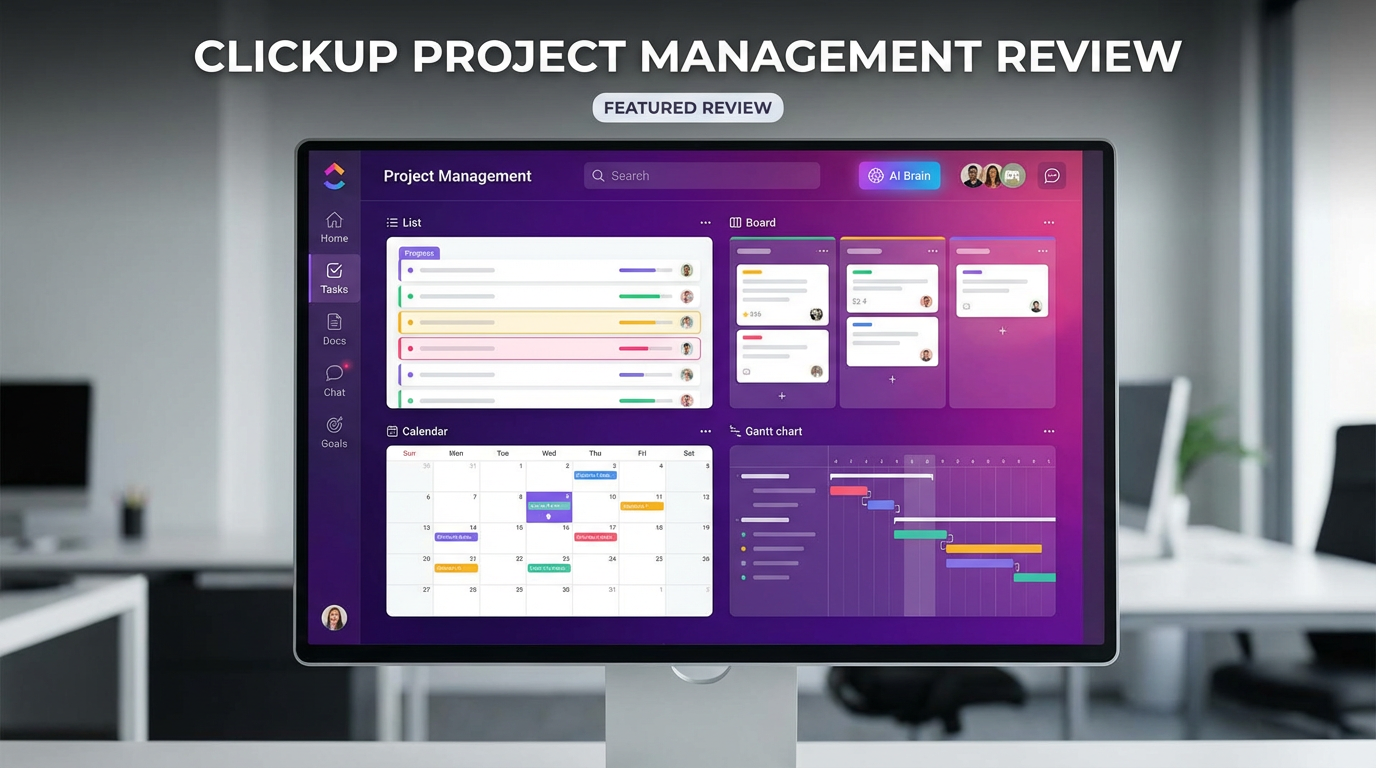
One of ClickUp’s standout features is its unparalleled number of ways to visualize work. This flexibility ensures that every team member can use the view that best suits their personal workflow and the task at hand, which is a cornerstone of effective Agile project management and team collaboration.

Caption: ClickUp allows users to switch between more than 15 views, including List, Board, Calendar, and Gantt, to visualize the same data in different ways.
Key views include:
•List View: A clean, simple, and effective way to manage tasks with priorities and statuses.
•Board View: A classic Kanban board for visualizing workflows and managing sprints.
•Gantt View: A powerful Gantt chart software for timeline tracking, managing dependencies, and planning complex projects.
•Calendar View: For scheduling content, planning events, and managing deadlines.
•Table View: A spreadsheet-like interface for bulk editing and data management.
•Mind Map View: For brainstorming ideas and planning projects visually.
This multi-view capability ensures that whether you're a project manager needing a high-level timeline or a developer focused on a sprint board, the platform adapts to you, not the other way around. This is a key differentiator in the productivity software space.
ClickUp Brain: The AI That Works Where You Work
In 2025, AI is no longer a novelty; it’s a necessity for team productivity. ClickUp Brain is one of the most deeply integrated AI assistants on the market, designed to enhance every aspect of the digital workspace. It’s not just a chatbot; it’s a suite of tools for process automation and intelligent assistance.

Caption: ClickUp Brain offers a suite of AI tools, including an AI writer, project manager, and Q&A, all integrated directly into the user's workflow.
Key AI features include:
•AI Writer: Helps draft and refine content, from emails to marketing copy.
•AI Project Manager: Automates task creation, assignment, and progress updates.
•AI Q&A: Instantly answers questions based on your workspace documents and tasks.
•AI Agents: Custom-built agents that can automate complex, multi-step workflows.
By connecting to models like ChatGPT, Claude, and Gemini, ClickUp Brain provides a powerful, centralized AI experience that enhances knowledge management and accelerates workflow automation.
Customizable Dashboards: Your Real-Time Command Center
For any team lead or executive, real-time business intelligence is critical. ClickUp’s Dashboards are fully customizable hubs that pull data from across your entire workspace into beautiful, easy-to-understand reports. This is a cornerstone of effective portfolio tracking.
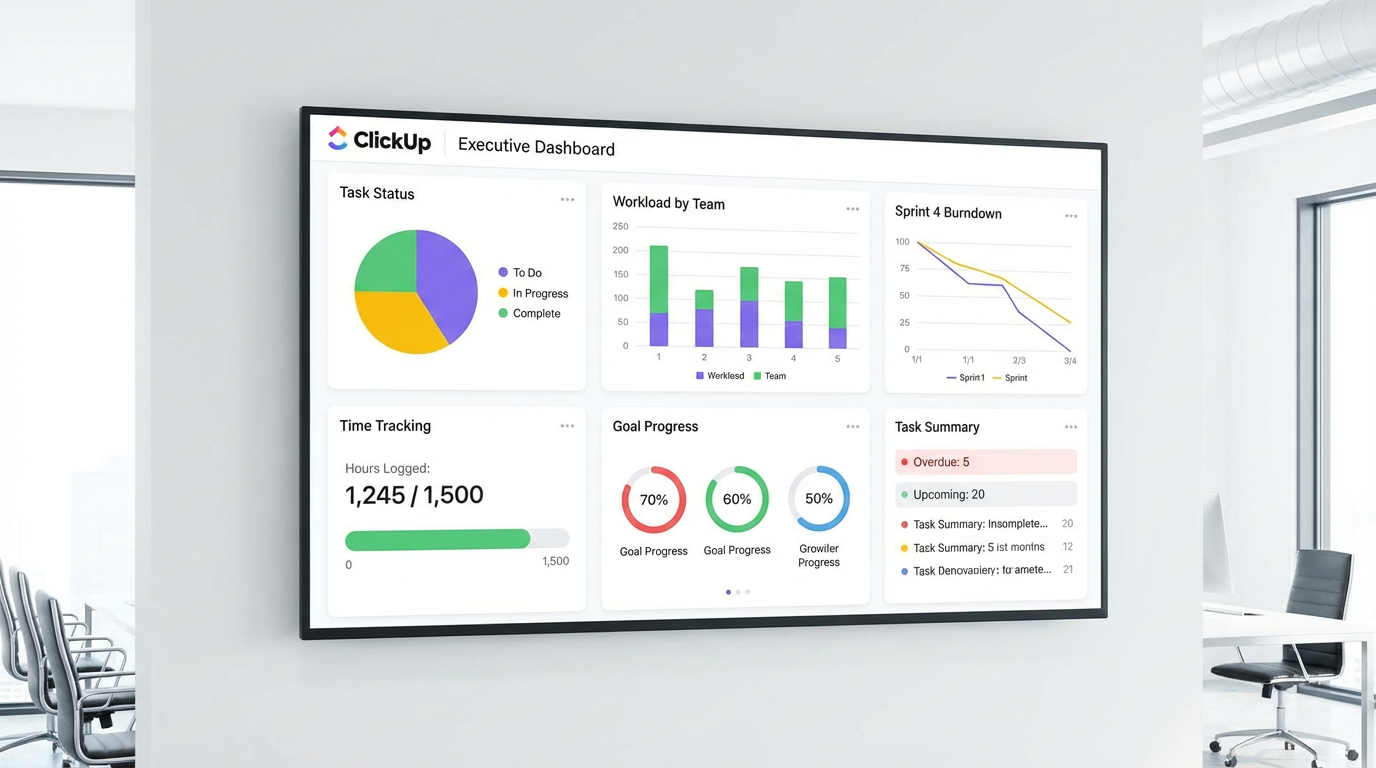
Caption: ClickUp Dashboards allow for the creation of custom reports with widgets for tracking project status, team workload, and key performance indicators.
With over 50 widget types, you can track everything from sprint progress and team workload to project budgets and cycle times. This level of dashboard reporting provides unparalleled visibility, ensuring that stakeholders are always informed and that decisions are data-driven. It’s a powerful tool for resource management and risk management.
No-Code Workflow Automation: Eliminate Manual Work
ClickUp’s workflow automation builder is both powerful and accessible. It allows users to create complex automations using a simple “when this happens, do that” logic, without needing to write any code. This is a game-changer for improving operational efficiency.

Caption: The visual automation builder in ClickUp enables users to automate repetitive tasks with custom triggers, conditions, and actions.
Automations can be used to:
•Assign tasks when a status changes.
•Post comments when a due date arrives.
•Move tasks between lists automatically.
•Integrate with other tools like Slack, GitHub, and Google Calendar.
This robust process automation capability frees up teams to focus on high-value work, making it a core component of any digital transformation strategy.
ClickUp Pricing in 2025: Unbeatable Value?
ClickUp’s pricing strategy is one of its most disruptive assets. It offers more features at a lower price point than nearly all of its major competitors, making it an incredibly attractive option for teams of all sizes.
•Free Forever Plan: The most generous free plan on the market, with unlimited tasks, unlimited users, and 100MB of storage. It’s a perfect starting point for individuals and small teams.
•Unlimited Plan ($7/user/month, billed annually): Unlocks unlimited storage, integrations, and dashboards. This is the best value plan for most small to medium-sized teams.
•Business Plan ($12/user/month, billed annually): Adds advanced automations, workload management, and time tracking features. Ideal for growing teams with more complex needs.
•Enterprise Plan (Custom Pricing): For large organizations requiring advanced security, permissions, and dedicated support.
The value proposition is clear: ClickUp provides enterprise software capabilities at an SMB price point, making powerful project management and workflow automation accessible to everyone.
Pros and Cons: A Balanced Perspective
ClickUp’s ambition to be everything to everyone is both its greatest strength and its most significant weakness.
Pros:
•Unbeatable Value: More features for your money than any other platform.
•Incredibly Feature-Rich: A massive toolkit that covers almost any use case.
•Extreme Customization: Can be tailored to fit any team’s specific workflow.
•Generous Free Plan: The best free offering in the project management space.
•Powerful AI Integration: ClickUp Brain is deeply embedded and highly capable.
Cons:
•Overwhelming and Complex: The sheer number of features can lead to a steep learning curve.
•Performance Issues: The platform can feel slow and laggy, especially in large workspaces.
•Feature Bloat: Some features feel half-baked or less polished than dedicated tools.
•Inconsistent UI: The user experience can feel cluttered and less intuitive than competitors.
Final Verdict: Is ClickUp the Right Choice for Your Team in 2025?
After an exhaustive review, ClickUp stands out as a uniquely powerful and ambitious player in the work management platform market. Its “one app to replace them all” philosophy is not just marketing hype; it’s a genuine attempt to solve the problem of tool fatigue and context switching.
You should choose ClickUp if:
•You are a tech-savvy team that loves to customize and tinker with your tools.
•You are looking for the absolute best value and the most features for your money.
•You want to consolidate multiple apps into a single digital workspace.
•You need a highly scalable platform that can grow with your team from startup to enterprise.
You might look elsewhere if:
•Your team is new to project management and needs a simple, intuitive tool (consider Asana or Trello).
•You prioritize a clean, beautiful UI and a flawless user experience over a massive feature set (consider Monday.com).
•Your primary need is for a knowledge base or wiki (consider Notion).
In 2025, ClickUp is the undisputed champion of value and versatility. While its complexity can be a hurdle, for teams willing to invest the time to learn it, ClickUp offers an unparalleled level of power and flexibility. It is the ultimate productivity software for those who believe that the perfect work management platform is one you build yourself.
Frequently Asked Questions (FAQ)
1. Is ClickUp truly free forever? Yes, the Free Forever plan offers unlimited tasks and members with some feature limitations. It’s a very functional plan for small teams and personal use.
2. How does ClickUp’s AI compare to other tools? ClickUp Brain is one of the most deeply integrated AI assistants. Unlike tools where AI is an add-on, ClickUp has woven AI into every part of the platform, from writing docs to managing projects, making it a powerful tool for process automation.
3. Is ClickUp good for beginners? It can be. While the platform is complex, its templates and onboarding process are helpful. However, users who are easily overwhelmed by too many options might find simpler tools like Trello or Asana easier to start with.
4. Can ClickUp replace Jira for software development? Yes, many teams use ClickUp for sprint planning, bug tracking, and roadmaps. It offers native integrations with GitHub, GitLab, and Bitbucket, making it a viable Jira alternative, especially for teams that want to keep all their work in one place.
5. What are ClickUp’s best features? Its top features include the 15+ customizable views, the powerful and generous free plan, the deeply integrated ClickUp Brain AI, and the extreme level of customization available for tasks, fields, and workflows.
6. How does ClickUp handle document collaboration? ClickUp Docs is a powerful feature that allows you to create wiki-style documents, knowledge bases, and SOPs directly within your workspace. Docs can be linked to tasks, and they support real-time collaboration, comments, and rich formatting.
7. Is ClickUp’s time tracking feature robust? Yes, it offers native time tracking that allows you to track time on tasks, add notes, and view reports. It’s a solid feature that can replace the need for a separate time tracking tool for many teams.
8. What is the “Everything View” in ClickUp? The Everything View is a powerful feature that allows you to see all tasks from every Space, Folder, and List in one place. You can then sort, filter, and group these tasks to get a high-level overview of all work happening in your organization.
9. How customizable are the dashboards? Dashboards are highly customizable. You can choose from over 50 different widgets to build reports that track almost any metric, from team performance and project progress to time tracked and workload distribution.
10. Is ClickUp a good choice for a single user? Absolutely. The Free Forever plan is perfect for freelancers, students, or anyone looking to manage their personal tasks and projects. The ability to create different views and custom fields makes it a powerful personal productivity software.