Firefly vs Leonardo Artistic Illustration: Best AI Art Tool?

Quick Verdict: Firefly vs Leonardo Artistic Illustration
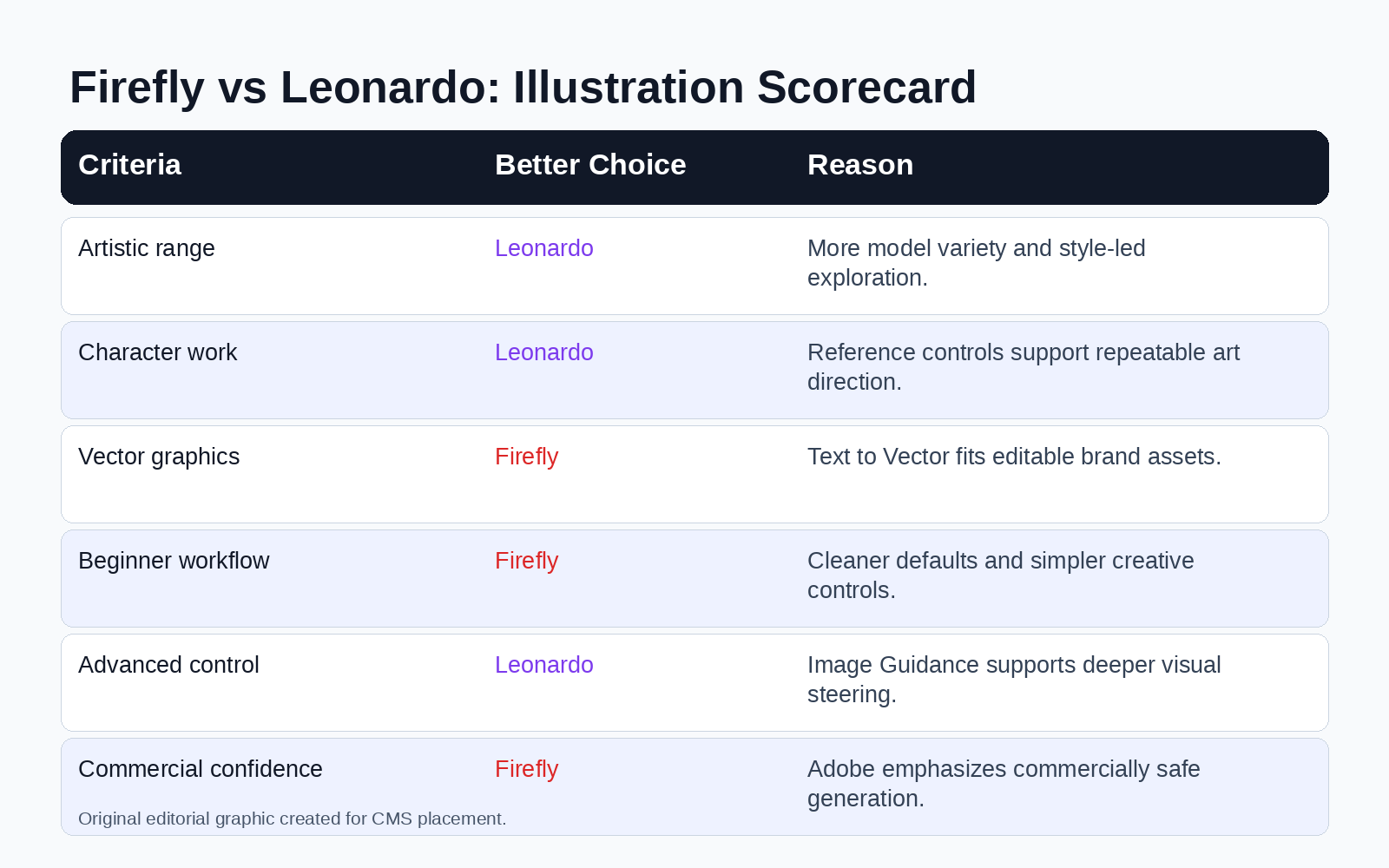
If you are comparing Firefly vs Leonardo artistic illustration, the better choice depends on the type of art you want to create. Leonardo is stronger for expressive AI art, fantasy concepts, game assets, character exploration, and style-heavy illustration. Adobe Firefly is better for polished commercial illustration, simple vectors, brand-safe creative assets, and workflows inside Adobe Creative Cloud.
For pure artistic exploration, Leonardo feels more flexible. It gives creators more model variety, reference controls, style guidance, and image-to-image options. That makes it useful when you need a bold look, a consistent character direction, or several creative variations from the same visual idea.
Firefly wins when the illustration must move into a real design workflow. It works well for marketers, designers, and brand teams who need safe, editable, campaign-ready images rather than experimental art.
How I Compared Firefly and Leonardo for AI Illustration
This review focuses on product-review intent, not a general AI art overview. I evaluated Firefly and Leonardo as tools someone might actually choose for illustration projects, including social media art, character sketches, storyboards, game concepts, blog graphics, brand visuals, and editorial images.
The comparison uses five criteria:
•Artistic range: How many illustration styles can the tool support?
•Prompt control: Does it follow creative instructions clearly?
•Reference control: Can you guide style, content, character, or composition?
•Workflow fit: Does the output move easily into editing or publishing?
•Commercial confidence: Can teams use the output with fewer brand and licensing concerns?
This framework matters because “better art” is not one thing. A fantasy illustrator, a YouTube thumbnail designer, and a marketing team need different strengths from an AI image generator.
What Is Adobe Firefly?
Adobe Firefly is Adobe’s generative AI platform for images, video, audio, vector graphics, and creative editing. Adobe positions Firefly as a creative AI solution built for professional workflows and commercial use. In its 2025 Firefly update, Adobe said Firefly had generated more than 22 billion assets worldwide in under two years.
Adobe’s key advantage is workflow. Firefly is not just a text-to-image generator. It connects with Adobe’s design ecosystem, including Photoshop, Illustrator-style vector workflows, and Creative Cloud projects. That makes it useful when AI illustration is one step in a larger design process.
Adobe also emphasizes that Firefly is designed to be commercially safe from the ground up. This matters for agencies, content teams, ecommerce brands, and publishers that cannot treat image licensing as an afterthought.
Firefly’s Illustration Strengths
Firefly performs best when the goal is clean, polished, design-friendly visual content. Adobe says Firefly Image Model 4 is suited for rapid ideation and everyday creative needs, including simple illustrations, icons, and basic image concepts.
Firefly also includes Text to Vector, which helps users create editable vector graphics, icons, patterns, logo concepts, and brand-aligned illustrations. That gives Firefly a real advantage for design production, especially when the final asset must be refined, resized, or adapted.
In simple terms, Firefly is strongest when you need:
•Blog and landing page illustrations.
•Social media campaign visuals.
•Brand-safe graphics.
•Icons, patterns, and vector-style assets.
•Image ideas that move into Adobe editing tools.
What Is Leonardo AI?
Leonardo AI is a generative image, art, and video platform aimed at creators who want high-quality visuals across many styles and use cases. Its official homepage says users can generate visuals from simple prompts or custom models, tailored to an aesthetic and scaled across concepts, styles, and use cases.
Leonardo’s biggest advantage is creative flexibility. Its product language speaks directly to artists, designers, animators, photographers, marketers, and developers. For artists, Leonardo says it helps users create bold styles, detailed characters, and concept art ready for refinement.
Leonardo also provides deeper reference-based controls. Its Image Guidance documentation explains how users can apply uploaded or generated images as references, use ControlNet-style guidance, and adjust appearance through Style Reference, Character Reference, Content Reference, Edge to Image, Pose to Image, Depth to Image, and other options, depending on the model.
Leonardo’s Illustration Strengths
Leonardo is especially strong for artistic ideation. It gives creators more ways to direct style and structure before they commit to a final image. That matters for illustration because artists often need several rounds of exploration.
The platform’s Style Reference controls support Low, Mid, High, Ultra, and Max strength settings. Multiple style references can also be weighted through influence ratios. This gives creators a practical way to blend visual inspirations without relying only on long prompts.
Leonardo’s Character Reference system is also useful for illustration projects. Its documentation explains that higher reference strength improves resemblance but reduces flexibility. That trade-off is exactly what illustrators face when they develop recurring characters for games, comics, mascots, or storyboards.
Firefly vs Leonardo for Artistic Range
Leonardo wins on artistic range. It feels better suited for creators who want fantasy art, anime-inspired styles, painterly scenes, game art, stylized portraits, surreal compositions, and mood-heavy concept images.
The reason is control depth. Leonardo supports style and character references, content guidance, sketch-to-image workflows, and model-specific guidance options. These features help users push the output toward a specific look instead of accepting a generic AI image.
Firefly can create attractive illustrations, especially simple 2D and 3D graphics. Adobe’s examples include vector flat landscape art, glossy character-style objects, and 3D vector-style illustrations. Still, Firefly usually feels more like a design assistant than an experimental art studio.
For artists, that distinction matters. Firefly produces clean results. Leonardo gives you more room to chase a strange, specific, or highly stylized visual direction.
Firefly vs Leonardo for Prompt Control
Both tools can turn prompts into strong images, but they behave differently. Firefly favors guided controls and polished defaults. Leonardo rewards more intentional prompting, references, and model choices.
If your prompt is short, Firefly can often deliver a usable commercial image faster. That helps beginners and marketers who do not want to learn advanced prompt engineering.
Leonardo becomes more powerful when you already know what you want. A prompt like “storybook watercolor fox explorer in a mossy ancient library, warm rim light, expressive face, handcrafted texture” gives Leonardo room to interpret mood, character, and style.
The better prompt tool depends on your workflow. Firefly helps when you want fewer decisions. Leonardo helps when you want more control.
Firefly vs Leonardo for Character Illustration
Leonardo is the better choice for character illustration. Its Character Reference and Style Reference features give illustrators more structure for maintaining a consistent look across multiple images.
That does not mean Leonardo guarantees perfect character consistency. Its own documentation says Character Reference is not a face-swap feature and does not guarantee a perfect replica. Still, the presence of character-focused guidance makes Leonardo more useful for recurring characters than a basic prompt-only workflow.
Firefly can generate high-quality people, portraits, and stylized figures. Adobe says Firefly Image Model 4 and 4 Ultra improved prompt fidelity and render people, animals, and architectural elements with more precision, clarity, and realism.
However, artistic illustration often needs more than a good single image. It needs repeatable characters, consistent costumes, a stable color language, and a style that survives several variations. Leonardo has the better toolset for that job.
Firefly vs Leonardo for Vector, Icon, and Brand Illustration
Firefly is the better option for vector-style illustration and brand design. Adobe’s Text to Vector feature is a major reason. It allows users to generate editable vector graphics, icons, patterns, and logo directions from text prompts.
That makes Firefly more useful for practical design assets. A marketing team may not need a dramatic fantasy illustration. It may need a flat hero graphic, a branded icon set, a simple product illustration,
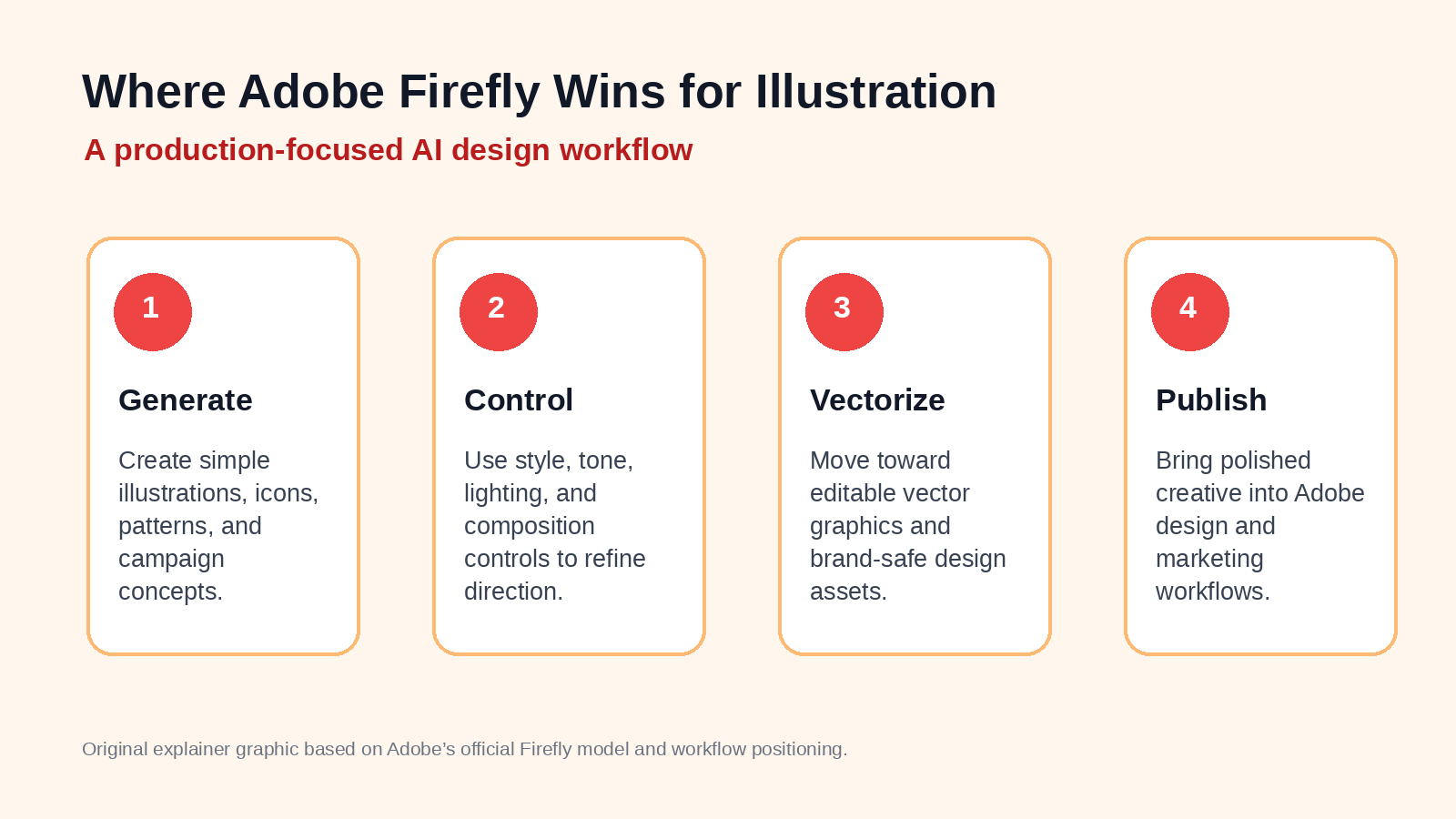
Leonardo can create icons and flat graphics, but Firefly fits the design-production path better. If the final file needs to live in an Adobe workflow, Firefly saves time.
Firefly vs Leonardo for Commercial Use
Firefly has the stronger commercial-use story. Adobe repeatedly frames Firefly as commercially safe and built for professional creative production. This does not remove every legal or brand review requirement, but it gives teams a clearer starting point.
Leonardo can be used for professional creative work, and its output quality can be excellent. Still, its value proposition leans more toward creative range, custom aesthetics, and advanced generation controls.
For freelancers and indie creators, Leonardo’s flexibility may matter more than enterprise safety language. For agencies, publishers, ecommerce brands, and large teams, Firefly’s Adobe ecosystem and commercial positioning may matter more.
Hands-On Editorial Take: Where Each Tool Feels Better
My editorial takeaway is simple: Leonardo feels more like an AI art lab, while Firefly feels more like an AI design workstation. That difference shows up in almost every creative decision.
When I map a character concept, Leonardo is the tool I would reach for first. It gives more options for references, style strength, and repeated exploration. It is better for finding an unexpected visual direction.
When I need a polished blog hero graphic or an illustration that a designer will refine later, Firefly makes more sense. It supports cleaner production and easier movement into design tools.
This is why the “best” tool is not universal. The right choice depends on whether your priority is expressive art direction or controlled design production.
Pros and Cons of Adobe Firefly for Illustration
Firefly Pros
Firefly is easy to use and fits professional design workflows. Its strongest benefit is that it connects AI generation with Adobe’s creative ecosystem.
It also gives teams a clearer commercial-use narrative. That helps when the content supports a brand campaign, ad creative, landing page, or sales asset.
Firefly Cons
Firefly can feel less adventurous for highly stylized illustration. It may produce cleaner, safer images when an artist wants rougher, stranger, or more expressive results.
It also works best for users who already value Adobe’s workflow. If you do not use Adobe tools, some of Firefly’s advantage becomes less important.
Pros and Cons of Leonardo for Illustration
Leonardo Pros
Leonardo is more flexible for artistic experimentation. It supports deep reference workflows, multiple guidance types, custom aesthetics, and concept-driven image creation.
It is also strong for characters, fantasy scenes, game-style visuals, and artistic variations. Creators can use it to explore mood, pose, composition, and style before selecting a final direction.
Leonardo Cons
Leonardo can feel more complex. Advanced controls create power, but they also create a learning curve.
Beginners may need time to understand models, references, strength levels, and guidance settings. Firefly is usually faster when the goal is a simple usable graphic.
Firefly vs Leonardo: Which Handles Artistic Illustration Better?
For artistic illustration, Leonardo is the better overall choice. It gives artists more creative range, better reference control, stronger character workflows, and more freedom to explore stylized results.
Firefly is still the better choice for commercial design illustration. It handles polished, brand-safe, vector-friendly, and Adobe-connected workflows more naturally.
So the best answer is:
•Choose Leonardo for concept art, character design, fantasy scenes, game visuals, stylized illustrations, and creative exploration.
•Choose Firefly for brand illustration, commercial graphics, icons, vectors, social media assets, and Adobe-based production.
Featured Snippet Answer
Leonardo handles artistic illustration better than Adobe Firefly when the goal is expressive AI art, character design, fantasy concepts, or stylized creative exploration. Adobe Firefly is better for commercial illustration, vector-style graphics, brand-safe visuals, and workflows connected to Adobe Creative Cloud.
FAQ: Firefly vs Leonardo Artistic Illustration
Is Firefly better than Leonardo for AI art?
Firefly is better for commercial design art, especially if you use Adobe tools. Leonardo is better for expressive AI art and illustration styles that need deeper creative control.
Is Leonardo good for character illustration?
Yes. Leonardo is strong for character illustration because it supports Character Reference, Style Reference, and Image Guidance workflows. These tools help artists maintain visual direction across multiple images.
Is Adobe Firefly good for vector illustration?
Yes. Adobe Firefly is strong for vector-style graphics because Adobe includes Text to Vector features for editable icons, patterns, logo concepts, and design assets.
Which is better for beginners?
Firefly is usually easier for beginners. Leonardo gives more creative control, but that control adds complexity.
Which tool should agencies use?
Agencies should consider Firefly when brand safety, Adobe workflow, and commercial production matter most. They should consider Leonardo when the project needs unusual art direction, concept exploration, or strong character work.
Final Verdict
If the question is Firefly vs Leonardo artistic illustration, Leonardo wins for artists who want expressive range, character control, and stylized experimentation. It is the stronger creative playground.
Firefly wins for teams that need polished, safe, editable, and brand-ready illustration. It is the stronger production tool.
The smartest workflow may use both. Start with Leonardo when you need to explore visual style. Move to Firefly or Adobe tools when the idea must become a finished commercial asset.
That approach gives creators the best of both worlds: Leonardo’s imagination and Firefly’s production discipline.