Runway vs InVideo AI: The Ultimate AI Video Creation Showdown

The landscape of AI video creation is rapidly segmenting into two distinct categories: generative AI and automation AI. At the forefront of the generative movement is Runway, a platform that empowers filmmakers and artists with cutting-edge tools to create entirely new footage from scratch. On the other side, InVideo AI champions the automation approach, focusing on turning text, scripts, and ideas into ready-to-publish videos using a vast library of stock media and templates.
For content creators, marketers, and filmmakers, the choice between these two platforms is a fundamental decision that defines their entire workflow. Do you prioritize the artistic freedom and groundbreaking capabilities of pure generative video, or the speed, efficiency, and scale of automated content production? This comprehensive 2500-word analysis will serve as your definitive guide, comparing the core technologies, feature sets, target audiences, and commercial viability of both platforms. By the end, you will have a clear understanding of which tool is the right fit for your video strategy. The contest of Runway vs InVideo AI is a perfect illustration of the two major paths forward in AI-powered video.
1. Core Functionality: Generative Video vs. Script-to-Video Automation
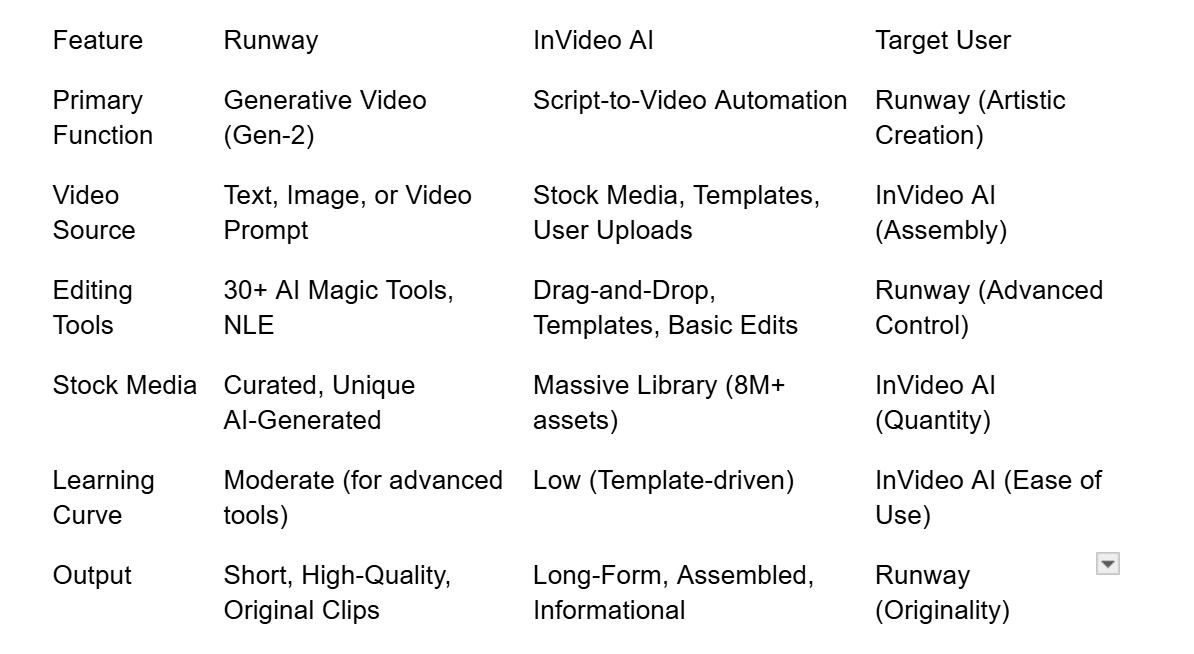
The most significant difference between Runway and InVideo AI lies in their primary function and the type of video they are designed to create.
Runway: The Generative AI Powerhouse
Runway is fundamentally a creative suite built around its state-of-the-art generative models, such as Gen-2 and the upcoming Gen-3. Its core value is the ability to create video content that is entirely new and unique, rather than relying on the assembly of pre-existing footage.
•Text-to-Video (Gen-2): Runway’s flagship feature is the ability to generate short, high-quality video clips from a simple text prompt. This is pure creation, allowing users to conjure scenes that have never existed before, from abstract concepts to photorealistic environments. The model is continuously refined to improve temporal coherence and reduce visual artifacts.
•Image-to-Video and Stylization: Beyond text, Runway excels at using existing images or video clips as a starting point. Users can animate a still image, apply new artistic styles to existing footage, or use the "Customization" feature to train the model on their own assets for highly personalized results.
•Artistic Focus and Control: Runway’s tools are designed to give filmmakers and artists granular control over the generated output. Advanced features include Camera Motion Controls (pan, tilt, zoom) to dictate the virtual camera's movement, and Seed Values to ensure visual consistency across multiple generated clips. This level of control is essential for professional production pipelines.
InVideo AI: The Automation Engine
InVideo AI is primarily a script-to-video automation platform designed for rapid content production.
•Script-to-Video: Its core strength is taking a long-form script, article, or even a simple idea, and automatically generating a complete video. This includes selecting relevant stock footage, adding voiceovers, background music, and text overlays, all in a matter of minutes.
•Template-Driven: InVideo AI relies heavily on a massive library of templates and stock media to assemble the final video. It is an assembly tool, not a generative one.
•Marketing Focus: The platform is optimized for content creators and marketers who need to produce a high volume of explainer videos, social media clips, and promotional content quickly and efficiently.
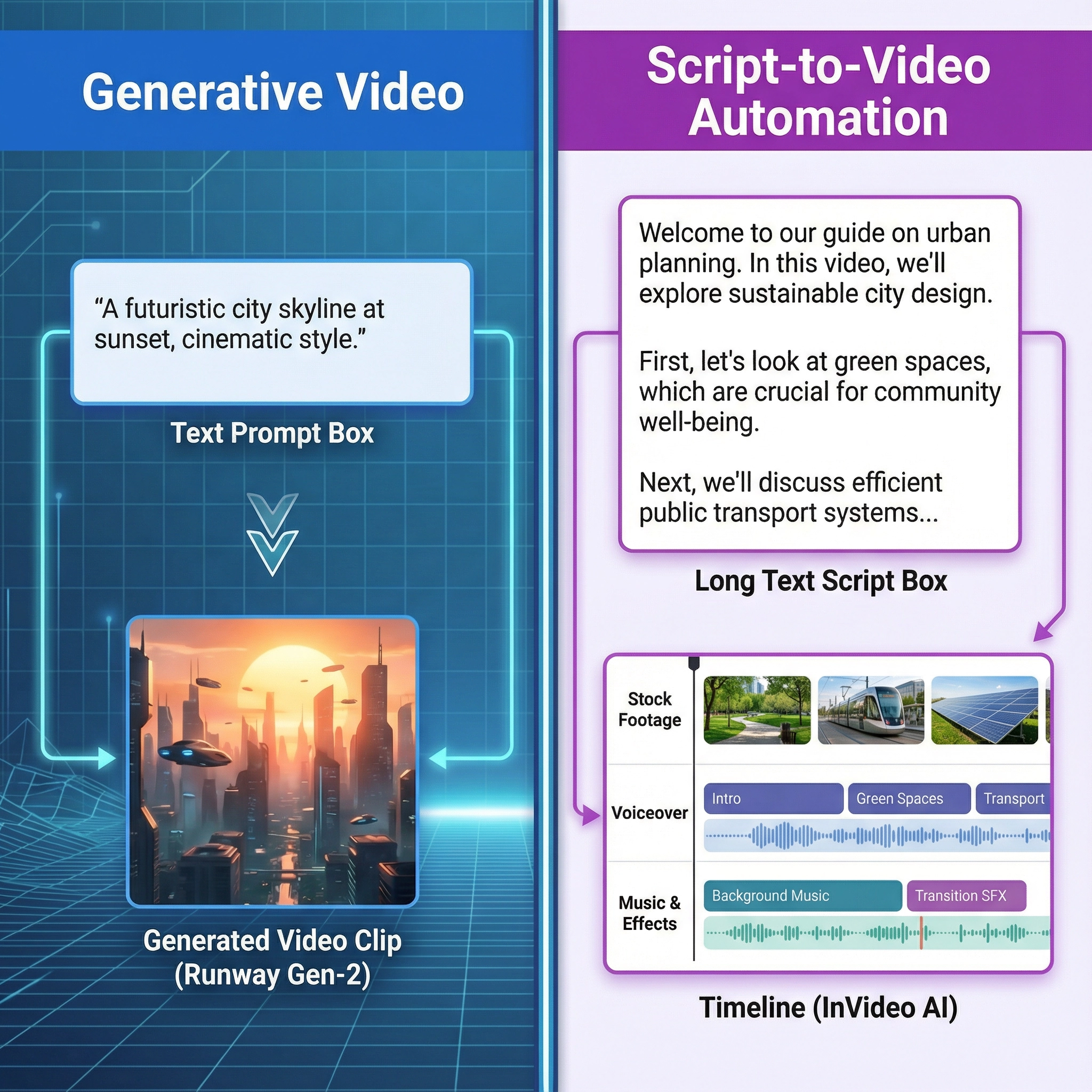
A side-by-side visual comparison of the core function. On the left, a text prompt box leading to a short, generated video clip (Runway Gen-2). On the right, a long text script box leading to a timeline filled with stock footage and voiceover tracks (InVideo AI). Label the left 'Generative Video' and the right 'Script-to-Video Automation'.
2. Editing and Post-Production: Advanced AI Tools vs. Template-Based Simplicity
The editing capabilities of each platform reflect their core focus, offering vastly different user experiences.
Runway’s Advanced AI Editing Suite
Runway is packed with over 30 "AI Magic Tools" that are designed to perform complex post-production tasks with a single click, effectively democratizing professional-grade visual effects.
•AI Magic Tools: These tools are the platform's signature and represent a significant leap in video editing efficiency. They include:
•Inpainting/Outpainting: This allows users to seamlessly remove unwanted objects from a video or extend the boundaries of a scene (outpainting), tasks that traditionally required frame-by-frame manual work.
•Motion Brush: A revolutionary tool that lets users paint over an area of a still image to dictate its movement, transforming a static image into a dynamic video clip with precise control over the direction and intensity of motion.
•Green Screen/Rotoscoping: The AI automatically isolates subjects from their background with high precision, making complex keying and masking operations simple and fast.
•Non-Linear Editor (NLE): Runway features a robust, modern NLE that allows for traditional editing, compositing, and fine-tuning of both generated and uploaded footage. The interface is clean, professional, and built for a workflow that integrates generative AI with standard editing practices. This makes it a true all-in-one post-production hub for the modern filmmaker.
InVideo AI’s Template-Driven Editor
InVideo AI’s editor is designed for speed and ease of use, prioritizing a low learning curve.
•Drag-and-Drop Interface: The editor is highly intuitive, relying on a drag-and-drop system that is easy for beginners to master.
•Massive Template Library: InVideo AI’s strength lies in its thousands of pre-made templates for every social media platform and business need. Users select a template and simply replace the text and media.
•Stock Media Integration: The platform boasts a massive library of over 8 million stock media assets (images and videos) that the AI automatically selects and inserts based on the script, ensuring a quick and complete video assembly 1.
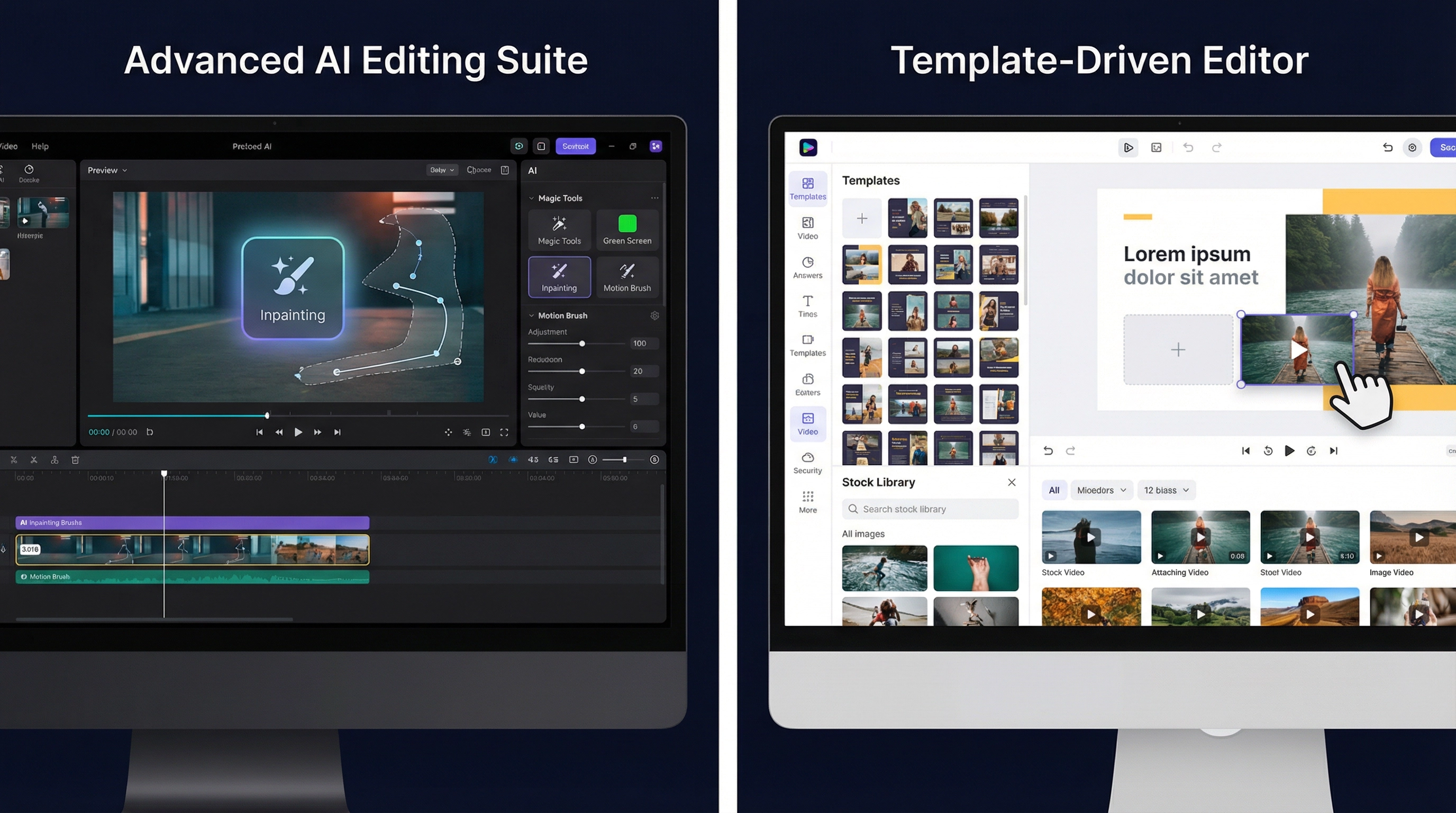
A side-by-side comparison of the editing interface. On the left, a clean, modern, non-linear editor with advanced AI tools like inpainting and motion brush visible (Runway). On the right, a template-heavy, drag-and-drop interface with a large stock library preview (InVideo AI). Label the left 'Advanced AI Editing Suite' and the right 'Template-Driven Editor'.
3. Target Audience and Use Cases
The distinct feature sets of Runway vs InVideo AI mean they cater to fundamentally different user bases and use cases.
Runway: The Filmmaker and Artist
Runway is the tool of choice for users who prioritize artistic control, originality, and pushing the boundaries of visual media.
•Filmmakers and VFX Artists: Ideal for pre-visualization, creating unique B-roll footage, and performing complex visual effects that would otherwise require expensive software and hours of manual labor.
•Concept Artists: Perfect for quickly generating visual concepts and mood boards that are entirely original and not reliant on existing stock footage.
•Creative Agencies: Used for high-end commercial work where the client demands a unique, never-before-seen visual style.
InVideo AI: The Marketer and Content Creator
InVideo AI is the go-to platform for users who need to produce a high volume of content quickly and efficiently for business purposes.
•Digital Marketers: Excellent for creating product demos, social media ads, and explainer videos from existing blog posts or scripts.
•Small Business Owners: Ideal for generating promotional content without the need for a dedicated video editor or expensive stock subscriptions.
•News and Media Aggregators: Used to quickly turn text-based news stories into video summaries for platforms like YouTube and TikTok.

A visual metaphor for the target audience. On the left, a stylized image of a film director or concept artist with a cinematic camera (Runway). On the right, a stylized image of a digital marketer or small business owner at a clean desk (InVideo AI). Label the left 'Filmmakers & Artists' and the right 'Marketers & Businesses'.
4. Pricing Models: Credit System vs. Unlimited Subscription
The pricing structure of Runway vs InVideo AI is a direct reflection of their core value proposition, with one selling computation and the other selling access.
Runway’s Credit System
Runway operates on a credit-based system, where every generative action consumes a certain number of credits.
•Generative Cost: Generating a video clip, using an AI Magic Tool, or performing a complex task costs credits. This model is common for platforms that rely on expensive, high-performance computing (HPC) to run large generative models.
•Subscription Tiers: Users purchase a subscription (Basic, Standard, Pro, Unlimited) which includes a monthly allotment of credits. The Unlimited plan offers unlimited Gen-2 generations, but most users operate on a credit-capped plan.
•Value Exchange: The user is paying for the raw computational power and the unique, original output that this power enables. The cost scales with the complexity and volume of the generative work 2.
InVideo AI’s Subscription Model
InVideo AI operates on a more traditional software-as-a-service (SaaS) subscription model, focused on unlimited output.
•Unlimited Exports: The primary value of the paid tiers (Plus, Max, Generative) is the ability to create and export an unlimited number of videos per month, often with no watermarks and in high definition.
•Fixed Cost: This fixed-cost model is ideal for businesses that need predictable, high-volume content production. The cost is not tied to the number of videos created, but to the access to the platform's features and stock library.
•Value Exchange: The user is paying for the convenience, the automation, and the access to the massive library of pre-existing assets.
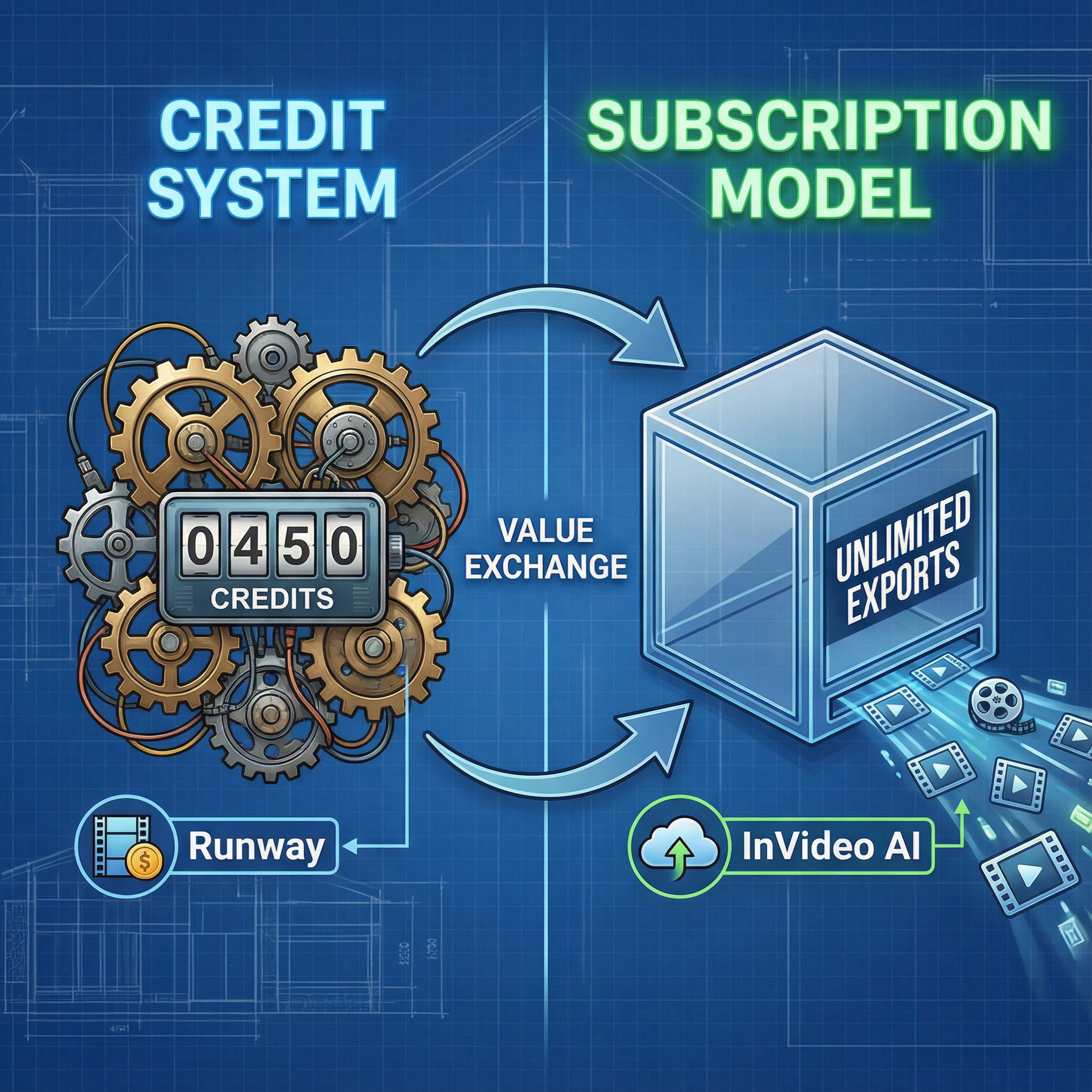
A visual metaphor for the pricing model. On the left, a small, complex set of gears and a digital counter labeled 'Credits' (Runway's credit system). On the right, a simple, clear subscription box labeled 'Unlimited Exports' (InVideo AI's subscription model). The background should be a subtle, technical blueprint.
5. Stock Media and Originality
The reliance on stock media is a key differentiator in the Runway vs InVideo AI debate, directly impacting the originality of the final product.
Runway: Focus on Originality
Runway’s core mission is to enable the creation of original content.
•Generative Stock: While Runway does offer some stock media, its primary focus is on generating entirely new footage. The "stock" it provides is often unique, AI-generated elements or highly curated, stylized clips that serve as excellent starting points for generative work.
•No Stock Reliance: A video created entirely in Runway Gen-2 is, by definition, original and not reliant on pre-existing footage, which is a major selling point for artists and high-end commercial projects.
InVideo AI: Focus on Assembly
InVideo AI’s efficiency is built on its ability to rapidly assemble videos from existing components.
•Massive Stock Library: InVideo AI’s strength is its integration with premium stock providers, giving users access to millions of video clips, images, and music tracks. The AI automatically selects the most relevant clips based on the script.
•Template Reliance: While fast, this process means that the final video is an assembly of existing stock footage, which can sometimes lead to a generic or less unique look compared to a fully generative video.
•Script-Driven Selection: The AI's ability to match script segments to relevant stock clips is a powerful automation feature, saving hours of manual searching and editing 3.
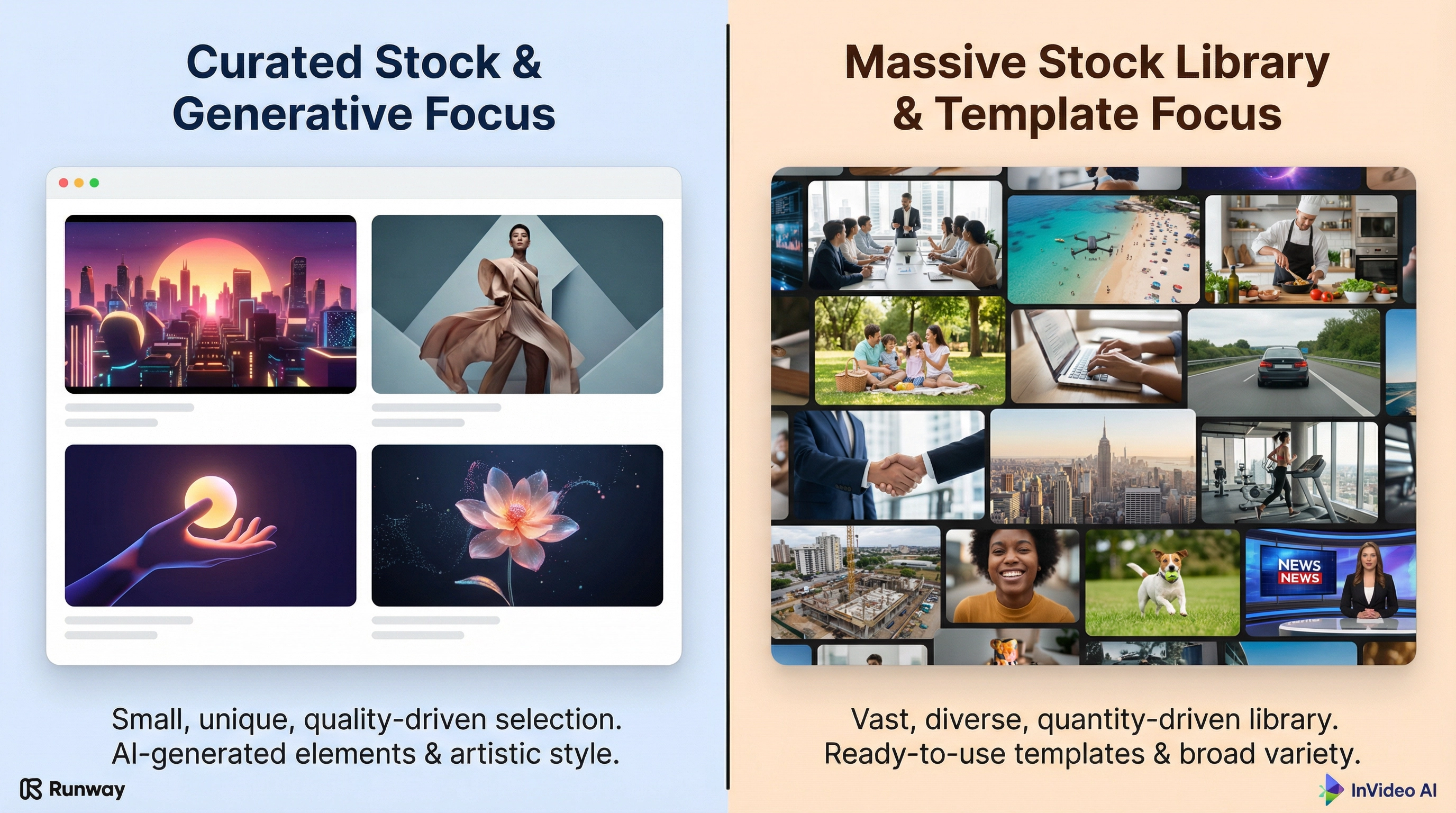
A side-by-side comparison of stock media usage. On the left, a small, highly curated selection of unique, stylized stock clips (Runway's focus on quality). On the right, a massive, overflowing library of generic, diverse stock footage clips (InVideo AI's focus on quantity and variety). Label the left 'Curated Stock & Generative Focus' and the right 'Massive Stock Library & Template Focus'.
6. Community and Learning Resources
The support ecosystem around each platform also reflects its target audience.
Runway’s Community and Learning
Runway has cultivated a community focused on artistic exploration and technical mastery.
•Artistic Focus: The community is highly engaged in sharing generative techniques, prompt engineering tips, and showcasing the most creative and technically challenging uses of the AI Magic Tools.
•Tutorials and Documentation: Runway provides extensive, high-quality tutorials and documentation aimed at helping users master the advanced features of the NLE and the generative models.
InVideo AI’s Community and Learning
InVideo AI’s community is focused on business results and content strategy.
•Marketing Focus: The community and learning resources are geared towards helping users create effective marketing videos, optimize for social media algorithms, and understand content strategy.
•Ease-of-Use Tutorials: Tutorials focus on the speed of creation, how to use templates effectively, and how to maximize the script-to-video workflow for high-volume output.
7. Final Verdict: Which AI Video Tool Reigns Supreme?
The ultimate choice between Runway vs InVideo AI depends entirely on your goal. There is no single "better" tool, only the tool that is better suited for your specific creative or business need.
Choose InVideo AI if:
•Your goal is high-volume, automated content production (e.g., social media clips, news summaries, explainer videos).
•You need to turn long-form text or scripts into video quickly and efficiently.
•You prioritize a low learning curve, a massive stock library, and a fixed, unlimited export subscription model 4.
Choose Runway if:
•Your goal is artistic originality, cinematic quality, and pushing the boundaries of visual effects.
•You need pure generative video (text-to-video, image-to-video) or advanced AI editing tools (Inpainting, Motion Brush).
•You are comfortable with a credit-based pricing model and a more complex, professional editing suite 5.
For the professional filmmaker or artist, Runway is the clear choice for its groundbreaking generative capabilities. For the digital marketer or small business owner who needs to produce content at scale, InVideo AI is the undisputed champion of automation.
The choice between Runway vs InVideo AI is a microcosm of the larger debate in the AI content creation space: the tension between artistic control and production scale. Runway is the tool for the creator who values the unique, the original, and the visually stunning, even if it means a higher cost per second of video. It is an investment in creative potential. InVideo AI, conversely, is the tool for the content strategist who values consistency, speed, and a predictable return on investment. It is an investment in content velocity. Understanding this fundamental difference is the key to selecting the right platform for your 2025 video strategy. The market is large enough for both to thrive, each serving a critical, yet distinct, need in the evolving digital landscape.