Smartsheet Review: Simplify Project Management in 2025?
In today’s fast-paced business environment, achieving operational efficiency is paramount. The drive for digital transformation has pushed organizations to seek out powerful tools that can streamline workflow automation and enhance cross-functional collaboration. For decades, the humble spreadsheet has been the default tool for managing everything from budgets to project timelines. But as complexity grows, traditional spreadsheets buckle under the pressure, lacking the robust features needed for true project portfolio management and enterprise project management.
Enter Smartsheet, a platform that has carved out a unique and powerful niche in the crowded work management platform market. It starts with a simple, brilliant premise: what if a spreadsheet could do more? What if it could be the foundation for a comprehensive project planning tool with Gantt charts, automated workflows, and real-time dashboard reporting? Smartsheet is the answer to that question. It’s a dynamic, cloud-based platform that combines the familiarity of a grid interface with the power of a dedicated project management software, making it a go-to choice for over 85% of Fortune 500 companies.
This 4000-word review will provide an exhaustive analysis of the Smartsheet platform. We will explore its core functionalities, from task management and resource management to its advanced workflow automation and AI-powered insights. We will place it head-to-head with its biggest competitors, dissect its pricing structure, and provide a balanced view of its strengths and weaknesses. Is Smartsheet the ultimate tool for simplifying complex project management in 2025, or is its spreadsheet DNA holding it back? Let’s dive in and find out if this productivity software is the key to unlocking your organization’s full potential for stakeholder management and change management.
What is Smartsheet? The Spreadsheet-Powered Work OS
At its core, Smartsheet is an intelligent work management platform that empowers teams to manage projects, automate processes, and scale programs. Unlike competitors that force users into a completely new interface, Smartsheet leverages the universal familiarity of the spreadsheet. This design choice is a strategic masterstroke, significantly lowering the adoption barrier for teams accustomed to Excel or Google Sheets. However, to call it just a “spreadsheet on steroids” would be a massive understatement. It is a complete enterprise software solution for process automation and timeline tracking.
Beneath this familiar grid lies a powerful engine for enterprise project management. Smartsheet is designed for scalability, capable of handling everything from a simple task management list for a small team to a complex project portfolio management system for a global corporation. It provides a centralized, single source of truth that enhances visibility and control, which are critical components of effective risk management and budget management. This focus on structured data and enterprise-grade governance makes it a powerhouse for any organization serious about improving its operational efficiency and executing its digital transformation strategy. The platform’s robust capabilities in milestone tracking and Gantt chart software make it an indispensable tool for modern project managers.
A Deep Dive into Smartsheet’s Core Features
Smartsheet’s strength comes from its comprehensive and interconnected feature set, which transforms a simple grid into a dynamic engine for work management.
Grid, Gantt, Card, and Calendar Views: A Multi-Perspective Approach
Flexibility in visualization is key to successful project management. Smartsheet excels by allowing teams to view the same underlying data in multiple ways, catering to different roles and preferences. This ensures that every team member, from executive to individual contributor, has the right perspective for their needs.

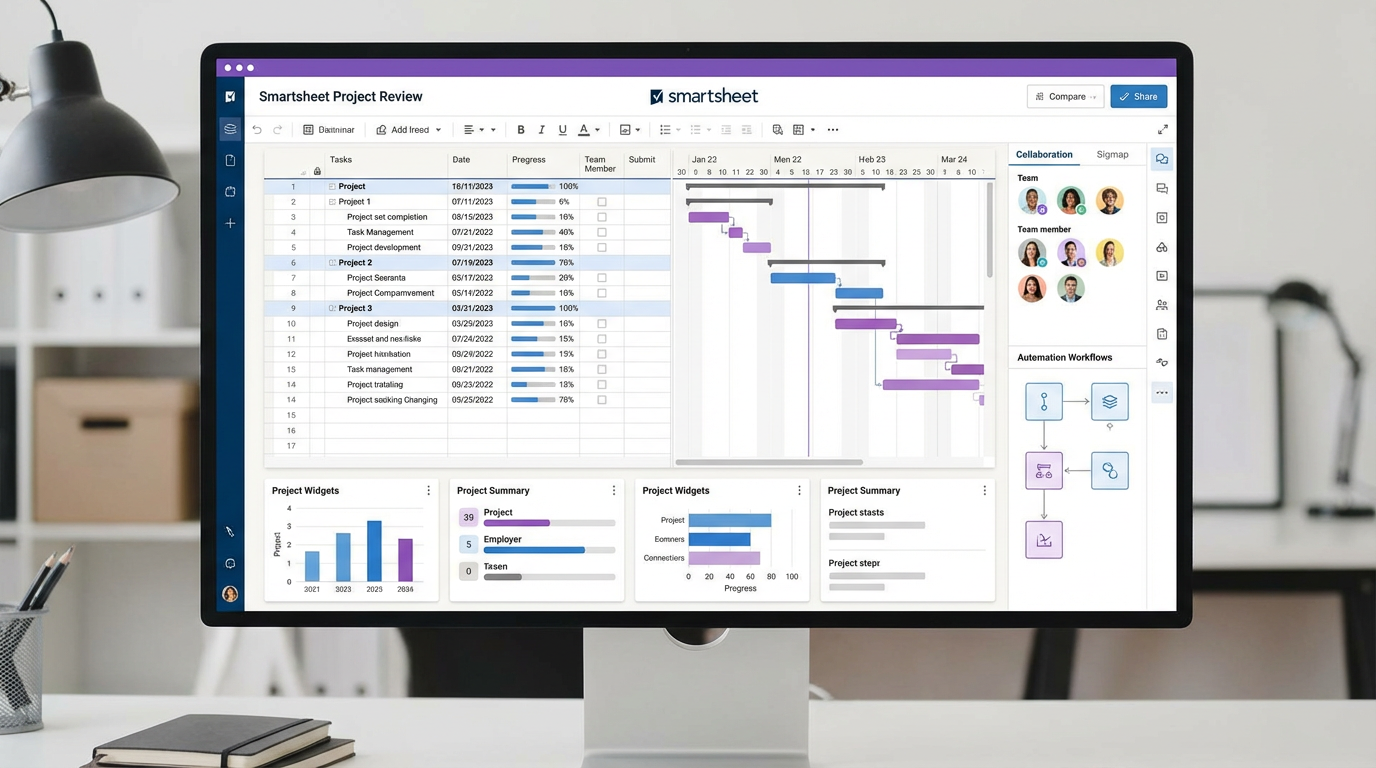
Caption: Smartsheet’s powerful interface allows users to switch between the familiar grid view and a dynamic Gantt chart for robust timeline tracking.
•Grid View: The default spreadsheet-style interface, perfect for data entry, organization, and those who love the structure of rows and columns.
•Gantt View: Transforms your sheet into a powerful Gantt chart software, visualizing project timelines, dependencies, and critical paths. This is essential for waterfall project management and detailed project planning.
•Card View: A Kanban-style board that allows teams to visualize workflows and manage tasks through different stages. It’s ideal for Agile methodology and managing continuous processes.
•Calendar View: Provides a traditional calendar layout, perfect for tracking deadlines, scheduling milestones, and managing content calendars.
This multi-view capability is a cornerstone of effective team collaboration, as it allows different departments to work from the same data set but in the format that best suits their function.
Dynamic Dashboards and Reporting: Your Single Source of Truth
For any organization, business intelligence and real-time visibility are non-negotiable. Smartsheet’s dashboards are a powerful tool for consolidating information from multiple sheets into a single, high-level view. These are not static reports; they are live, interactive hubs of information.
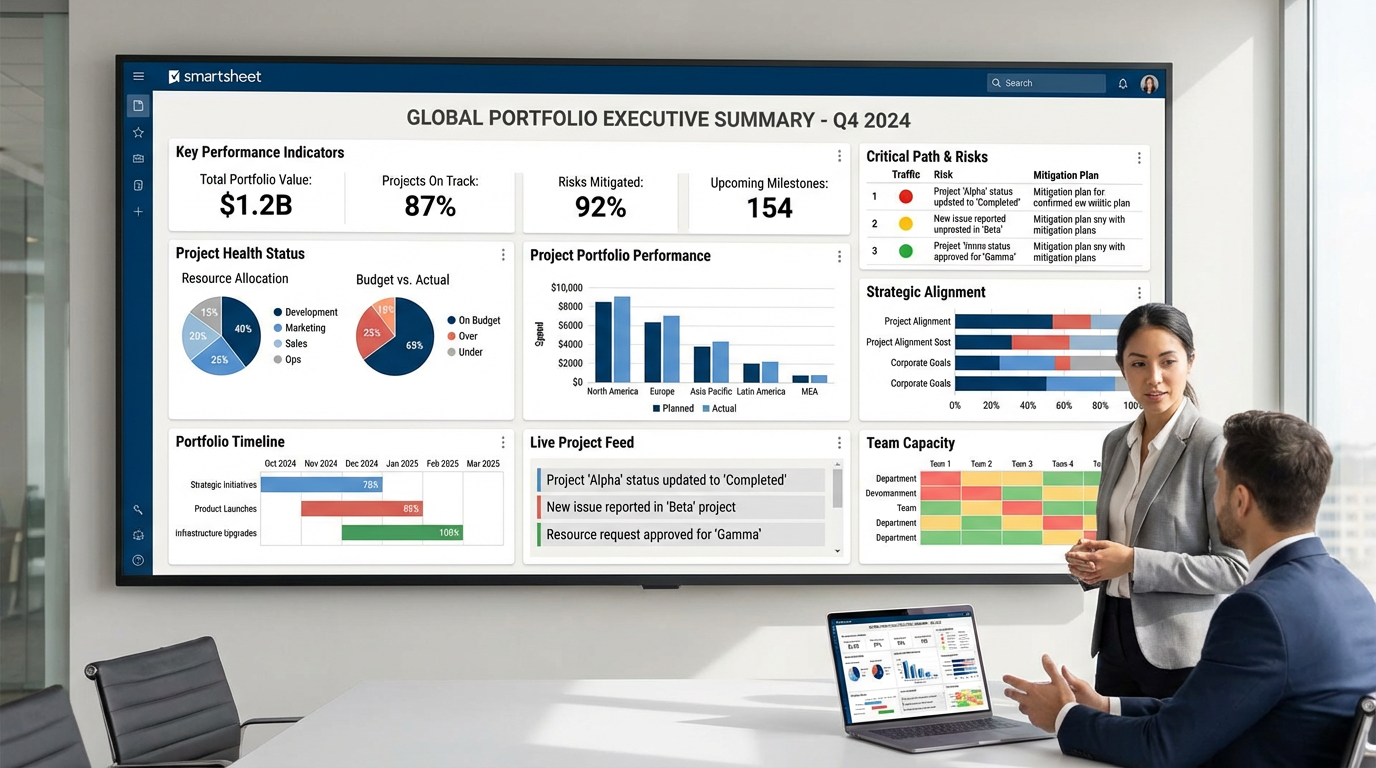
Caption: Smartsheet dashboards provide real-time, customizable widgets for portfolio tracking and executive-level business intelligence.
With dashboards, you can create executive summaries, monitor project health, track KPIs, and provide stakeholders with the exact information they need, when they need it. This capability is crucial for portfolio tracking and effective stakeholder management, eliminating the need for manual report creation and ensuring that decisions are based on the most current data available. This is a prime example of how a work management platform can drive better data analytics.
Powerful Workflow Automation: Putting Repetitive Tasks on Autopilot
Workflow automation is where Smartsheet truly begins to flex its muscles as a top-tier productivity software. The platform includes an intuitive, visual automation builder that allows users to create rules to automate repetitive tasks without writing a single line of code. This is a critical component of modern process automation.
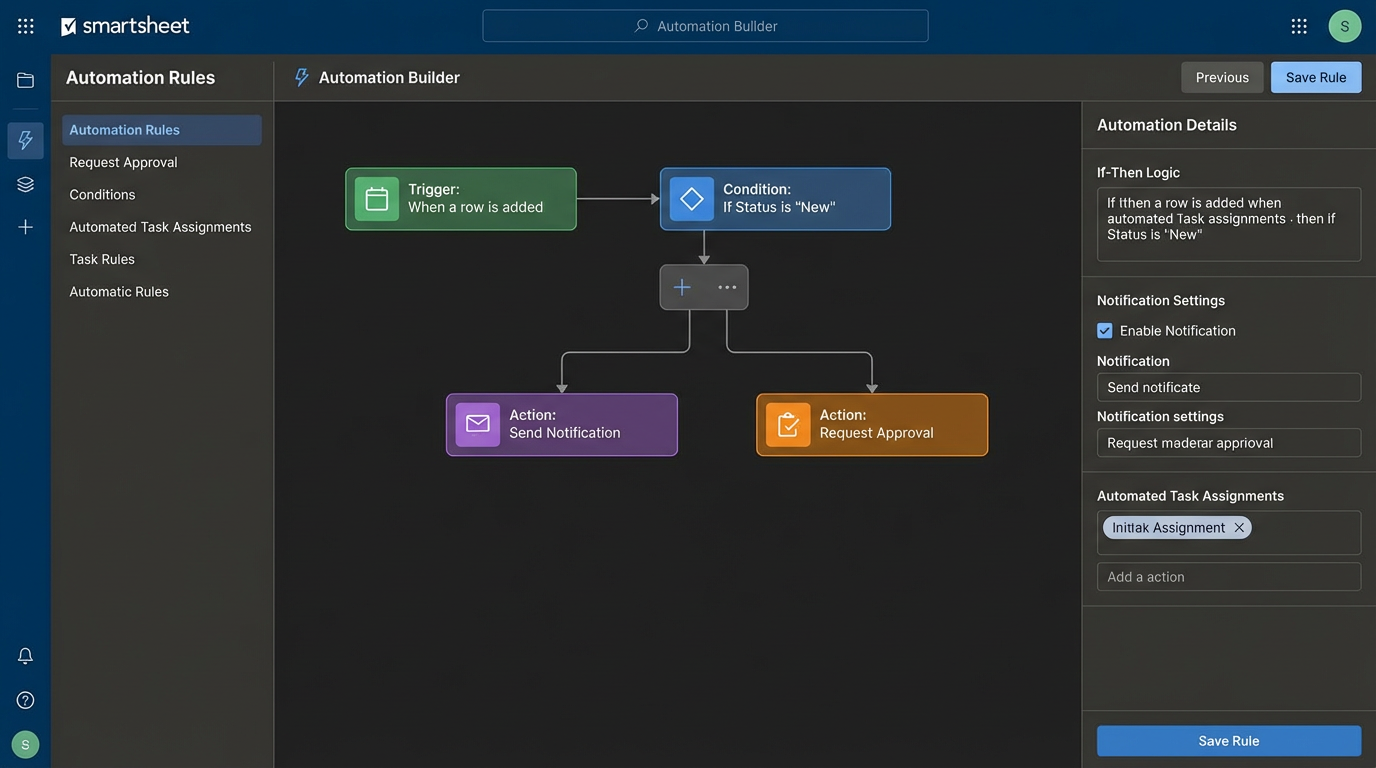
Caption: The visual automation builder enables users to create complex if-then rules for process automation, approvals, and notifications.
Common automations include:
•Alerts & Reminders: Automatically notify team members when a due date is approaching or a task is assigned to them.
•Approval Workflows: Route documents or requests to the right people for approval and track the status automatically.
•Update & Change Requests: Automatically trigger actions when a value in a cell changes, such as moving a task to a different stage.
This level of automation frees up teams from manual, low-value work, allowing them to focus on strategic initiatives. It’s a key driver of operational efficiency and a core tenet of effective change management.
Seamless Team Collaboration and Proofing
Effective team collaboration is built into every aspect of Smartsheet. The platform moves conversations and files out of siloed email inboxes and into the context of the work itself. This focus on cross-functional collaboration is essential for any modern enterprise.
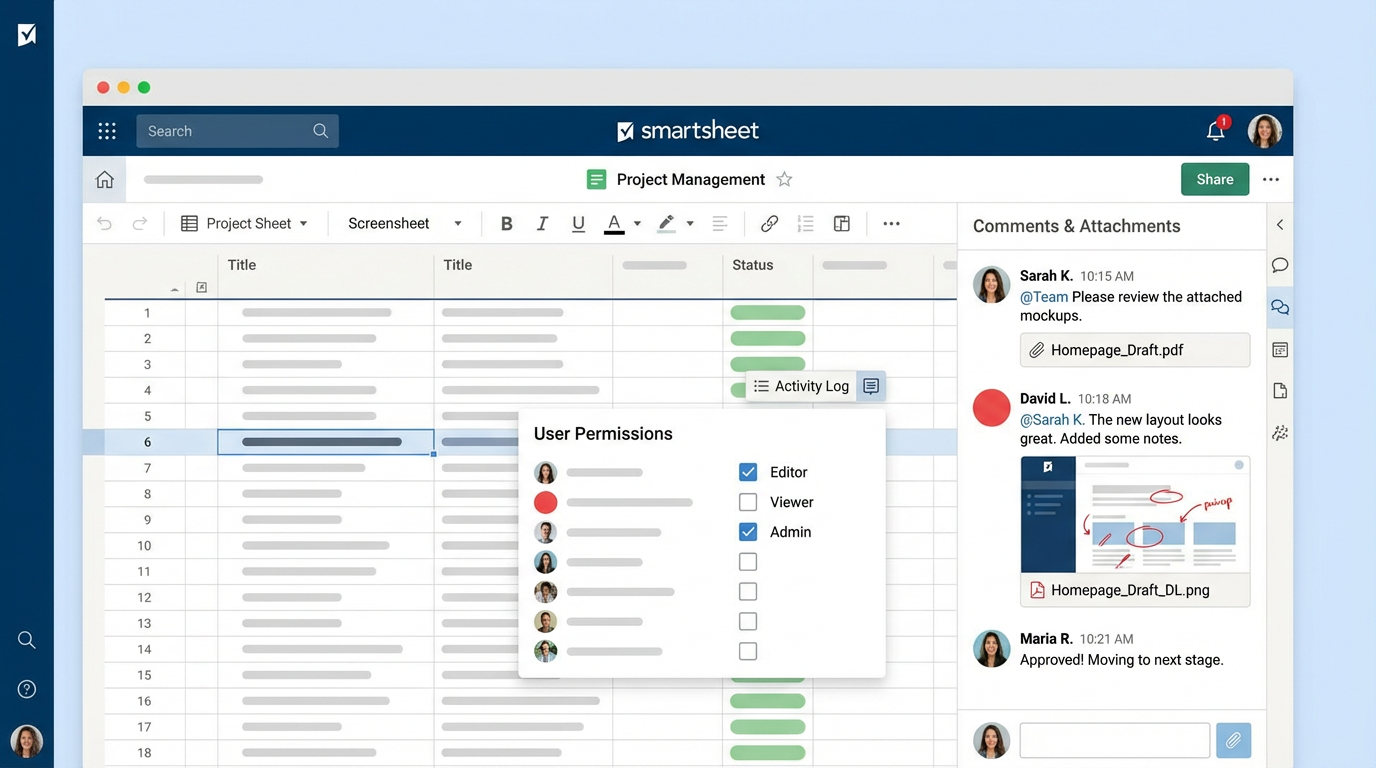
Caption: In-context comments, @mentions, file attachments, and proofing tools keep teams aligned and move work forward.
Key collaboration features include:
•Comments & @mentions: Have conversations directly on a specific row or task.
•Attachments: Attach files from your computer, Google Drive, Dropbox, and more.
•Proofing: Upload images or documents and have stakeholders mark them up with specific feedback and approval statuses.
These tools ensure that everyone is on the same page, reducing miscommunication and accelerating review cycles. This is what a modern collaboration platform should deliver.
Smartsheet Pricing in 2025: Is It Worth the Investment?
Smartsheet’s pricing reflects its positioning as an enterprise-grade platform. While it offers plans for smaller teams, its true value is unlocked at the Business and Enterprise levels, making budget management a key consideration.
•Pro Plan ($7/user/month, billed annually): Aimed at small teams (up to 10 users), this plan provides access to the core features but is limited in terms of dashboards, automations, and integrations.
•Business Plan ($25/user/month, billed annually): This is the most popular plan, unlocking unlimited dashboards, advanced automation, resource management, and branding. It’s the true entry point for serious project management.
•Enterprise Plan (Custom Pricing): This tier is for large organizations and includes everything in Business, plus enterprise-grade security (SSO), advanced admin controls, and access to premium features like Smartsheet AI.
While the per-user cost can seem high, the ROI is realized through increased operational efficiency, reduced manual work via workflow automation, and improved decision-making from real-time business intelligence. For large organizations, the cost is often a fraction of the savings gained from better resource management and risk management. However, a significant change in 2025 is that free users are now more limited, with commenting and editing often requiring a paid license, which can increase the total cost of ownership.
Pros and Cons: A Balanced Perspective
No platform is perfect. Smartsheet’s greatest strengths can also be its weaknesses, depending on your team’s needs.
Pros:
•Familiar Interface: The spreadsheet-like design makes it easy for anyone with Excel experience to get started.
•Incredible Scalability: It can grow with you from a single project to managing an entire enterprise portfolio.
•Powerful Automation: The automation engine is one of the best in class, enabling true process automation.
•Superior Reporting: Customizable, real-time dashboards provide unparalleled visibility.
•Enterprise-Grade Security: Top-tier security and compliance features make it suitable for any industry.
Cons:
•Steep Learning Curve: While the basics are easy, mastering advanced features and formulas can be challenging.
•Can Be Expensive: The per-user pricing, especially with the new licensing changes, can be costly for large teams with many casual users.
•Less Visually Intuitive: It lacks the colorful, modern UI of competitors like Monday.com, which can feel dated to some users.
•Mobile App Limitations: The mobile app is functional but doesn’t offer the full power of the desktop experience.
Final Verdict: Is Smartsheet the Right Choice for Your Team in 2025?
After a thorough review, Smartsheet solidifies its position as a dominant force in the work management platform market, but it’s not a one-size-fits-all solution. It is an unapologetically powerful, data-centric, and enterprise-focused platform.
You should choose Smartsheet if:
•Your organization runs on spreadsheets, and you want a tool that your team will readily adopt.
•You are managing complex projects or entire portfolios that require robust Gantt charts, dependency tracking, and resource management.
•You need powerful, real-time dashboards and reporting for executive stakeholders.
•Your business requires enterprise-grade security, governance, and compliance.
You might look elsewhere if:
•You are a small team or startup with a limited budget.
•Your team prefers a highly visual, board-centric approach to task management (consider Monday.com or Asana).
•Your projects are simple and do not require complex data management or reporting.
In 2025, Smartsheet is the undisputed champion for organizations looking to bring structure, automation, and intelligence to their complex work processes. It successfully bridges the gap between the flexibility of spreadsheets and the power of traditional project management software, creating a platform that is both accessible and immensely scalable. For any business serious about digital transformation and achieving a new level of operational efficiency, Smartsheet is not just a good choice—it’s a strategic investment.
Frequently Asked Questions (FAQ)
1. Can Smartsheet completely replace Microsoft Excel? For collaborative project and process management, yes. Smartsheet is far superior for tracking tasks, automating workflows, and real-time collaboration. However, for complex financial modeling or pure data analysis, Excel still has more powerful functions and capabilities.
2. Is Smartsheet difficult to learn? The basics are very easy, especially if you know how to use a spreadsheet. However, mastering advanced features like complex formulas, cross-sheet lookups, and intricate automations requires a significant time investment.
3. What is the main difference between Smartsheet and Asana? Smartsheet is data-centric and built around a spreadsheet core, making it ideal for tracking budgets, resources, and complex timelines. Asana is task-centric and built around lists and boards, making it better for managing team workloads and agile projects.
4. How does Smartsheet’s automation compare to Zapier? Smartsheet’s native automation is excellent for actions within the platform (e.g., when a row is added, send an alert). Zapier is an integration platform designed to connect Smartsheet to other apps that it doesn’t have a direct integration with.
5. What are “Dashboards” used for in Smartsheet? Dashboards are customizable pages that pull real-time data from your sheets into visual widgets like charts, graphs, and reports. They are used to create executive summaries, project status hubs, and portfolio-level overviews for stakeholders.
6. Can I manage project budgets in Smartsheet? Yes, Smartsheet is excellent for budget management. You can use formulas to track expenses, compare planned vs. actual spending, and roll up budget data from multiple projects into a portfolio-level dashboard.
7. What is Smartsheet AI and is it included in all plans? Smartsheet AI is a set of features that uses artificial intelligence to help you analyze data, generate formulas, and get insights from your sheets. It is primarily available on the Enterprise plan and is a key part of their intelligent work management offering.
8. Does Smartsheet support Agile project management? Yes. While it’s traditionally strong in waterfall project management with its Gantt charts, the Card View provides a Kanban board that is perfect for managing sprints and Agile workflows.
9. What are some of the most popular Smartsheet integrations? Popular integrations include Microsoft Teams, Slack, Salesforce, Jira, Google Workspace, and Adobe Creative Cloud. These integrations help embed Smartsheet into your existing enterprise software ecosystem.
10. Is Smartsheet a good tool for resource management? Yes, the Business and Enterprise plans include robust resource management features. You can track team member allocation across multiple projects, view workloads to prevent burnout, and forecast future resource needs.