Stable Diffusion vs DreamStudio: The Battle for Open-Source AI Image Generation
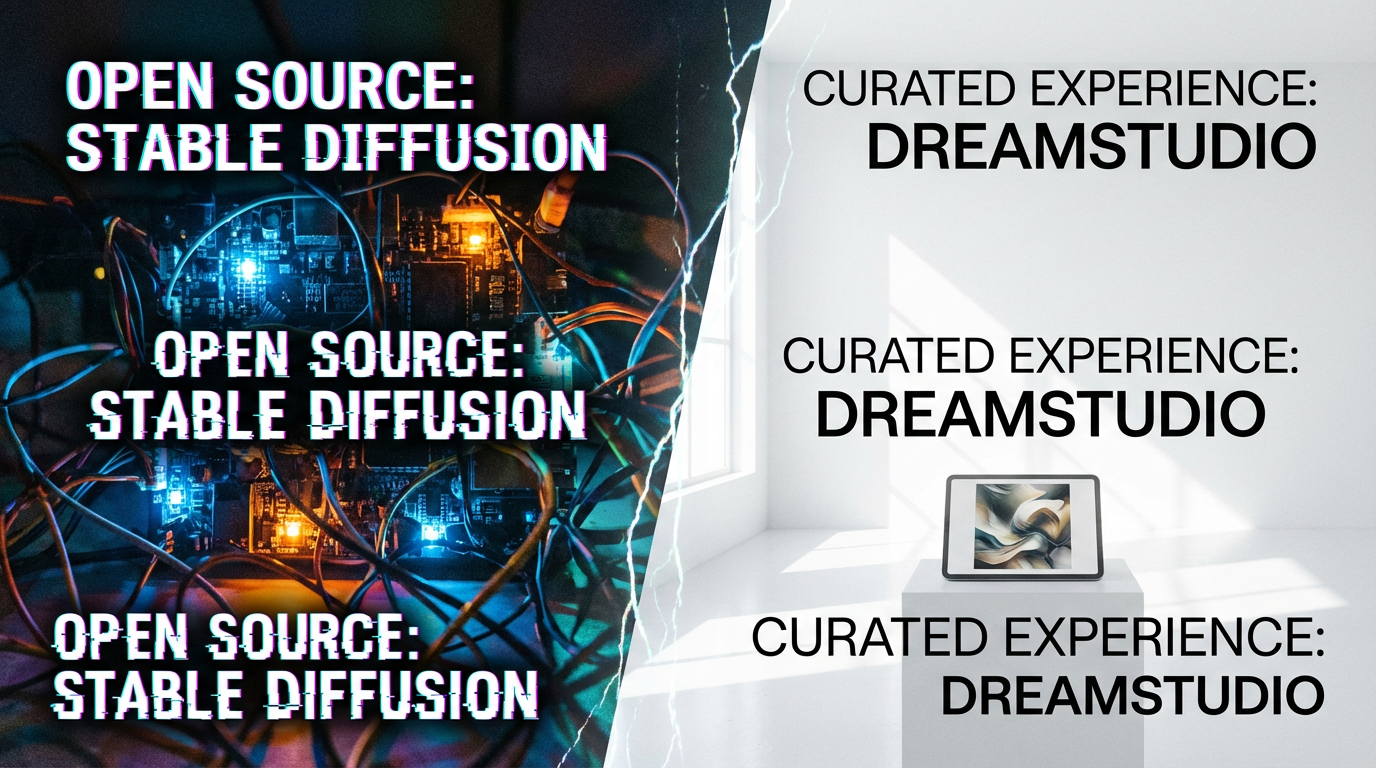
The revolution in text-to-image generation is defined by a fundamental tension between unrestricted power and unparalleled accessibility. At the heart of this dynamic are two platforms that, while sharing the same core technology, offer vastly different user experiences: the sprawling, open-source ecosystem of Stable Diffusion and the streamlined, official, commercial platform of DreamStudio.
For artists, developers, and hobbyists entering the world of generative AI, the choice between these two is not merely a matter of preference; it is a choice between a high-friction, high-control development environment and a low-friction, curated creative tool. This comprehensive analysis will dissect the core differences in workflow, cost, flexibility, and output quality to help you determine which platform is the superior choice for your creative and technical needs. The debate over Stable Diffusion vs DreamStudio is essentially a debate over the future of open-source AI itself.
1. Core Identity and Access: Open Source vs. Official Interface
The most significant difference between the two platforms lies in their fundamental identity and how users gain access to the underlying Stable Diffusion model.
Stable Diffusion: The Open-Source Ecosystem
Stable Diffusion is, at its core, an open-source latent diffusion model released by Stability AI 1. This means the source code is publicly available, allowing anyone to download, modify, and run it on their own hardware. This freedom has led to a massive, decentralized ecosystem of community-developed interfaces, models, and extensions.
- Access: Typically accessed via community-developed web UIs like Automatic1111 or ComfyUI.
- Setup: High friction. Requires a capable GPU (NVIDIA recommended), knowledge of command-line tools, and significant time for installation and configuration.
- Target User: Developers, power users, and artists who demand maximum control and are comfortable with technical complexity.
DreamStudio: The Official, Curated Experience
DreamStudio is the official, cloud-based web interface provided by Stability AI, the company that created Stable Diffusion 2. It is designed to be the simplest, most reliable way to access the latest Stable Diffusion models.
- Access: Accessed directly through a web browser with a simple login.
- Setup: Zero friction. No local hardware or technical knowledge is required beyond basic web navigation.
- Target User: Beginners, casual users, and professionals who prioritize speed, simplicity, and a guaranteed, stable experience.
2. The Interface and Workflow Showdown
The user interface is the most immediate point of contrast, reflecting the underlying philosophies of control versus simplicity.
Stable Diffusion: The Cockpit of Control
Interfaces like Automatic1111 are designed to expose every possible parameter of the diffusion process. The workflow is complex, often involving multiple tabs, sliders, and advanced settings. This complexity is the price of ultimate control.
- Key Features: Text-to-Image, Image-to-Image, Inpainting, Outpainting, ControlNet, numerous sampling methods (Euler, DPM++), and detailed seed manipulation.
- Workflow: Iterative and technical. Users must manage multiple settings (CFG Scale, Sampling Steps, VAE) to achieve the desired result. The learning curve is steep, but the creative ceiling is virtually limitless.
DreamStudio: The Minimalist Canvas
DreamStudio’s interface is the antithesis of the complex Stable Diffusion UIs. It is clean, minimalist, and focuses the user's attention almost entirely on the prompt box.
- Key Features: Text-to-Image, basic Image-to-Image, simple upscaling, and a limited set of styles and aspect ratios.
- Workflow: Fast and intuitive. The platform handles the complex technical parameters behind the scenes, allowing the user to focus purely on the creative prompt. This is ideal for rapid prototyping and quick, high-quality results.
The visual difference is stark, as illustrated below:
.png)
A split screen showing the complex, parameter-heavy interface of a typical Stable Diffusion WebUI (Automatic1111) on the left, and the clean, minimalist, prompt-focused interface of DreamStudio on the right, highlighting the contrast between high-control and high-simplicity workflows.
3. Control vs. Simplicity: The Creative Ceiling
The core of the Stable Diffusion vs DreamStudio debate centers on the trade-off between granular control and ease of use.
Stable Diffusion: Unlocking the Full Potential
The open-source nature of Stable Diffusion allows for the integration of powerful tools that fundamentally alter the generation process.
- ControlNet: This revolutionary tool allows users to control the composition, pose, depth, and structure of the generated image using input images (e.g., a line drawing or a human pose skeleton). This level of structural control is not available in DreamStudio.
- Custom Models and LoRAs: Users can download and train thousands of custom models (fine-tuned for specific styles like anime, photorealism, or concept art) and LoRAs (small files that add specific characters, objects, or styles). This flexibility allows for niche, highly specialized output that is impossible to achieve with a single, general-purpose model.
DreamStudio: Curated and Consistent
DreamStudio’s simplicity is its strength. By limiting the exposed parameters, it ensures that even a novice user can consistently generate high-quality images without falling into the technical pitfalls of complex settings.
- Consistency: The official platform guarantees that the underlying model and its parameters are stable and optimized, leading to predictable results.
- Safety Rails: The simplified interface acts as a set of "safety rails," preventing users from accidentally generating low-quality or broken images due to incorrect settings.
The conceptual difference between the two is profound:
.png)
A visual metaphor contrasting the complex, antique-looking control panel with hundreds of dials and switches (representing the granular control of Stable Diffusion) with a single, large, glowing 'Generate' button (representing the simplicity of DreamStudio).
4. Ecosystem and Flexibility: The Community Advantage
The open-source community surrounding Stable Diffusion is its single greatest asset, creating an ecosystem that no single commercial entity can match.
Stable Diffusion: A Sprawling, Interconnected Network
The Stable Diffusion ecosystem is a decentralized network of innovation. New models, samplers, and extensions are released daily by the community, often long before they are integrated into official platforms.
- Model Variety: Platforms like Civitai host thousands of community-trained models and LoRAs, giving users an unparalleled range of aesthetic choices.
- Extensions: Tools like the Automatic1111 WebUI support a vast library of extensions for everything from batch processing to advanced upscaling and animation.
- Development Speed: The open-source nature allows for rapid iteration and the quick adoption of new research breakthroughs.
DreamStudio: The Secure Fortress
DreamStudio is a closed, proprietary platform. While it benefits from the latest official models released by Stability AI (like SDXL), it does not support community-developed models, LoRAs, or extensions.
- Guaranteed Stability: The closed nature ensures a stable, bug-free environment, which is crucial for commercial work.
- Security: Users do not have to worry about downloading potentially malicious code or models, as all assets are officially vetted by Stability AI.
The contrast between the two ecosystems is a key factor in the Stable Diffusion vs DreamStudio decision:
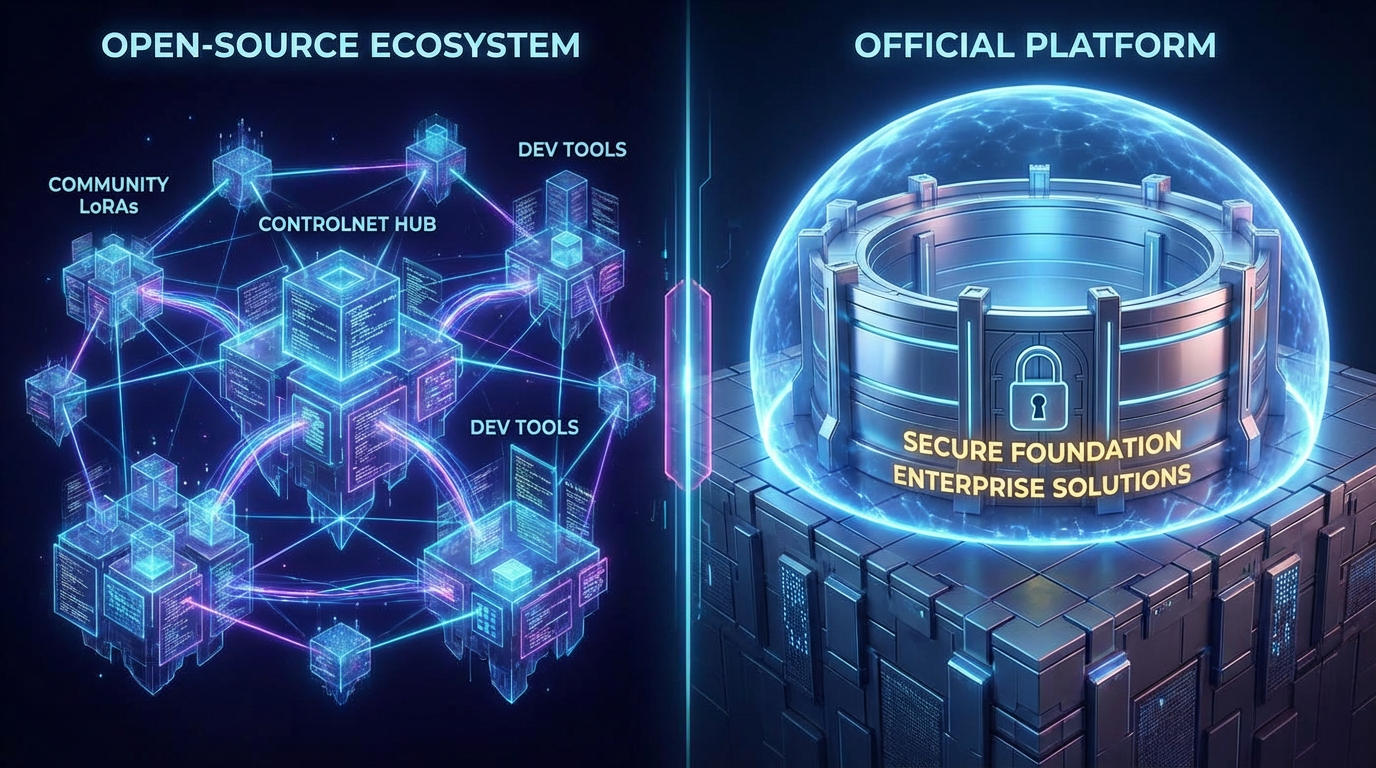
A visual metaphor showing the sprawling, interconnected network of the open-source ecosystem (with nodes for LoRAs, ControlNet, and community models) versus the single, secure, and contained fortress of the official DreamStudio platform.
5. Pricing and Cost of Ownership
The financial model is a critical differentiator, pitting the cost of hardware against the cost of cloud credits.
Stable Diffusion: The Hardware Investment
Running Stable Diffusion locally is free in terms of software, but it requires a significant upfront investment in hardware.
- Upfront Cost: Requires a powerful GPU (e.g., NVIDIA RTX 30-series or higher), which can cost hundreds or thousands of dollars.
- Running Cost: Essentially free, limited only by electricity consumption. For high-volume generation, the cost per image is negligible.
- Flexibility: Once the hardware is purchased, the user has unlimited, free generation time.
DreamStudio: The Credit Consumption Model
DreamStudio operates on a pay-as-you-go credit system. Users purchase credits, and each generation consumes a certain number of credits based on the model, resolution, and number of steps 3.
- Upfront Cost: Zero. Users can start generating immediately after signing up.
- Running Cost: Variable. The cost per image is fixed, but the total cost scales directly with usage. This can become expensive for high-volume users.
- Accessibility: This model democratizes access, allowing users without expensive hardware to generate high-quality images.
The financial comparison is a classic trade-off:
.png)
A visual comparison of the two pricing models. The left side shows a powerful gaming PC with a high upfront cost and low running cost (representing local Stable Diffusion). The right side shows a digital wallet with stacks of credits (representing DreamStudio's pay-as-you-go cloud model).
6. Output Quality and Aesthetic Range
Since DreamStudio runs on the official Stable Diffusion models (like SDXL), the raw, technical quality of the images is fundamentally the same. However, the range of aesthetic output is vastly different.
Stable Diffusion: Niche and Specialized Aesthetics
The ability to use custom models and LoRAs means that Stable Diffusion can generate images in highly specific, niche styles that are not possible with a general-purpose model.
- Customization: Artists can fine-tune models to match their unique artistic signature, leading to truly original and specialized output.
- Photorealism: With the right custom model and advanced settings, Stable Diffusion can achieve a level of photorealism that rivals any other tool.
DreamStudio: Polished and Consistent Quality
DreamStudio guarantees a high-quality, polished output from the official, well-tested models.
- Reliability: Every image generated will be technically sound and aesthetically pleasing, adhering to the high standards set by Stability AI.
- Consistency: The output is consistent across users, making it a reliable choice for commercial projects where brand consistency is paramount.
The difference is often between a highly unique, custom look and a polished, professional look:
.png)
A side-by-side comparison of two generated images. The left image is highly stylized, with a unique, complex aesthetic (representing the flexibility of custom SD models). The right image is clean, photorealistic, and technically perfect but with a more standard, recognizable style (representing DreamStudio's polished output).
7. The Developer and Professional Divide
The choice between Stable Diffusion vs DreamStudio also reflects a divide in professional use cases.
Stable Diffusion: The Developer's Toolkit
For developers, researchers, and those building AI-powered applications, the open-source nature of Stable Diffusion is non-negotiable.
- API Access: While DreamStudio offers an API, the open-source model allows for deep integration into custom applications without reliance on a third-party service.
- Research: Researchers can modify the core code, test new algorithms, and contribute directly to the advancement of the technology.
- Local Processing: For sensitive data or high-volume batch processing, running the model locally ensures data privacy and often better performance than cloud-based services.
DreamStudio: The Commercial Gateway
For small businesses, graphic designers, and content creators, DreamStudio offers a simple, reliable gateway to AI image generation.
- Ease of Use: A graphic designer can quickly generate a placeholder image or a concept without needing to install complex software or manage a GPU.
- Stability: The guaranteed uptime and stability of the official platform are essential for commercial deadlines.
- Commercial Licensing: Stability AI provides clear commercial licensing terms for images generated on DreamStudio, simplifying legal compliance for businesses 4.
8. The Future of the Rivalry
The competition between Stable Diffusion vs DreamStudio is a healthy one that drives innovation across the entire ecosystem.
- Convergence: The future will likely see a convergence of features. Community UIs are becoming more user-friendly (e.g., Fooocus), and DreamStudio is slowly adding more advanced features.
- Model Evolution: As Stability AI releases new models (like SD 3), DreamStudio will be the first to integrate them, giving it a temporary quality advantage. However, the open-source community quickly adapts, porting the new models to local UIs soon after.
- The Ecosystem Advantage: The sheer volume of community-developed assets (LoRAs, extensions) ensures that the open-source ecosystem will always maintain a lead in terms of creative flexibility and niche aesthetic options.
9. Final Verdict: Choosing Your Platform
The choice between the two platforms is entirely dependent on the user's technical skill, budget, and creative goals.
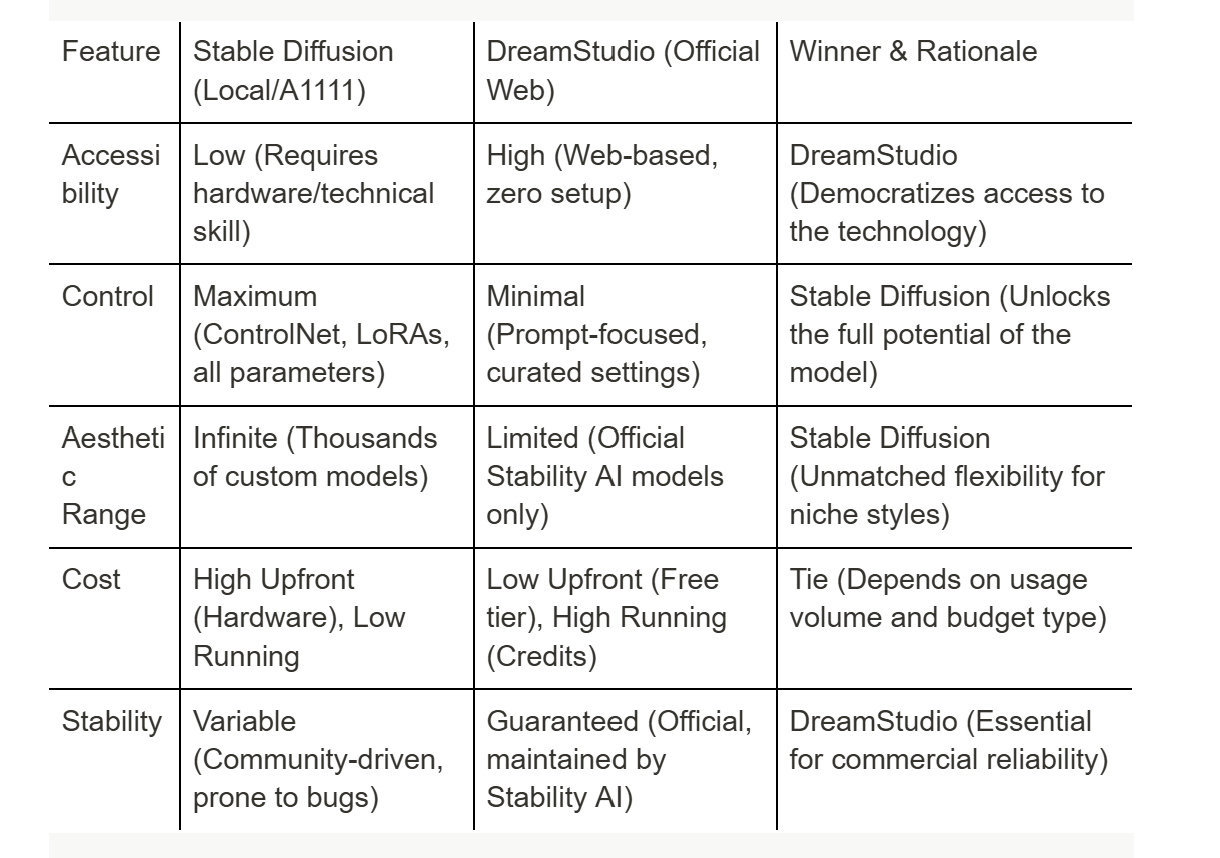
For the Developer or Power User who demands ultimate control, customizability, and a negligible running cost, Stable Diffusion run locally is the only choice.
For the Beginner, Casual User, or Professional who needs a fast, reliable, and high-quality image without the technical headache, DreamStudio is the superior platform. It is the easiest way to access the power of Stable Diffusion without becoming a system administrator.
The competition between Stable Diffusion vs DreamStudio ensures that the technology remains both cutting-edge and accessible, serving the entire spectrum of the creative community.
10. Technical Deep Dive: Model Management and Sampler Flexibility
Beyond the interface, the technical freedom offered by the open-source ecosystem is a profound advantage for advanced users, particularly in model management and sampler selection.
Model Management: The Core Difference
In the open-source environment, the user is the master of their models. A local Stable Diffusion installation can host dozens of base models (e.g., SD 1.5, SDXL, custom-trained models) and hundreds of LoRAs, Checkpoints, and Embeddings. This allows for unparalleled experimentation and the ability to combine different models to achieve unique effects. The user can switch between a photorealistic model and a cartoon model in seconds, a flexibility that is the hallmark of the open-source community.
DreamStudio, by contrast, is limited to the models officially supported and deployed by Stability AI. While these are the latest and most optimized models, the user has no ability to load custom community models or LoRAs. This is a deliberate design choice to ensure stability and a consistent user experience, but it severely restricts the creative palette for artists who rely on niche, community-developed styles.
Sampler Flexibility
The sampler is the algorithm that determines how the noise is removed from the image during the generation process. Different samplers (like DPM++ 2M Karras, Euler A, or DDIM) can dramatically affect the final image's aesthetic, speed, and quality.
In a local Stable Diffusion UI, the user has full access to every available sampler and can fine-tune their parameters (e.g., the number of sampling steps). This level of control is essential for advanced prompt engineering and for optimizing generation speed versus quality.
DreamStudio abstracts this complexity away. It typically offers a simplified selection of "quality" or "speed" settings, which internally map to a curated set of samplers and steps. While this is excellent for simplicity, it removes a powerful lever of control from the hands of the expert user who understands the subtle differences between samplers. This difference alone is often enough to push a professional artist toward the open-source route, as the ability to choose the perfect sampler for a specific model and prompt is a key to achieving peak quality. This technical freedom is a core part of the value proposition of the open-source Stable Diffusion vs DreamStudio debate.