Top 15 monday.com Alternatives for 2025

In the dynamic landscape of project management and team collaboration, monday.com has established itself as a leading Work Operating System (Work OS). Its visually appealing interface, customizable workflows, and extensive feature set have made it a popular choice for teams of all sizes across various industries. However, as with any popular tool, it's not a one-size-fits-all solution. Your team's unique needs, budget constraints, or specific workflow requirements might lead you to search for monday.com alternatives.
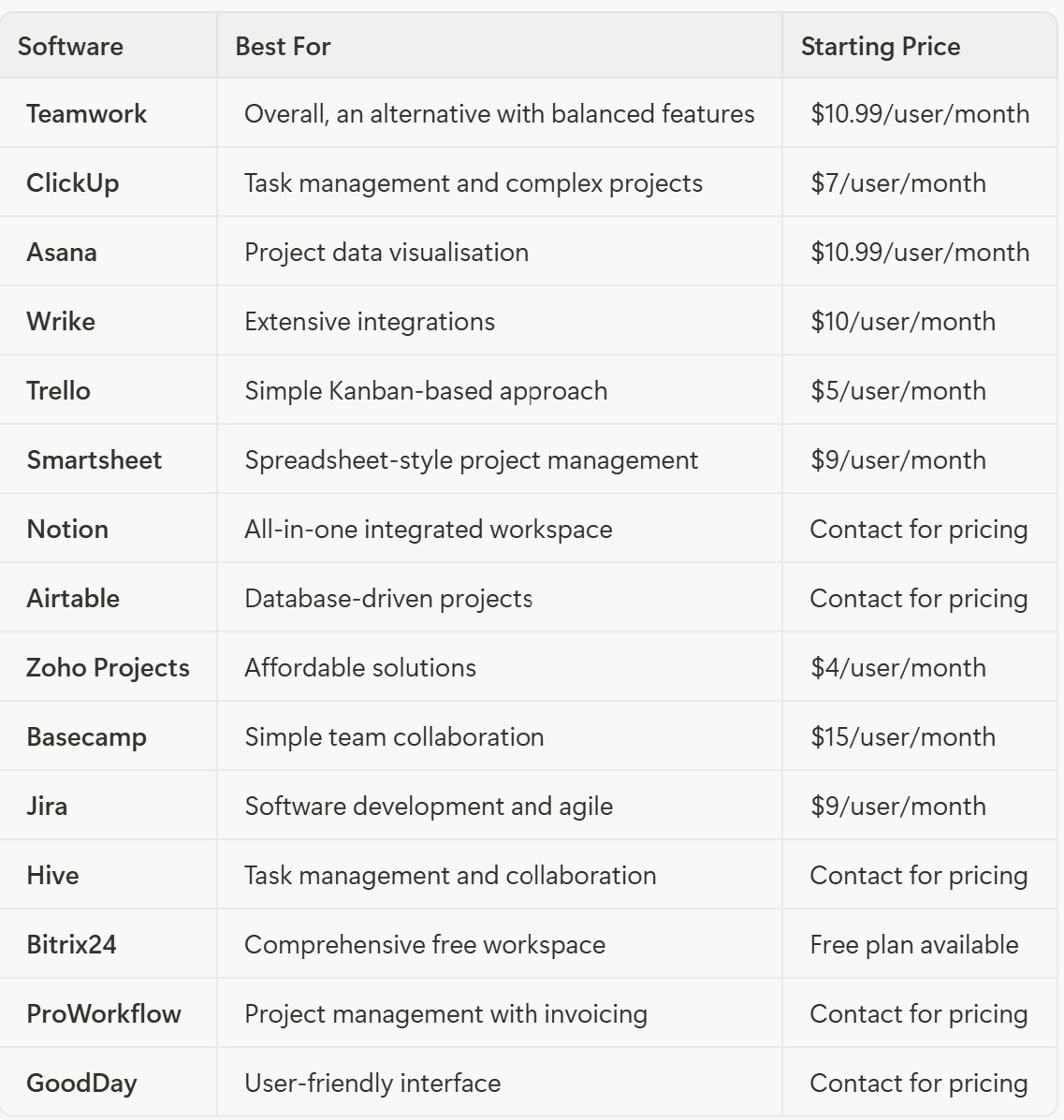
This comprehensive guide will explore the 15 best monday.com alternatives and competitors in 2025. We will delve into their features, pricing, and unique selling propositions to help you make an informed decision and find the perfect project management software for your team.
Why Look for a monday.com Alternative?
monday.com is a powerful and versatile platform, but there are several compelling reasons why you might consider an alternative.
Pricing considerations are often at the forefront of this decision. While monday.com offers a free plan, its paid plans can become expensive, especially for larger teams. The per-user pricing model can quickly add up, and some essential features are only available in the higher-tier plans. Many alternatives offer more competitive pricing or more generous free plans that can help your business save money.
Specific feature requirements may also drive your search for an alternative. Your team might need features that monday.com doesn't offer or that are better implemented in other tools. For example, you might need more advanced time tracking, integrated invoicing, or more robust agile project management features for software development teams.
Ease of use and learning curve represent another important consideration. While monday.com is known for its user-friendly interface, its extensive customization options can be overwhelming for some users. Some teams may prefer a simpler, more straightforward tool with a gentler learning curve that requires less onboarding time.
Integration requirements can also influence your choice. Although monday.com offers a wide range of integrations, you might need to connect with a specific tool that isn't supported or where the integration is more seamless with another platform.
Team size and composition matter significantly when choosing project management software. Some tools are better suited for small teams, while others are designed for large enterprises. You might find an alternative that better fits your team's size and structure.
Industry-specific needs are also important to consider. Certain industries have unique workflow requirements. You might find a monday.com alternative that is specifically designed for your industry, such as software development, marketing, or construction.
Monday.com Alternatives Overview
1. Teamwork
Best monday.com alternative overall
Cost: Starts at $10.99/user/month for the Deliver plan.
Platform Availability: Web (all devices), mobile app (iOS/Android).
Free Trial: Yes, a 30-day free trial is available.
Key Features
Teamwork is a powerful and versatile project management platform that excels in providing a comprehensive set of tools for managing projects, collaborating with team members, and tracking progress. The platform offers robust project and task management capabilities, allowing you to set deadlines, assign tasks to team members, and track progress with ease.
Like monday.com, Teamwork provides multiple ways to visualize your projects, including Kanban boards, Gantt charts, and task lists. This flexibility ensures that your team can work in the way that suits them best.
Teamwork has built-in time tracking capabilities, allowing you to monitor the time spent on tasks and projects accurately. This feature is particularly useful for billing clients and managing team productivity. The platform includes a range of collaboration tools, such as real-time messaging, file sharing, and project-specific notebooks, to facilitate seamless communication and teamwork.
Teamwork provides detailed reports and analytics to help you gain insights into your team's performance, project progress, and resource allocation. These insights can be invaluable for making data-driven decisions about your projects and team management.
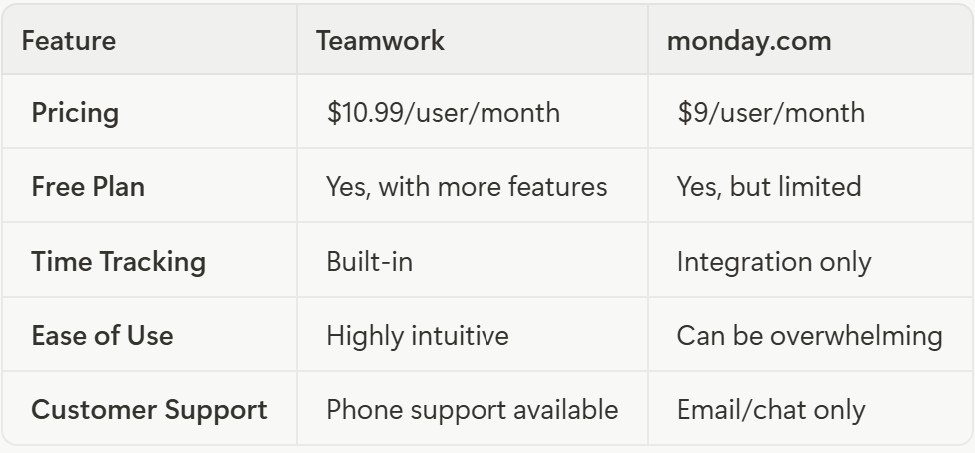
Teamwork vs. monday.com
Why Switch to Teamwork?
Teamwork is an excellent choice for teams looking for a comprehensive and user-friendly project management solution. Its built-in time tracking and invoicing capabilities make it a great option for agencies, consulting firms, and other businesses that bill clients for their time.
The platform's intuitive interface and excellent customer support make it easy to get started and get help when you need it. While it may be slightly more expensive than monday.com's entry-level plan, the additional features and functionality it offers make it a worthwhile investment for many teams.
2. ClickUp
Best for task management and complex projects
Cost: Starts at $7/user/month for the Unlimited plan.
Platform Availability: Web (all devices), mobile app (iOS/Android), desktop app (Windows, Mac, Linux).
Free Trial: Yes, a free forever plan is available.
Key Features
ClickUp is a highly customizable and feature-rich project management platform that aims to be the "one app to replace them all." The platform offers a high degree of customization for tasks, allowing you to create custom fields, statuses, and workflows to match your team's specific needs.
With over 15 different views, including list, board, calendar, Gantt, and mind map, ClickUp provides unparalleled flexibility in how you visualize and manage your work. This variety of views ensures that every team member can find a perspective that works for them.
ClickUp includes built-in tools for creating documents, wikis, and collaborative whiteboards, allowing you to keep all your project-related information in one place. The platform offers a powerful automation engine that allows you to automate repetitive tasks and workflows, saving you time and effort.
ClickUp enables you to set and track goals, and its reporting features provide insights into your team's performance and project progress. These capabilities make it easy to align your team's work with your business objectives.
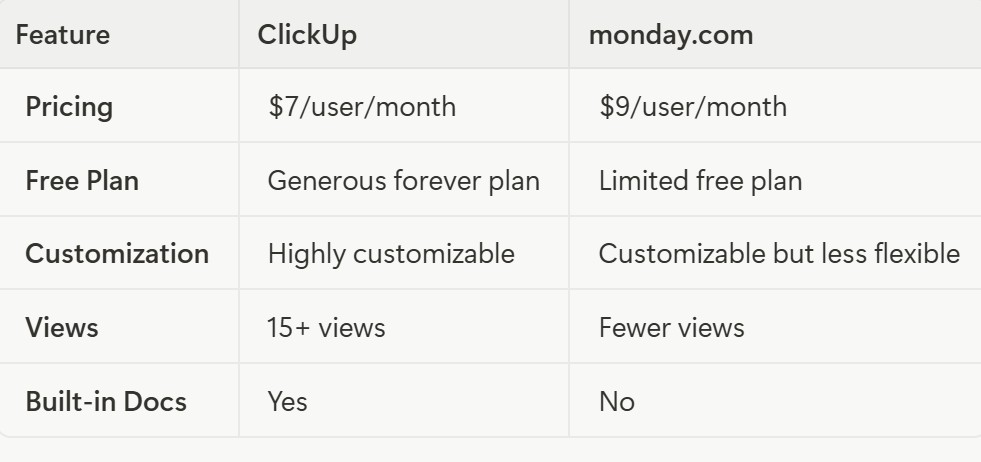
ClickUp vs. monday.com
Why Switch to ClickUp?
ClickUp is an excellent choice for teams that need a high degree of customization and a wide range of features. Its flexibility makes it suitable for a variety of use cases, from simple task management to complex project planning.
The platform's affordable pricing and generous free forever plan make it an attractive option for teams of all sizes. However, the sheer number of features and customization options can be overwhelming for some users. If your team is willing to invest the time to learn the platform, ClickUp can be a powerful and versatile tool that can replace multiple other applications.
3. Asana
Best for project data visualization
Cost: Starts at $10.99/user/month for the Premium plan.
Platform Availability: Web (all devices), mobile app (iOS/Android).
Free Trial: Yes, a 30-day free trial is available.
Key Features
Asana is a popular project management tool that focuses on helping teams organize, track, and manage their work. The platform provides a clear and intuitive interface for creating and managing projects, tasks, and subtasks. You can set due dates, assign tasks, and add attachments and comments to keep everything organized.
Asana offers several ways to visualize your projects, including lists, boards, timelines, and calendars. The timeline view is particularly useful for planning and managing project schedules. The platform includes a workload management feature that allows you to see how much work each team member has on their plate, helping you to prevent burnout and ensure a balanced distribution of tasks.
Asana offers a range of automation rules that can help you to streamline your workflows and reduce manual work. You can create rules to automatically assign tasks, update statuses, and more. The platform provides real-time reporting and customizable dashboards that allow you to track project progress, monitor key metrics, and gain insights into your team's performance.
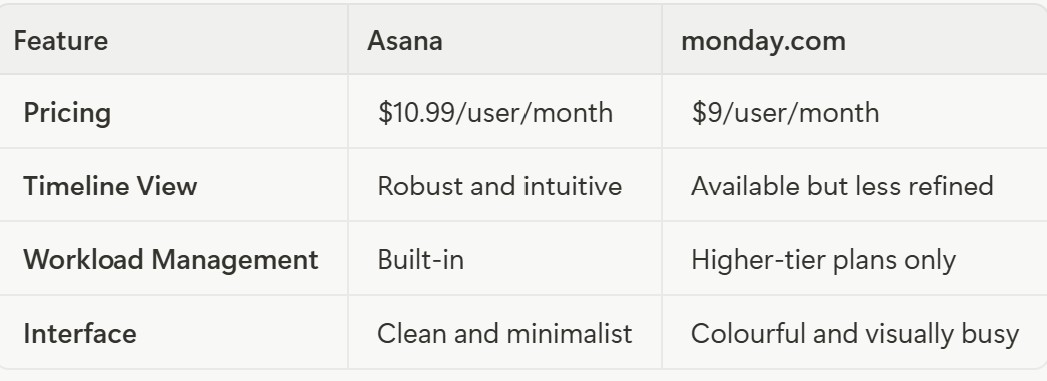
Asana vs. monday.com
Why Switch to Asana?
Asana is an excellent choice for teams that value a clean, intuitive interface and powerful data visualization features. Its timeline view is one of the best in the industry, making it a great tool for project planning and scheduling.
The platform's workload management feature is also a major plus, helping teams to maintain a healthy work-life balance. If your team is looking for a user-friendly project management tool with strong visualization capabilities, Asana is definitely worth considering.
4. Wrike
Best for integrations
Cost: Starts at $9.80/user/month for the Team plan.
Platform Availability: Web (all devices), mobile app (iOS/Android), desktop app (Windows, Mac).
Free Trial: Yes, a 14-day free trial is available.
Key Features
Wrike is a powerful and versatile project management platform that is known for its extensive integration capabilities. The platform allows you to create custom workflows and statuses to match your team's specific processes. This flexibility makes it suitable for a wide range of industries and use cases.
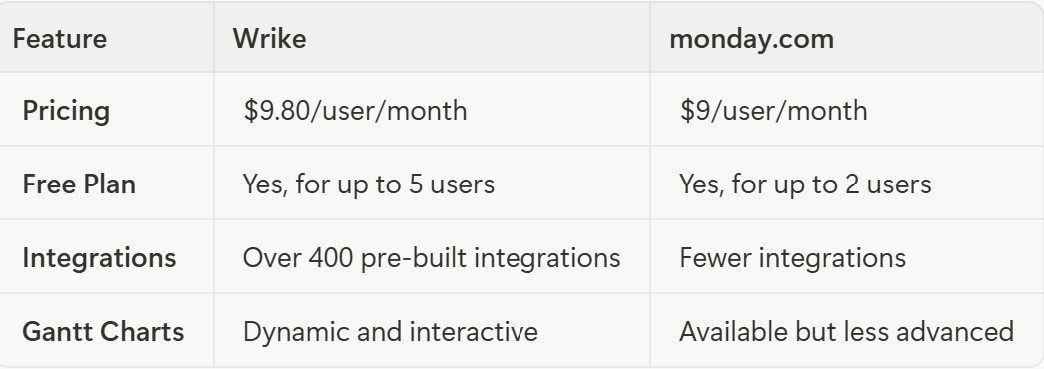
Wrike offers dynamic and interactive Gantt charts that allow you to visualize your project timelines, set dependencies, and track progress. The platform includes built-in tools for tracking time and managing project budgets, helping you to stay on schedule and within your financial constraints.
The platform provides a range of advanced reporting and analytics features, including customizable dashboards and real-time reports, to help you monitor your team's performance and make data-driven decisions. Wrike offers over 400 pre-built integrations with popular tools like Salesforce, Adobe Creative Cloud, and Microsoft Teams, making it easy to connect with your existing software ecosystem.
Wrike vs. monday.com
Why Switch to Wrike?
Wrike is an excellent choice for teams that need to integrate their project management software with a wide range of other tools. Its extensive integration capabilities make it a powerful hub for all your work-related applications.
The platform's advanced reporting and analytics features are also a major plus, providing deep insights into your team's performance and project progress. If your team relies heavily on a variety of software tools and needs a central platform to connect them all, Wrike is an excellent choice.
5. Trello
Best for a simple, Kanban-based approach
Cost: Starts at $5/user/month for the Standard plan.
Platform Availability: Web (all devices), mobile app (iOS/Android), desktop app (Windows, Mac).
Free Trial: Yes, a free forever plan is available.
Key Features
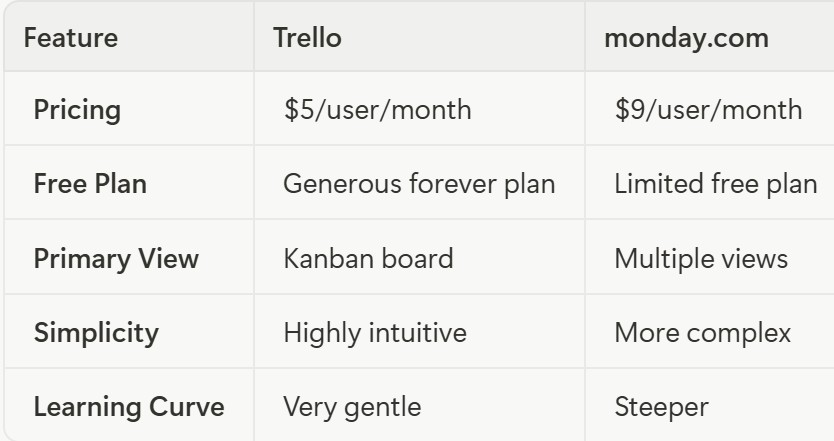
Trello is a simple and intuitive project management tool that is built around the Kanban methodology. Trello's core feature is its visual Kanban boards, which allow you to organize your work into cards and move them through different stages of your workflow.
You can create cards for individual tasks and organize them into lists that represent different stages of your project. Cards can include descriptions, checklists, due dates, attachments, and comments. Trello offers a wide range of "Power-Ups" that allow you to add extra features and integrations to your boards. You can add calendars, voting, and integrations with tools like Slack, Google Drive, and Salesforce.
Trello's built-in automation tool, Butler, allows you to create rules, buttons, and commands to automate repetitive tasks and workflows. Trello is known for its simplicity and ease of use. The intuitive drag-and-drop interface makes it easy for anyone to get started with project management.
Trello vs. monday.com
Why Switch to Trello?
Trello is an excellent choice for individuals and small teams that are new to project management or prefer a simple, visual approach to organizing their work. Its intuitive Kanban boards make it easy to see the status of your projects at a glance and move tasks through your workflow.
The platform's generous free forever plan is also a major plus, making it a great option for personal projects and small-scale collaboration. If your team is looking for a straightforward and user-friendly project management tool that is easy to learn and use, Trello is an excellent choice.
6. Smartsheet
Best for spreadsheet users
Cost: Starts at $7/user/month for the Pro plan.
Platform Availability: Web (all devices), mobile app (iOS/Android).
Free Trial: Yes, a 30-day free trial is available.
Key Features
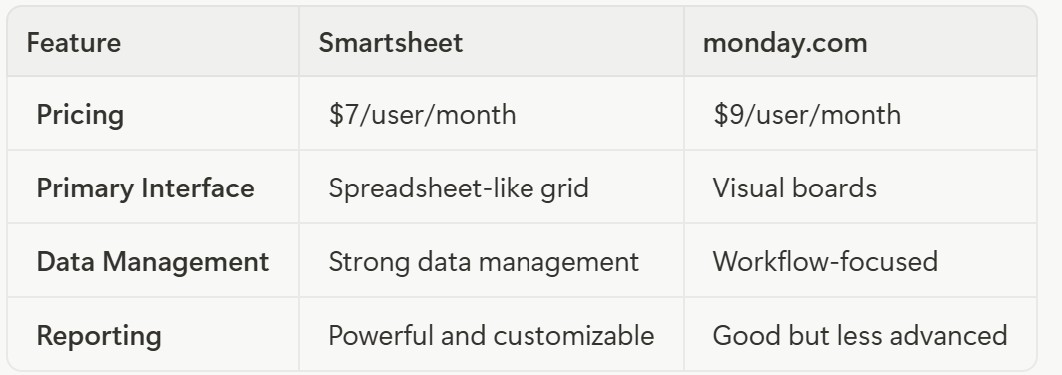
Smartsheet is a unique project management tool that combines the familiarity of a spreadsheet with the power of a project management platform. Smartsheet's primary interface is a grid view that looks and feels like a spreadsheet. This makes it easy for users who are familiar with Excel or Google Sheets to get started.
In addition to the grid view, Smartsheet offers other project views, including Gantt, card, and calendar views, to help you visualize your work in different ways. The platform includes a powerful automation engine that allows you to automate repetitive tasks, such as sending notifications, requesting updates, and approving changes.
Smartsheet provides robust reporting and dashboard features that allow you to create real-time summaries of your project data and share them with stakeholders. The platform offers a wide range of integrations with popular business tools, including Microsoft 365, Google Workspace, Salesforce, and more.
Smartsheet vs. monday.com
Why Switch to Smartsheet?
Smartsheet is an excellent choice for teams that are accustomed to working with spreadsheets and need a more powerful and collaborative way to manage their projects. The platform's familiar interface makes it easy for Excel and Google Sheets users to get up and running quickly.
Smartsheet's strong data management and reporting capabilities make it a great option for data-heavy projects and teams that need to track and analyze a large amount of information. If your team loves spreadsheets but needs a more robust and collaborative solution for project management, Smartsheet is the perfect fit.
7. Notion
Best for integrated workspaces
Cost: Contact for pricing.
Platform Availability: Web (all devices), mobile app (iOS/Android), desktop app (Windows, Mac).
Free Trial: Yes, a free personal plan is available.
Key Features
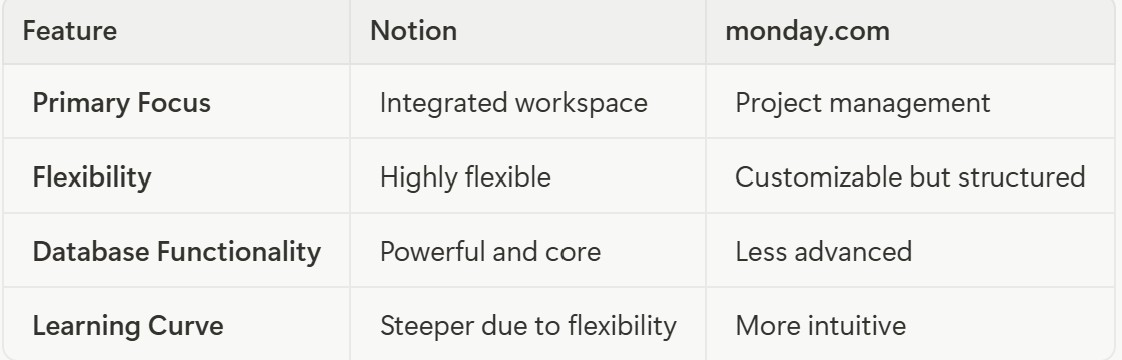
Notion is a unique and highly flexible tool that combines project management, note-taking, and database functionality into a single, integrated workspace. Notion's core strength lies in its powerful database capabilities. You can create databases to store and organize your project information, and then visualize that information in multiple views, including tables, boards, lists, calendars, and galleries.
Every item in Notion is a page that you can customize with a wide range of content blocks, including text, images, to-do lists, and embedded content from other applications. Notion offers a vast library of templates for a variety of use cases, from project management and content calendars to personal habit trackers and CRMs.
The platform provides real-time collaboration features, allowing you to work on pages and databases with your team members simultaneously. Notion integrates with a growing number of third-party tools, including Slack, Google Drive, and Figma.
Notion vs. monday.com
Why Switch to Notion?
Notion is an excellent choice for teams that are looking for a highly flexible and customizable workspace that can be adapted to a wide range of use cases. Its powerful database functionality and integrated note-taking capabilities make it a great tool for knowledge management, content creation, and project planning.
If your team is looking for a single tool to replace multiple applications and create a truly customized workspace, Notion is an excellent option.
8. Airtable
Best for database-driven projects
Cost: Contact for pricing.
Platform Availability: Web (all devices), mobile app (iOS/Android), desktop app (Windows, Mac).
Free Trial: Yes, a free plan is available.
Key Features
Airtable is a powerful and flexible platform that combines the functionality of a spreadsheet with the power of a database. Airtable allows you to create flexible databases, called "bases," to store and organize any kind of information. You can create tables, fields, and relationships to structure your data in a way that makes sense for your project.
Like Notion, Airtable offers multiple ways to visualize your data, including grid, calendar, Kanban, form, and gallery views. This allows you to see your information from different perspectives and work in the way that is most comfortable for you.
The platform includes a powerful automation engine that allows you to create custom workflows and automate repetitive tasks. You can create rules to trigger actions based on changes to your data, such as sending notifications, creating new records, and integrating with other applications.
Airtable offers a marketplace of "apps" that you can add to your bases to extend their functionality. You can also integrate with a wide range of third-party tools using Airtable Sync and the platform's API.
Airtable vs. monday.com
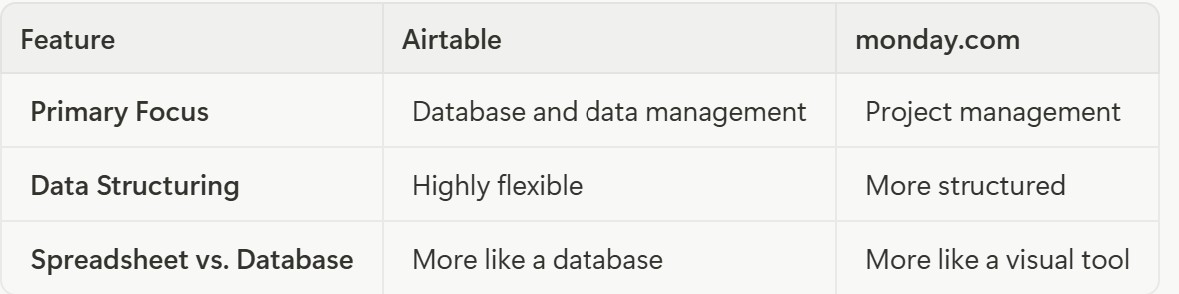
Why Switch to Airtable?
Airtable is an excellent choice for teams that need a powerful and flexible way to manage their data. Its database-driven approach makes it a great tool for a wide range of use cases, from content calendars and CRMs to inventory management and bug tracking.
If your team is looking for a tool that can handle complex data and be customized to fit your specific needs, Airtable is an excellent option.
9. Zoho Projects
A highly affordable option with a good set of features
Cost: Starts at $4/user/month for the Premium plan.
Platform Availability: Web (all devices), mobile app (iOS/Android).
Free Trial: Yes, a 10-day free trial is available.
Key Features
Zoho Projects is a comprehensive project management tool that is part of the larger Zoho suite of business applications. Zoho Projects provides a robust set of tools for managing tasks, including task lists, subtasks, dependencies, and recurring tasks.
The platform includes a built-in time tracking module that allows you to log the time spent on tasks and projects, and generate timesheets for billing and payroll. Zoho Projects offers interactive Gantt charts that allow you to visualize your project timelines, set dependencies, and track progress against your plan.
The platform includes a range of collaboration tools, such as project forums, chat, and document management, to help your team stay connected and work together effectively. Zoho Projects integrates seamlessly with other Zoho applications, as well as a variety of third-party tools, including Google Workspace, Microsoft Teams, and Slack.
Zoho Projects vs. monday.com
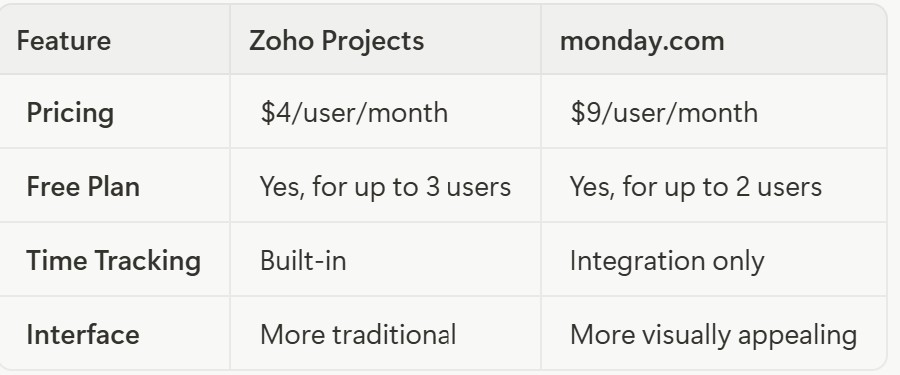
Why Switch to Zoho Projects?
Zoho Projects is an excellent choice for teams that are already using other Zoho applications or are looking for a highly affordable and feature-rich project management solution. The platform's seamless integration with the Zoho ecosystem makes it a powerful tool for businesses that want to manage all their operations in one place.
Zoho Projects' affordable pricing and generous free plan also make it an attractive option for small to mid-sized teams with limited budgets. If your team is looking for an affordable project management solution with a solid feature set, Zoho Projects is a compelling alternative to monday.com.
10. Basecamp
Best for simple team collaboration
Cost: Starts at $15/user/month.
Platform Availability: Web (all devices), mobile app (iOS/Android), desktop app (Windows, Mac).
Free Trial: Yes, a 30-day free trial is available.
Key Features
Basecamp is a project management and team communication tool that is known for its simplicity and focus on clear communication. Basecamp allows you to create to-do lists for your projects and assign tasks to team members. You can set due dates, add notes, and attach files to each task.
The platform includes a message board for each project, where you can post announcements, discuss ideas, and keep all your project-related conversations in one place. Basecamp offers a real-time chat room, called Campfire, for each project, allowing for informal discussions and quick questions.
You can set up automatic check-in questions to get regular updates from your team members on their progress and any roadblocks they are facing. Basecamp provides a central place to store and organize all your project-related documents and files.
Basecamp vs. monday.com
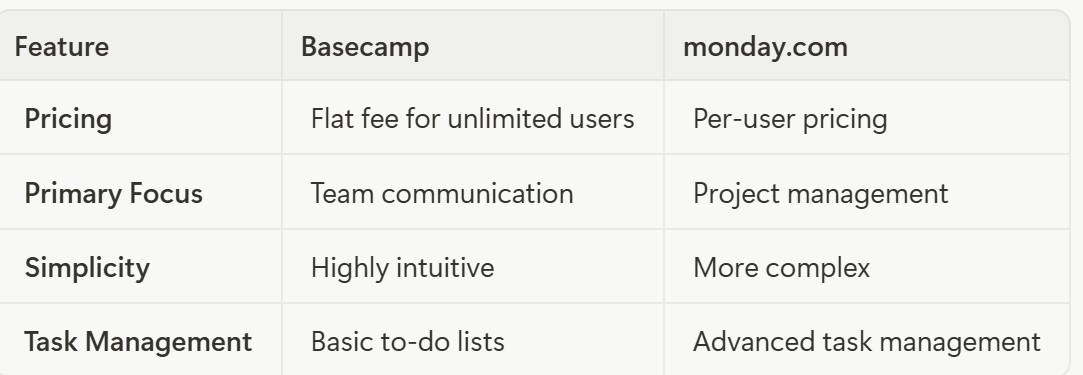
Why Switch to Basecamp?
Basecamp is an excellent choice for teams that prioritize clear communication and a simple, straightforward approach to project management. Its focus on collaboration and its intuitive interface make it easy for teams to get up and running quickly.
The platform's flat-fee pricing model can also be a major advantage for large teams, as it allows you to add as many users as you need without increasing your monthly bill. If your team is looking for a tool that will help you to stay organized and communicate effectively, Basecamp is an excellent choice.
11. Jira
The industry standard for software development and agile project management
Cost: Starts at $9/user/month for the Standard plan.
Platform Availability: Web (all devices), mobile app (iOS/Android), desktop app (Windows, Mac).
Free Trial: Yes, a free plan is available for up to 10 users.
Key Features
Jira is a powerful project management tool developed by Atlassian that is specifically designed for software development teams. Jira provides a comprehensive set of tools for agile project management, including scrum boards, Kanban boards, and burndown charts.
The platform is renowned for its powerful issue and bug tracking capabilities, allowing teams to track and manage software development issues from creation to resolution. Jira allows you to create custom workflows to match your team's specific development processes, from code review to quality assurance.
Jira integrates seamlessly with a wide range of developer tools, including Bitbucket, GitHub, and Jenkins, to provide a unified development environment. The platform includes a roadmapping feature that allows you to plan and visualize your product roadmap, and communicate your plans to stakeholders.
Jira vs. monday.com
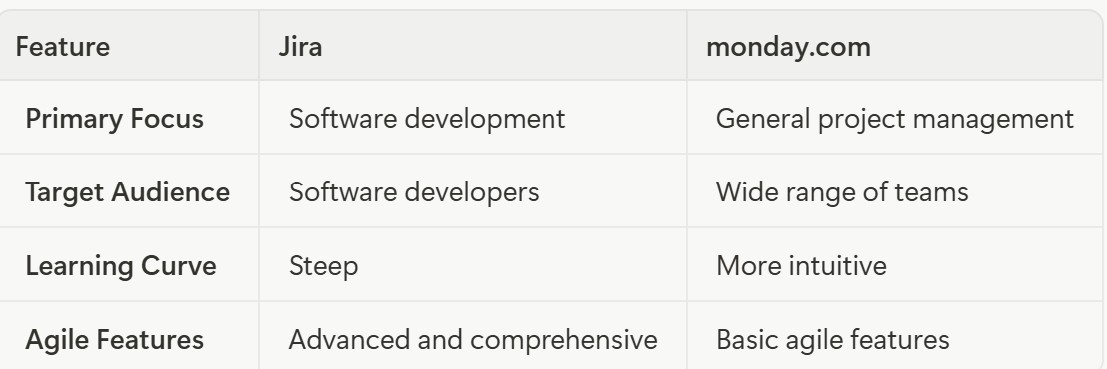
Why Switch to Jira?
Jira is the go-to choice for software development teams that need a powerful and specialized tool for managing their agile workflows. Its comprehensive set of features for issue tracking, bug tracking, and agile project management make it an indispensable tool for many development teams.
The platform's seamless integration with developer tools also helps to create a streamlined and efficient development environment. If your team is involved in software development and needs a powerful and specialized tool to manage your projects, Jira is the clear choice.
12. Hive
A good all-around option with a focus on task management and team collaboration
Cost: Contact for pricing.
Platform Availability: Web (all devices), mobile app (iOS/Android), desktop app (Windows, Mac).
Free Trial: Yes, a 14-day free trial is available.
Key Features
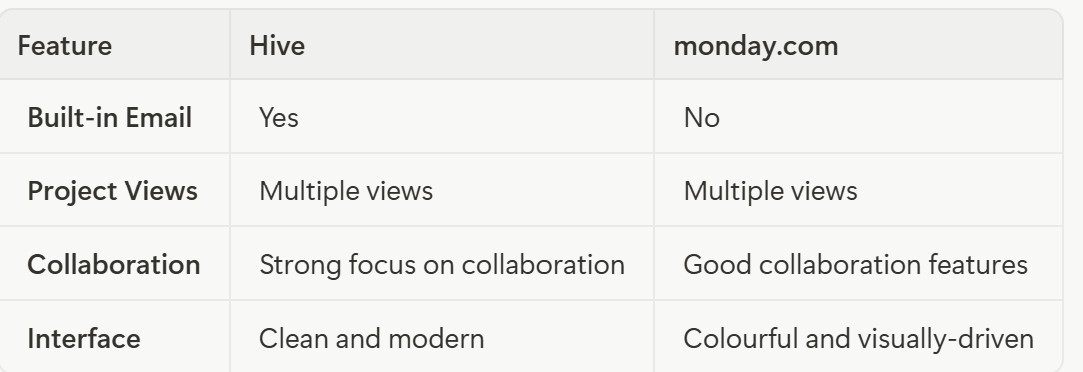
Hive is a project management and collaboration platform that aims to bring all your team's work into a single, unified workspace. Hive offers a variety of project views, including Kanban, Gantt, table, and calendar views, to help you visualize your work in the way that best suits your team's needs.
The platform's "action cards" allow you to create tasks, assign them to team members, set due dates, and add attachments and comments. You can also create sub-actions and dependencies to break down complex tasks into smaller, more manageable steps.
Hive includes a built-in email client that allows you to send and receive emails directly within the platform. This helps to keep all your project-related communication in one place. The platform includes tools for tracking time, managing team resources, and generating timesheets.
Hive provides a range of analytics and reporting features to help you track project progress, monitor team productivity, and gain insights into your workflows.
Hive vs. monday.com
Why Switch to Hive?
Hive is an excellent choice for teams that are looking for a project management tool with strong collaboration features. The platform's built-in email and chat capabilities help to streamline communication and keep all your project-related conversations in one place.
Hive's multiple project views and flexible action cards make it a versatile tool that can be adapted to a variety of workflows. If your team prioritizes communication and teamwork, Hive is a compelling alternative to monday.com.
13. Bitrix24
A comprehensive free workspace solution with CRM and communication tools
Cost: Free plan available; paid plans start at $49/month for 5 users.
Platform Availability: Web (all devices), mobile app (iOS/Android), desktop app (Windows, Mac, Linux).
Free Trial: Yes, a 15-day free trial is available.
Key Features
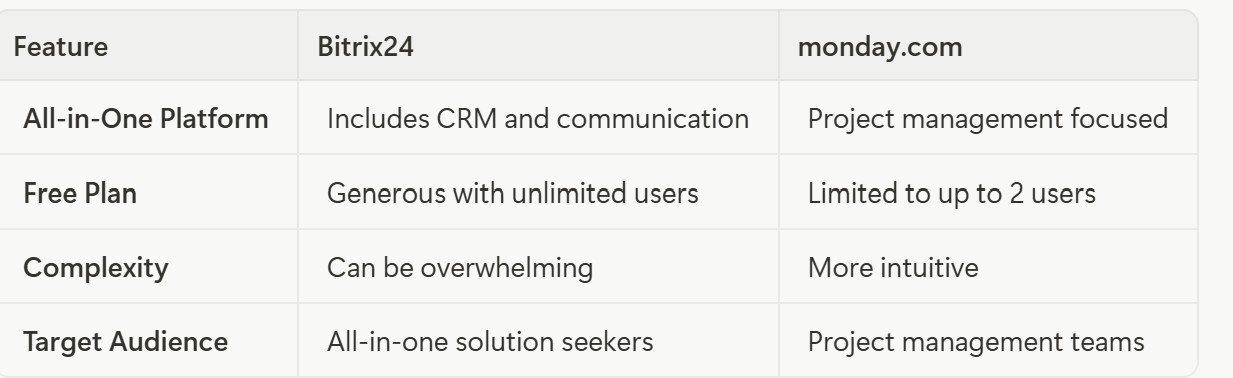
Bitrix24 is a unique and powerful platform that combines project management, CRM, and communication tools into a single, unified workspace. Bitrix24 offers a comprehensive set of project management tools, including Gantt charts, Kanban boards, and task dependencies.
The platform includes a full-featured CRM that allows you to manage your customer relationships, track leads, and automate your sales processes. Bitrix24 provides a wide range of communication tools, including real-time chat, video conferencing, and a corporate social network.
The platform includes a built-in contact center that allows you to manage customer inquiries from a variety of channels, including phone, email, and social media. Bitrix24 even includes a website builder that allows you to create and host your own website.
Bitrix24 vs. monday.com
Why Switch to Bitrix24?
Bitrix24 is an excellent choice for businesses that are looking for an all-in-one solution to manage their projects, customer relationships, and communications. The platform's comprehensive feature set and generous free plan make it an attractive option for small to mid-sized businesses with limited budgets.
If your business is looking for a single tool to replace multiple applications and manage all your operations in one place, Bitrix24 is an excellent option.
14. ProWorkflow
Best for connecting project management with invoicing
Cost: Contact for pricing.
Platform Availability: Web (all devices), mobile app (iOS/Android).
Free Trial: Yes, a 14-day free trial is available.
Key Features
ProWorkflow is a project management and time tracking tool that is designed to help businesses manage their projects, track time, and bill clients. ProWorkflow provides a comprehensive set of tools for managing projects, tasks, and deadlines. You can create project templates, assign tasks to team members, and track progress with ease.
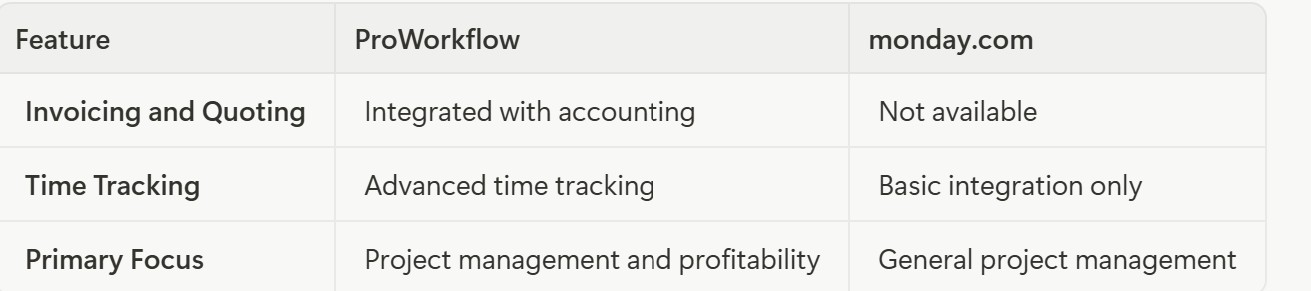
The platform includes a robust time tracking module that allows you to track time spent on tasks and projects, and generate detailed timesheets. ProWorkflow integrates with popular accounting software like Xero and QuickBooks, allowing you to create and send invoices and quotes directly from the platform.
The platform includes tools for managing your team's workload and availability, helping you to allocate resources effectively and prevent burnout. ProWorkflow provides a range of reporting and dashboard features to help you track key metrics, monitor project profitability, and gain insights into your team's performance.
ProWorkflow vs. monday.com
Why Switch to ProWorkflow?
ProWorkflow is an excellent choice for service-based businesses, such as agencies, consulting firms, and freelancers, that need to track time and bill clients for their work. The platform's strong time tracking and invoicing capabilities, combined with its robust project management features, make it a powerful tool for managing the entire project lifecycle.
If your business needs to manage both projects and finances, ProWorkflow is a compelling alternative to monday.com.
15. GoodDay
A user-friendly option with an intuitive interface and good customer support
Cost: Contact for pricing.
Platform Availability: Web (all devices), mobile app (iOS/Android).
Free Trial: Yes, a 14-day free trial is available.
Key Features
GoodDay is a modern and user-friendly project management platform that is designed to help teams of all sizes to plan, track, and execute their work. GoodDay provides a comprehensive set of tools for managing projects, tasks, and subtasks. You can create custom workflows, set deadlines, and track progress with ease.
The platform offers a variety of project views, including list, board, Gantt, and timeline views, to help you visualize your work in the way that best suits your team's needs. GoodDay includes tools for managing your team's workload and availability, helping you to allocate resources effectively and prevent burnout.
The platform includes a built-in time tracking module that allows you to track time spent on tasks and projects, and generate detailed reports. GoodDay provides a range of collaboration tools, including real-time chat, file sharing, and project-specific discussion boards, to help your team stay connected and work together effectively.
GoodDay vs. monday.com
Why Switch to GoodDay?
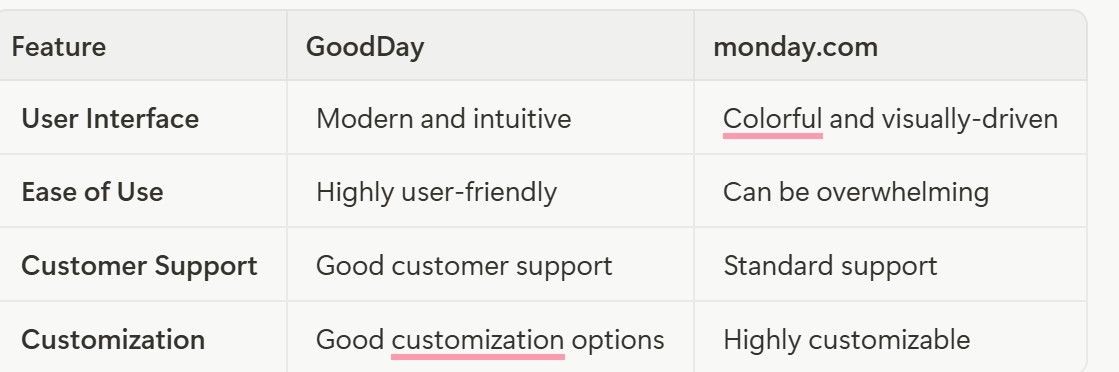
GoodDay is an excellent choice for teams that are looking for a user-friendly and intuitive project management tool with good customer support. The platform's modern interface and straightforward navigation make it easy for teams to get up and running quickly.
GoodDay's comprehensive feature set, including resource management and time tracking, makes it a versatile tool that can be adapted to a variety of workflows. If your team values a smooth and hassle-free user experience, GoodDay is a compelling alternative to monday.com.
Best Free Alternatives to monday.com
While many of the tools on this list offer free trials, some also provide generous free forever plans that are perfect for individuals, small teams, and personal projects.
ClickUp offers one of the most generous free forever plans on the market. It includes unlimited tasks, unlimited members, and 100MB of storage. You also get access to many of the platform's key features, including multiple project views and real-time collaboration.
Trello provides another excellent free option for individuals and small teams. It includes unlimited cards, unlimited members, and up to 10 boards per workspace. You also get access to a wide range of Power-Ups to extend the functionality of your boards.
Bitrix24 offers a comprehensive free plan that includes project management, CRM, and communication tools for an unlimited number of users. While some of the advanced features are reserved for the paid plans, the free plan is a powerful tool for businesses that are just getting started.
Asana provides a free plan for teams of up to 15 people. It includes unlimited tasks, projects, and conversations, as well as basic project views and reporting features.
Conclusion: Finding Your Perfect Project Management Solution
Choosing the right project management tool is a critical decision that can have a significant impact on your team's productivity and success. While monday.com is a powerful and versatile platform, it's not the right choice for everyone. The 15 alternatives we've explored in this guide offer a wide range of features, pricing models, and user experiences to suit the needs of any team.
If you're looking for the best overall alternative to monday.com, Teamwork is an excellent choice. Its comprehensive feature set, user-friendly interface, and strong customer support make it a powerful and reliable platform for managing projects of all sizes.
For teams that need a high degree of customization and a wide range of features, ClickUp is a powerful and versatile option. Its flexible platform and affordable pricing make it a great choice for teams that are willing to invest the time to learn the platform.
If your team values simplicity and a visual approach to project management, Trello is an excellent choice. Its intuitive Kanban boards and gentle learning curve make it easy for anyone to get started with project management.
Ultimately, the best monday.com alternative for your team will depend on your specific needs, budget, and workflow requirements. We recommend taking advantage of the free trials and free plans offered by these tools to test them out and see which one is the best fit for your team. By carefully evaluating your options and considering the factors that matter most to your organization, you can find the perfect project management solution that will help your team achieve its goals and maximize productivity.