Userway Review: Easy Website Accessibility in 2025?
In the digital-first era of 2025, website accessibility is no longer a niche concern or a developer afterthought; it is a legal, ethical, and commercial imperative. With the rise of accessibility lawsuits and a growing global emphasis on digital inclusion, ensuring your website is usable by people with disabilities is non-negotiable. This is where compliance with standards like the Web Content Accessibility Guidelines (WCAG) and the Americans with Disabilities Act (ADA) becomes critical. However, achieving and maintaining this compliance can feel like a daunting task, requiring deep technical knowledge and significant resources.
Enter UserWay, a platform that has rapidly become one of the most recognized names in the web accessibility space. It promises a fast, simple, and AI-powered path to compliance through its flagship accessibility overlay widget. The pitch is compelling: add a single line of code to your site and instantly address dozens of potential accessibility issues, from screen reader compatibility to keyboard navigation. But does this promise of effortless compliance hold up to scrutiny? And what about the heated debate surrounding accessibility overlays within the disability community?
This 4000-word review will provide an exhaustive analysis of the UserWay platform. We will explore its AI-driven features, dissect its pricing model, and weigh its significant benefits against its notable drawbacks. We will also tackle the overlay controversy head-on, providing a balanced perspective on whether tools like UserWay are a step forward for inclusive web design or a risky shortcut that fails to deliver true universal design. By the end, you’ll have a clear understanding of whether UserWay is the right solution to protect your business and create a genuinely accessible user experience (UX).
What is UserWay? The AI-Powered Path to Compliance
UserWay positions itself as the world’s leading AI-powered web accessibility solution. At its heart is the Accessibility Widget, an overlay that appears on a website and provides users with a suite of tools to customize their browsing experience. This approach is designed to retrofit accessibility onto an existing site without requiring a complete overhaul of the underlying code. The goal is to provide a quick and cost-effective way to meet WCAG 2.1 and WCAG 2.2 standards, thereby reducing the risk of accessibility lawsuits and expanding a site’s audience.
The platform’s core philosophy is automation. It uses artificial intelligence to scan a website’s code, identify common accessibility barriers, and apply fixes in real-time. For example, it can automatically add missing alt text to images, ensure interactive elements are accessible via keyboard navigation, and fix insufficient color contrast ratios. This focus on automation makes it an attractive option for businesses that lack the in-house expertise or budget for a full manual accessibility audit and remediation services.
A Deep Dive into UserWay’s Core Features
UserWay offers a multi-layered approach to accessibility, combining its famous widget with a suite of scanning, auditing, and management tools.
The AI-Powered Accessibility Widget
This is the user-facing component and the star of the show. Once installed, a small accessibility icon appears on the site, which users can click to open a comprehensive menu of options. This allows individuals to tailor the site’s presentation to their specific needs.
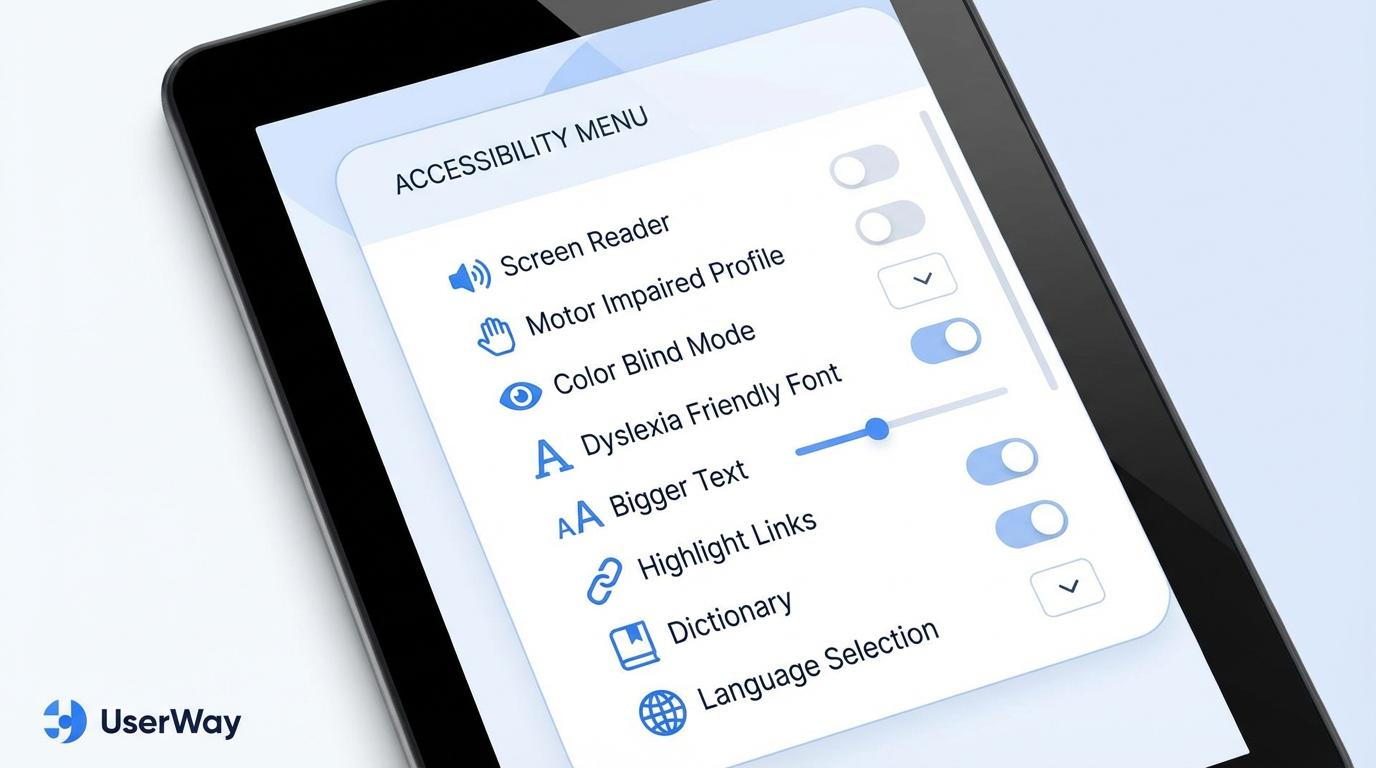
Caption: The UserWay widget provides a rich menu of accessibility options for end-users.
Key functions within the widget include:
•Profiles: Pre-configured settings for common disability types, such as Motor Impaired, Color Blind, and Dyslexia Friendly.
•Screen Reader Adjustments: Optimizes the page for use with assistive technology by structuring content logically.
•Contrast & Saturation: Allows users to select from various high-contrast modes (e.g., dark, light, inverted) to improve readability.
•Text & Content Scaling: Users can increase font size, adjust text spacing, and even use a built-in dictionary to understand complex terms.
•Navigation Tools: Features like “Highlight Links” and “Big Cursor” make it easier for users with motor impairments to navigate the site.
This level of user-controlled customization is a powerful aspect of inclusive design, empowering users to adapt the content to their needs.
Accessibility Scanner & Monitoring
Beyond the widget, UserWay provides a backend dashboard for website owners. The Accessibility Scanner automatically crawls your site to find accessibility violations based on WCAG standards. This is a crucial tool for proactive compliance management.
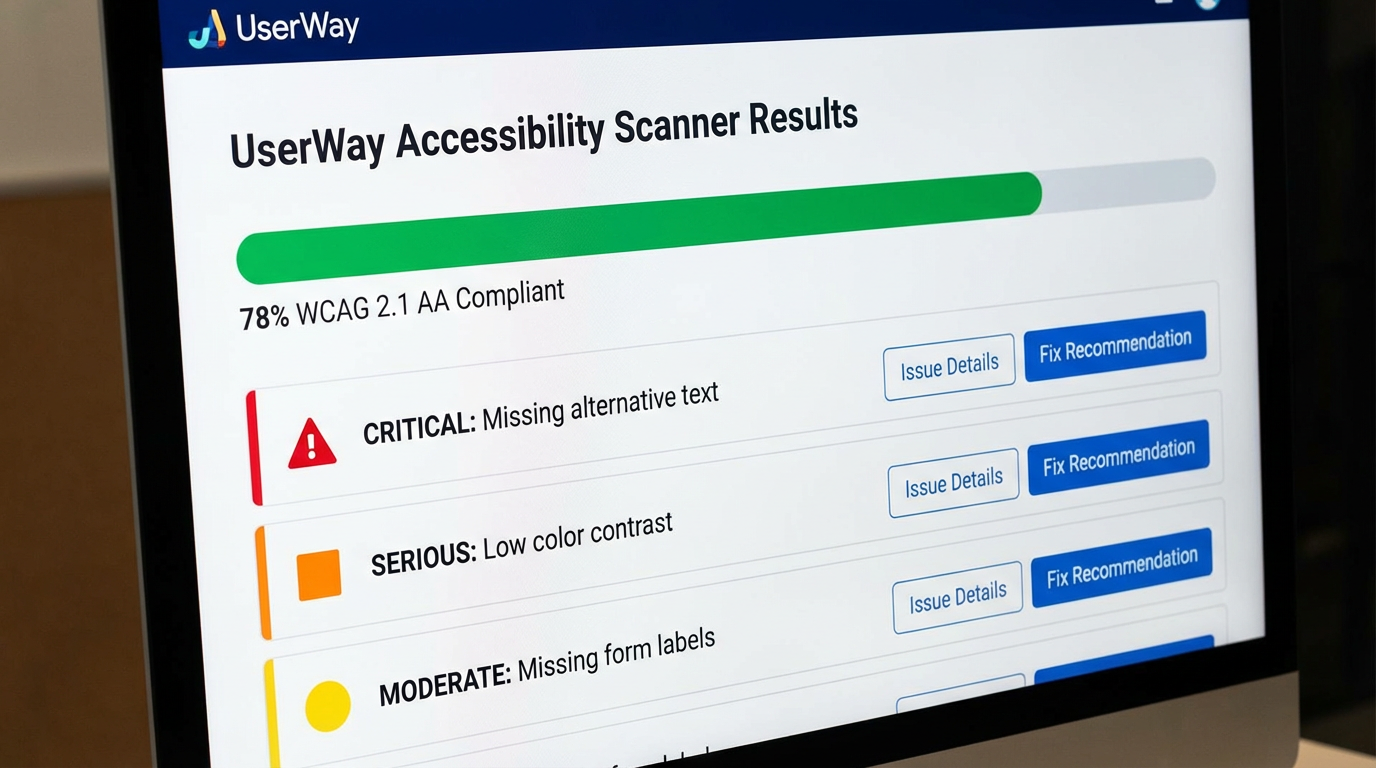
Caption: UserWay’s scanner identifies and prioritizes accessibility issues.
The scanner categorizes issues by severity (Critical, Serious, Moderate), allowing teams to prioritize their manual remediation efforts. This continuous monitoring helps ensure that as new content is added to the site, it doesn’t introduce new accessibility barriers, a key part of maintaining legal compliance over time.
Management Dashboard & Compliance Reporting
For businesses managing multiple sites or those needing detailed documentation, the UserWay dashboard is the central hub for overseeing your accessibility efforts. It provides a high-level compliance score, tracks remediation progress, and generates reports that can be used to demonstrate due diligence.

Caption: The admin dashboard offers a real-time overview of a site’s accessibility health.
This dashboard is essential for achieving and proving compliance certification. It provides the data needed to show progress and commitment to digital inclusion, which can be invaluable in the event of a legal challenge. The platform also generates an Accessibility Statement, a public declaration of your commitment and the measures you’ve taken.
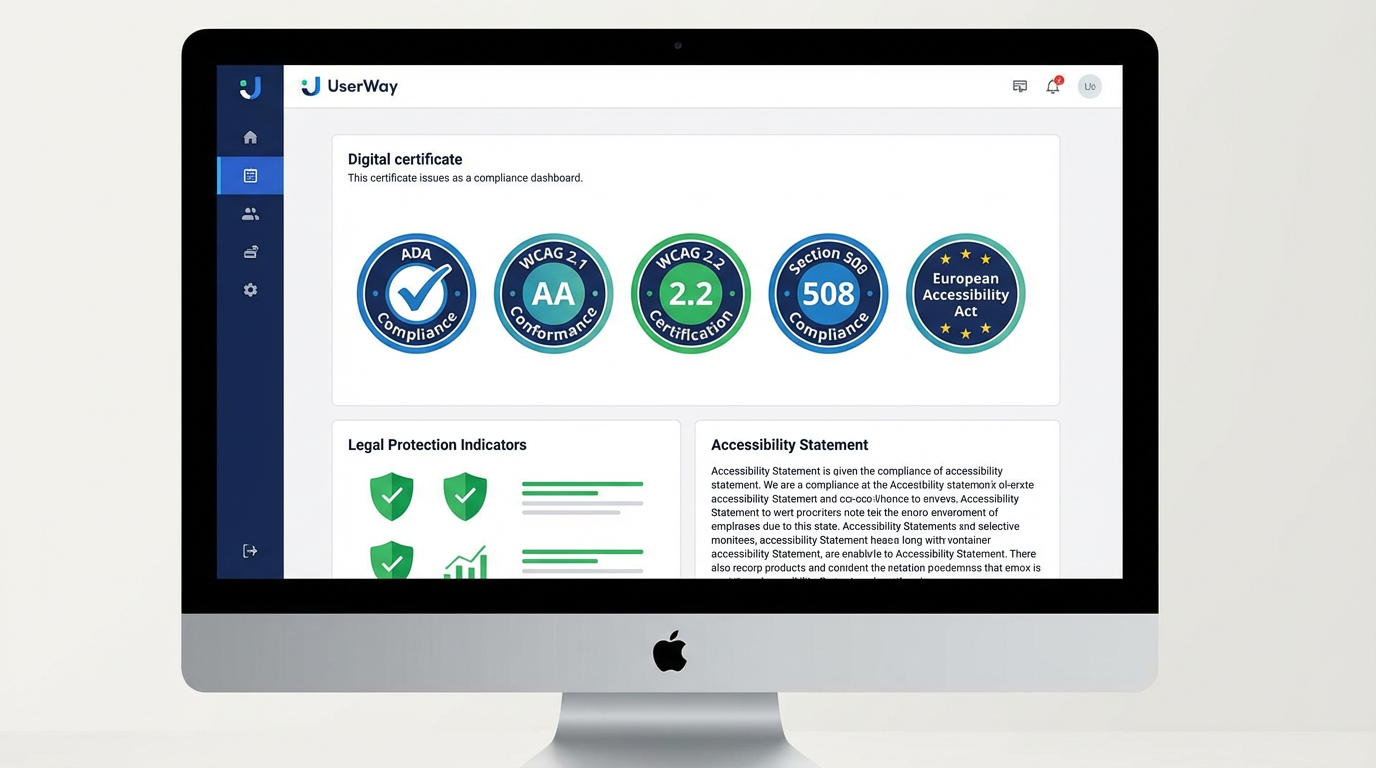
Caption: UserWay provides a dashboard to display compliance badges and statements.
The Great Debate: Are Accessibility Overlays a Solution or a Shortcut?
No review of UserWay would be complete without addressing the significant controversy surrounding accessibility overlays. Many prominent accessibility advocates and individuals with disabilities argue that these tools are fundamentally flawed.
The Case Against Overlays:
•They Don’t Fix the Core Code: Critics argue that overlays are a “band-aid” that covers up underlying problems in the website’s semantic HTML. True accessibility should be built in, not bolted on.
•Interference with Assistive Technology: In some cases, overlays can conflict with a user’s own assistive technology (like a dedicated screen reader), creating a worse user experience.
•A False Sense of Security: Overlays can lead businesses to believe they are fully compliant when significant, fundamental issues remain, leaving them vulnerable to accessibility lawsuits.
•Limited Effectiveness: Automated AI cannot understand context in the way a human can. It may generate incorrect alt text for an image or fail to fix complex navigation issues, which require accessible web development practices.
The Case For Overlays:
•A Pragmatic First Step: For many small businesses, a full manual audit is financially out of reach. An overlay provides a significant and immediate improvement in accessibility for a low cost.
•Better Than Nothing: Proponents argue that while not perfect, an overlay makes a site more accessible to more people than having no solution at all.
•Empowering the User: The user-facing widget gives individuals control over their experience, which aligns with the principles of universal design.
•AI is Improving: The technology is constantly evolving, and AI-powered remediation is becoming more sophisticated and accurate over time.
Ultimately, the most robust approach to web accessibility involves a combination of automated scanning, manual testing by experts (including users with disabilities), and a commitment to accessible web development from the ground up. Overlays like UserWay can be a useful part of that strategy, but they should not be considered a complete, standalone solution.
UserWay Pricing: What’s the Investment?
UserWay’s pricing is tiered, making it accessible to a wide range of organizations.
•Free Widget: Offers basic features like text resizing and contrast adjustments. It’s a good starting point but lacks the AI-powered remediation needed for serious WCAG compliance.
•Pro Widget (Small Site): Starts at $49/month. This is the most popular plan, offering the full AI-powered widget for sites with up to 100,000 monthly page views.
•Pro Widget (Medium to Large Sites): Ranges from $149/month to $359/month for sites with up to 1 million or more page views.
•Enterprise Plans: Custom pricing for organizations needing to manage accessibility across multiple websites, with features like centralized billing and advanced support.
While the monthly cost is manageable for most businesses, it’s important to remember that this is an ongoing subscription. The investment in legal compliance and digital inclusion is not a one-time fix.
Pros and Cons: A Balanced Perspective
Pros:
•Extremely Easy to Install: You can get the widget running on your site in minutes, providing immediate accessibility improvements.
•Affordable Entry Point: The free and low-cost plans make it accessible for small businesses and non-profits.
•Comprehensive User-Facing Tools: The widget offers a wide array of options that genuinely help many users.
•AI-Powered Automation: The automated remediation saves significant time and resources compared to a fully manual approach.
•Reduces Legal Risk: While not a silver bullet, it demonstrates a proactive effort towards ADA compliance, which can be a mitigating factor in legal disputes.
Cons:
•The Overlay Controversy: The tool is part of a product category that is heavily criticized by many accessibility experts.
•Incomplete Compliance: It cannot fix 100% of accessibility issues. Manual code remediation is still necessary for full compliance.
•Potential Performance Hit: Adding any third-party script can have a minor impact on page load times, which could affect SEO benefits.
•Risk of a False Sense of Security: Relying solely on the widget without addressing underlying code issues is a risky strategy.
Final Verdict: Is UserWay the Right Choice for You in 2025?
UserWay occupies a complex and contentious space in the world of digital accessibility. It is a powerful tool that can deliver immediate and tangible benefits, but it is not the magic wand for compliance that its marketing might suggest.
You should consider UserWay if:
•You are a small to medium-sized business with a limited budget and need to take a significant first step towards WCAG compliance quickly.
•You understand that UserWay is part of a broader accessibility strategy, not the entire strategy itself.
•You are prepared to use UserWay’s scanning tools to identify issues and invest in manual remediation for problems the AI cannot fix.
You should be cautious about UserWay if:
•You are a large enterprise or government entity with the resources for a comprehensive, manual-first accessibility program.
•You believe that installing the widget is all you need to do to be fully compliant and legally protected.
•Your development team has the expertise to build accessibility into your website from the ground up using semantic HTML and ARIA labels.
In 2025, UserWay is best viewed as a powerful accelerator for your accessibility journey. It can quickly handle the low-hanging fruit of compliance, provide valuable tools to your users, and offer a monitoring system to keep you on track. However, it must be paired with a commitment to fixing your site’s underlying code and embracing the principles of inclusive design at every level of your organization. When used correctly, it’s a valuable asset; when treated as a cure-all, it becomes a liability.
Frequently Asked Questions (FAQ)
1. Will UserWay make my website 100% ADA compliant? No. No automated tool can guarantee 100% compliance. UserWay significantly improves accessibility and helps meet many WCAG requirements, but some issues will always require manual review and remediation.
2. How long does it take to install UserWay? The basic widget can be installed in under 5 minutes by adding a single line of JavaScript to your website’s header or footer.
3. Do I need technical skills to use UserWay? No, installing the widget is a simple copy-and-paste operation. Using the dashboard and understanding the scan results requires some learning but is designed for non-developers.
4. Why do some accessibility experts dislike UserWay? The main criticism is against the entire category of “accessibility overlays.” Experts argue they don’t fix the root cause of inaccessibility in the code and can sometimes interfere with a user’s own assistive technology.
5. Can I still get sued for ADA non-compliance if I use UserWay? Yes, it is still possible. However, using a tool like UserWay demonstrates a good-faith effort to become compliant, which can be a strong defensive argument in a lawsuit. It significantly reduces your risk, but doesn’t eliminate it.
6. Does UserWay work on all website platforms? Yes, UserWay is platform-agnostic and works with all major CMS and e-commerce platforms, including WordPress, Shopify, Wix, and Squarespace.
7. How does UserWay’s AI work? UserWay’s AI scans the Document Object Model (DOM) of your website to understand the purpose and function of different elements. It then applies fixes, such as adding ARIA labels to buttons or ensuring form fields have proper labels, to make them accessible.
8. Is the free version of UserWay enough for compliance? The free version provides some useful user-facing tools but lacks the AI-powered remediation and scanning features of the Pro plans. It is not considered sufficient for achieving robust WCAG compliance.
9. What is the difference between WCAG 2.1 and WCAG 2.2? WCAG 2.2 is the latest version and adds new success criteria related to focus appearance, dragging movements, and target size, further enhancing usability for people with motor and cognitive disabilities. UserWay’s paid plans support both versions.
10. Should I use UserWay or hire a developer to fix my site? The ideal approach is to do both. Use UserWay to quickly address a wide range of issues and provide immediate user benefits, while simultaneously working with a developer to fix the core code issues identified by UserWay’s scanner for long-term, sustainable digital accessibility.